
Pioneer CDJ-400: Scratch Jog Effect Digital Jog Break Change playback speed Applying master tempo
Scratch Jog Effect Digital Jog Break Change playback speed Applying master tempo: Pioneer CDJ-400
Table of contents
- IMPORTANT VENTILATION CAUTION Operating Environment
- FEATURES
- BEFORE OPERATING (FEATURES) CONTENTS
- DISCS USABLE WITH THIS UNIT Types of discs playable on this unit Playing MP3 files
- BEFORE OPERATING (DISCS USABLE WITH THIS UNIT)
- CAUTIONS REGARDING HANDLING Location Storing Discs Installation Guidelines Condensation Cleaning and Handling Compact Discs Cleaning the Player CD Lens Cleaner
- CONNECTIONS 2. Connecting control cable for relay play
- 3. Connecting to other devices 4. Connecting the power cord
- PANEL FACILITIES 7. HOLD button
- 30. Jog touch indicators Rear Panel
- About TEXT display Removing the jog sheet
- DISC LOADING/UNLOADING
- DJ PLAYER OPERATIONS Starting playback Auto cue function Resume function To stop playback To temporarily interrupt playback
- Track cueing Jog dial functions Rotary search Fast-forward/fast-reverse
- Scratch Jog Effect Digital Jog Break Change playback speed Applying master tempo
- Mixing different tracks Cue point settings
- ADVANCED OPERATIONS Fader start playback Loop playback Scratch play Spin play Reverse play
- Relay play using two players Cue point/loop point memory Writing and reading data
- MIDI SETTING
- TROUBLESHOOTING Symptom
- Error message display
- SPECIFICATIONS
OPERATIONS (DJ PLAYER OPERATIONS)
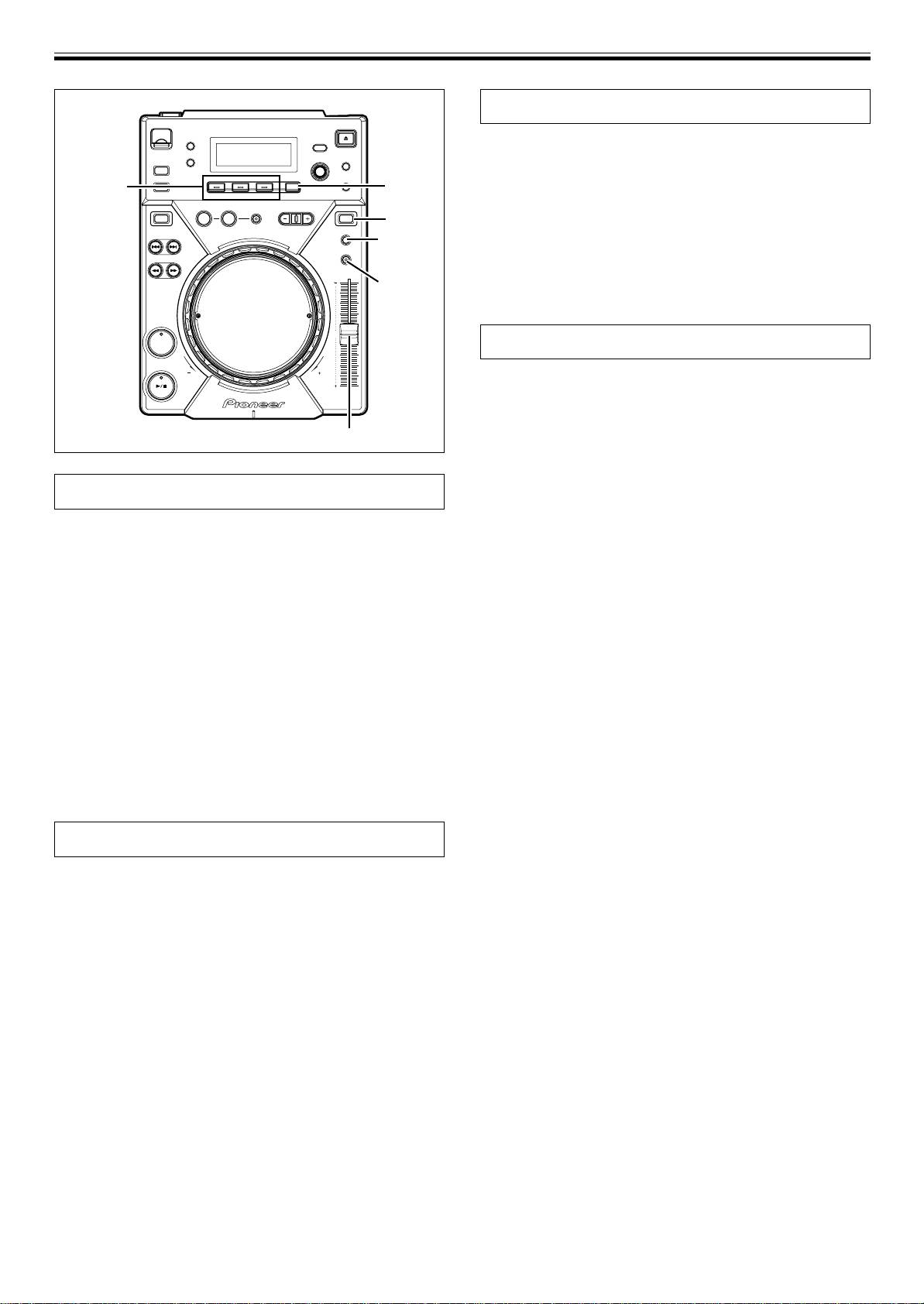
Scratch Jog Effect
Press one of the SCRATCH JOG EFFECT buttons (BUBBLE,
TRANS, WAH) during playback while in VINYL mode.
SCRATCH
¶ The effect is produced only while scratching.
JOG EFFECT
HOLD
DIGITAL
BUBBLE
JOG BREAK/
Produces a bubbly sound effect, simulating the bubble scratch tech-
REV
VINYL
VINYL
nique.
TEMPO
TRANS
ĺ6/ĺ10/
Produces an effect resembling sound muted with the mixer’s cross
ĺ16/WIDE
fader.
MASTER
WAH
TEMPO
Produces an effect resembling the wah-wah pedal used for guitars.
CUE
Digital Jog Break
Press one of the DIGITAL JOG BREAK buttons (JET, ROLL,
WAH) during playback while in CDJ mode.
¶ The selected effect will appear in the display, and the effect will
change corresponding to the degree of rotation of the jog dial.
TEMPO control slider
JET
Changes the delay time in response to rotation of the jog dial, and
adds a short delay sound to the original, thereby causing an interfer-
Change playback speed
ence between the sounds and creating a “swooshing” effect.
¶ The delay time corresponds to the jog dial’s rotation and changes
Sliding the TEMPO Control slider forward and back.
between 0 ms (when jog dial is completely stopped) to a maxi-
By sliding the lever towards you (+) increases the tempo; sliding the
mum of 3 ms.
lever away from you (–) decreases the tempo. The center detent posi-
¶ When removing hand from jog dial, the sound will gradually settle
tion is the normal speed.
back into the original sound.
¶ The rate of change in playback speed (tempo) is shown in the dis-
¶ The setting is canceled when the disc is ejected.
play.
¶ The playback speed can be changed without changing the pitch
ROLL
(☞”Applying master tempo”).
The playback sound will be affected with pitch and playback time var-
7 Selecting range of tempo adjustment
ied in response to the rotation of the jog dial.
Press the TEMPO ±6/±10/±16/WIDE button.
¶ When the jog dial was touched, audio will be loop-played then
Each time the button is pressed, the variable range of the TEMPO
rolled.
control slider alternates between ±6 %, ±10 %, ±16 % and WIDE. The
¶ When removing hand from jog dial, the sound will gradually settle
tempo can be adjusted in units of 0.02 % when set to ±6 %, units of
back into the original sound.
0.05 % when set to either ±10 % or ±16 %, and units of 0.5 % when set
¶ The setting is canceled when the disc is ejected.
to WIDE.
¶ ROLL cannot be performed during reverse playback.
The variable tempo range for MP3s is ±6 %/±10 %/±16 %.
¶ The set variable range will be shown in the display.
WAH
¶ The tempo range will be saved in memory when the power is
Adds a filter with cutoff frequency that changes in response to jog
turned off.
dial rotation.
¶ The filter changes into a high-pass filter when the jog dial is turned
clockwise; the filter changes into a low-pass filter when the jog
Applying master tempo
dial is turned counterclockwise.
¶ When removing hand from jog dial, the sound gradually settle
Press the MASTER TEMPO button during playback.
back into the original sound.
The MASTER TEMPO button and the [MT] indicator in the display will
light, and the speed (tempo) can be changed using the TEMPO con-
¶ The setting is canceled when the disc is ejected.
trol slider without changing the pitch (key).
¶ Due to digital processing of the sound, the sound quality will drop.
[HOLD function]
¶ The setting will be saved in memory when the power is turned off.
Used to maintain the effect that has been created by the turning of
the jog dial even after the jog dial’s rotation is stopped.
Press the HOLD button during usage of Digital Jog Break or
Scratch Jog Effect function.
¶ If you remove hand from jog dial, the effect at that point will be
maintained.
¶ When the HOLD function is turned ON, even if another effect is
selected, the setting prior to the new effect selection will be pre-
served in memory so long as hold is not turned off.
16
<DRB1451>
En


