
Asus Xonar HDAV1.3 Slim: 3. Hardware introduction 3.1 Xonar HDAV 1.3 Slim card layout No Item Description Coaxial and optical TOSLINK combo digital output port�
3. Hardware introduction 3.1 Xonar HDAV 1.3 Slim card layout No Item Description Coaxial and optical TOSLINK combo digital output port�: Asus Xonar HDAV1.3 Slim
Table of contents
- English ��������������������������������������������������������������1
- 1. Package contents 2. System requirements
- 3. Hardware introduction 3.1 Xonar HDAV 1.3 Slim card layout No Item Description Coaxial and optical TOSLINK combo digital output port�
- 3.2 Card installation
- 4. Driver installation
3. Hardware introduction
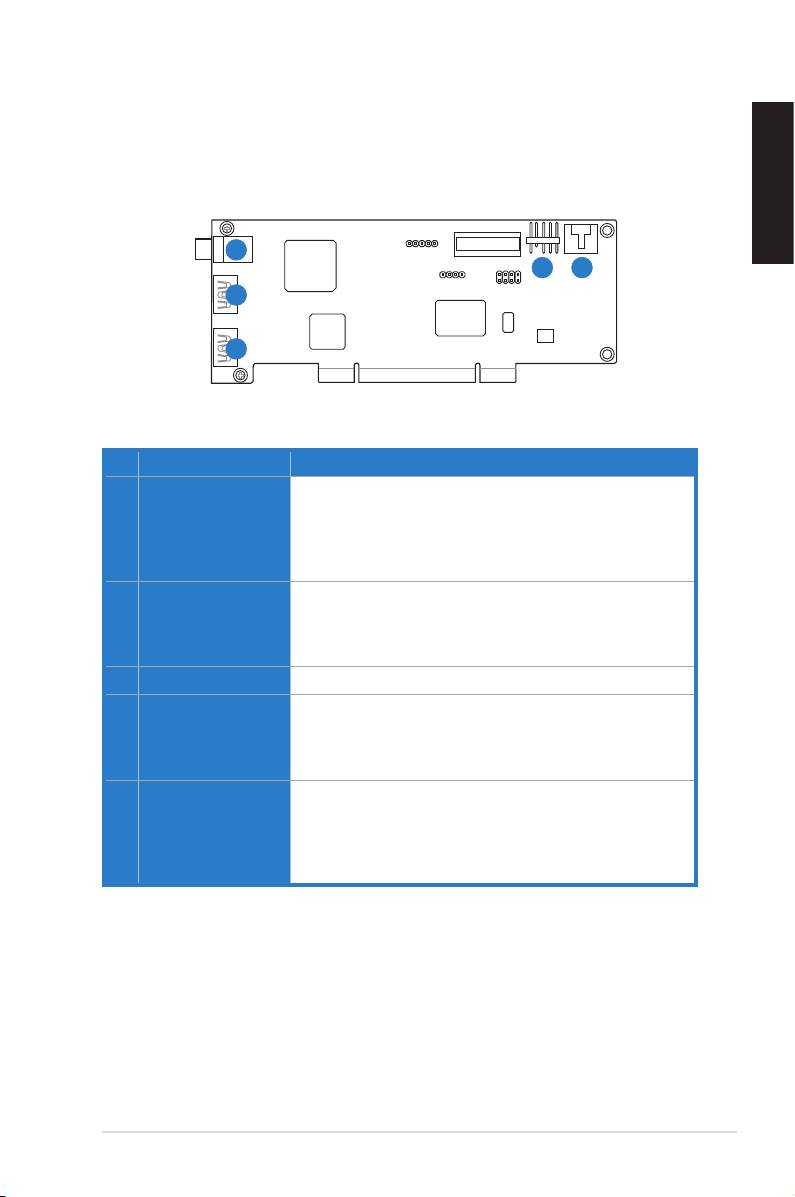
3.1 Xonar HDAV 1.3 Slim card layout
English
1
4
5
2
3
No Item Description
1 S/PDIF Out port
Coaxial and optical TOSLINK combo digital output port�
Connects to an external digital decoder or digital speaker
systems, Home Theater systems, AV receivers for outputting
digital audio including PCM, Dolby Digital, DTS, WMA-Pro,
etc�
2 HDMI In port (for DVI
Connects to the DVI port of a graphics card using the
signal input)
bundled HDMI-to-DVI cable for DVI signal transmission, or
connects to the HDMI Out port of an HDMI graphics card
using an HDMI cable�
3 HDMI Out port
Connects to a device with HDMI support�
4 Front panel audio
Connect one end of the front panel audio cable to the front
header
panel audio header on the Xonar HDAV 1�3 Slim card, with
the other end to the chassis-mounted front panel audio I/O
module�
5 Aux Input Header
Usually connects to the Analog Audio output of TV tuner card
or other sound source inside your PC system� (To monitor
yourTVtunercard’saudiofromthisAux-In,youmustenable
the“monitor”functionforAux-InintheXonarHDAVCenter‘s
recording mixer�)
ASUS Xonar HDAV 1�3 Deluxe Slim Quick Start Guide
3
