
Asus Xonar HDAV1.3 Slim: 3.2 Card installation
3.2 Card installation: Asus Xonar HDAV1.3 Slim
Table of contents
3.2 Card installation
Securing the Xonar HDAV 1.3 Slim card:
English
1� Power OFF the computer, the monitor,
and all other peripheral devices
connected to your computer�
2� Unplug the computer power cord from
your computer and power outlet�
3� Touch the metal back or side panel of
the computer to avoid static electricity�
4� Remove the chassis cover�
5� Remove the metal bracket from an available PCI slot for the Xonar HDAV
Slim card�
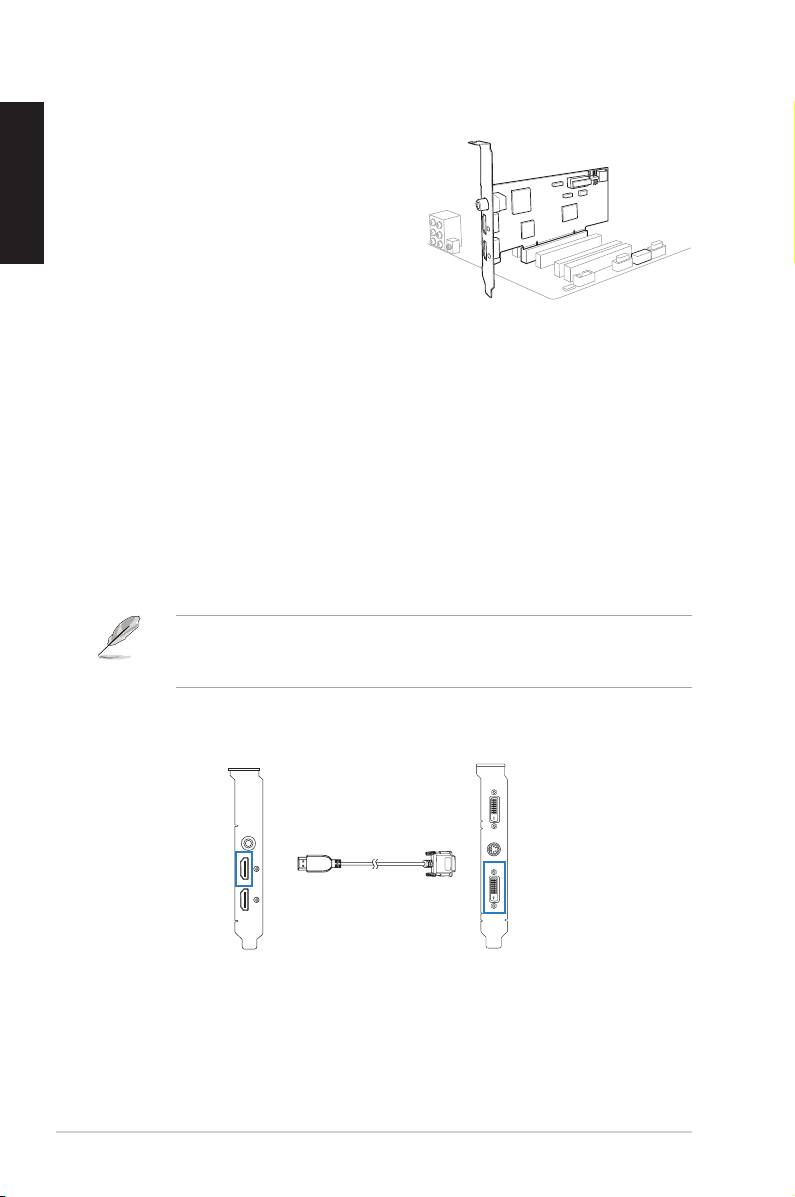
6� Carefully insert the Xonar HDAV Slim card into the PCI slot� Ensure the
Xonar HDAV Slim card sits properly in place�
7� Secure the Xonar HDAV Slim card with screws or metal brackets�
Connecting to a discrete graphics card and an HDMI display device:
1� Install a discrete graphics card on your motherboard�
2� Using the bundled DVI-to-HDMI cable, connect the DVI Out port of the
graphics card to the HDMI In port of the Xonar HDAV Slim card�
If you are using an HDMI graphics card, connect your graphics card with the
Xonar HDAV Slim card using the HDMI cable that comes with your graphics
card package�
Xonar HDAV Slim card Graphics card
HDMI In
DVI Out
DVI-to-HDMI cable
4
ASUS Xonar HDAV 1�3 Deluxe Slim Quick Start Guide
1
2
