
Asus Vulcan ANC: Installing the battery Connecting the microphone and the audio cable Activating the noise-canceling function Storing your headset
Installing the battery Connecting the microphone and the audio cable Activating the noise-canceling function Storing your headset: Asus Vulcan ANC
Table of contents
- Package contents Getting to know your headset
- Specification summary Wearing your headset
- Installing the battery Connecting the microphone and the audio cable Activating the noise-canceling function Storing your headset
English
Installing the battery
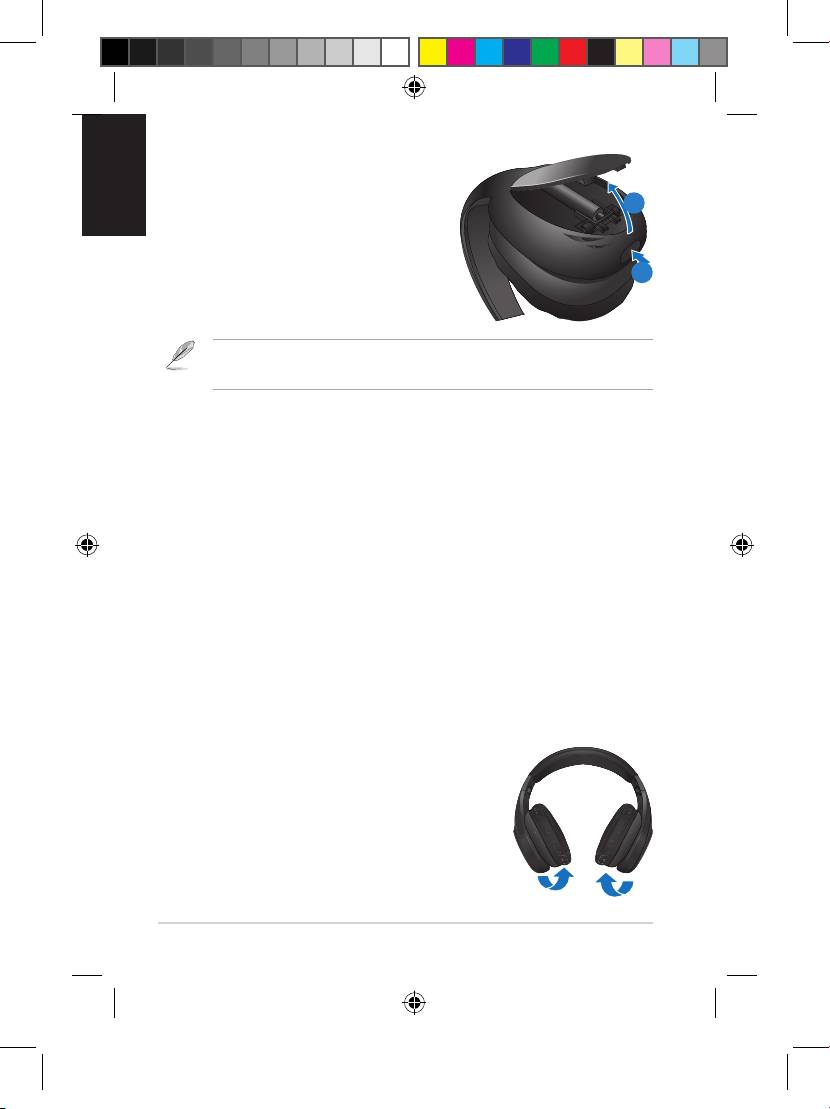
To install the battery
2
1. Turn off the ANC switch.
2. Push the battery cover button to open
and remove the battery cover.
1
3. Install one AAA battery in the battery slot.
4. Replace the battery cover.
NOTE: Remove the battery if you are not going to use your headset
for a long time.
Connecting the microphone and the audio cable
To connect the microphone
Connect the microphone to the headset’s microphone port.
To connect the audio cable
1. Connect the audio cable to the headset’s audio port.
2. Connect the audio cable’s headphone and microphone connectors to
your computer’s headphone and microphone ports.
Activating the noise-canceling function
The noise-canceling function removes ambient noise such as background
noise for a clearer sound quality.
To activate the noise-canceling function
Slide the ANC switch to the right to activate the noise-canceling function.
The activity LED turns red.
Storing your headset
To store your headset
1. Fold one side, then the other, ensuring that
pressure is applied to the hinges and not on the
ear cups.
2. Put your headset and its accessories in the
protective case.
Quick Start Guide4
U7449_Vulcan_ANC_QSG.indb 4 5/23/12 1:42:03 PM
