
Asus V2-P5G31: Installing a CPU
Installing a CPU: Asus V2-P5G31
Table of contents
- Front panel features Rear panel features
- Internal components
- Selecting the voltage Removing the side cover and front panel assembly
- Installing a CPU
- Installing the CPU fan and heatsink assembly
- Installing an AMD CPU heatsink and fan
- Installing a DIMM Installing an expansion card
- Installing storage drives
- Removing the bay covers and reinstalling the front panel assembly and side cover
English
Installation manual
5
Installing a CPU
®
®
Installing an Intel
Pentium
4 CPU in the LGA775 package
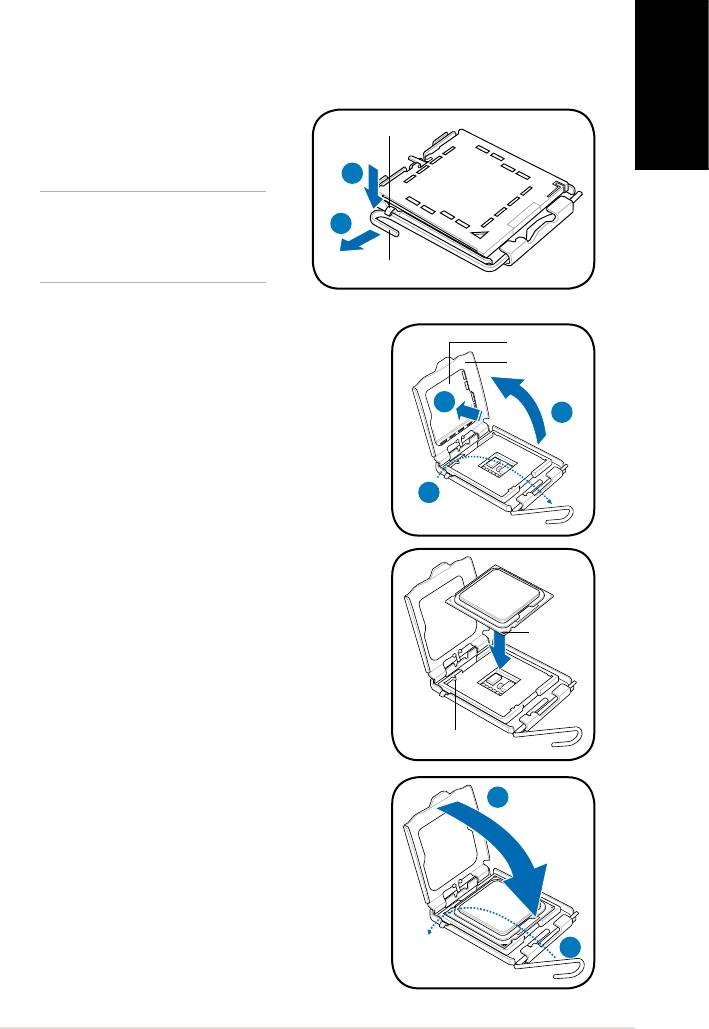
1. Locate the CPU socket on the motherboard.
2. Press the load lever with your thumb
Retention tab
(A), then move it to the left (B) until it
is released from the retention tab.
A
CAUTION. To prevent damage to
B
the socket pins, do not remove the
PnP cap unless you are installing
a CPU.
Load lever
3. Lift the load lever in the direction of the arrow to
PnP cap
a 135º angle.
Load plate
4. Lift the load plate with your thumb and
4B
forengertoa100ºangle(4A),thenpushthe
4A
PnP cap from the load plate window to remove
(4B).
3
5. Position the CPU over the socket, making
sure that the gold triangle is on the bottom-left
corner of the socket. Fit the socket alignment
key into the CPU notch.
Gold
triangle
mark
Alignment key
6. Close the load plate (A), then push the load
lever (B) until it snaps into the retention tab.
A
B


