
Asus GX1008B V5: instruction
Class: Networks, communications, telecommunications, internet, security
Type:
Manual for Asus GX1008B V5
Table of contents

Italiano Deutsch EnglishFrançais
EspañolTürkçe
Русский
繁體中文
简体中文
日本語
한국어
®
Q3563
GigaX 1008B
GigaX 1005B
10/100Mbps Fast Ethernet Switch
Quick Installation Guide
Copyright © 2007 ASUSTeK COMPUTER INC.
All Rights Reserved.
Content
English ................................................................1
Français ..............................................................6
Deutsch ............................................................10
Italiano ..............................................................14
Español.............................................................18
Italiano Deutsch EnglishFrançais
Türkçe ..............................................................22
Русский
...............................................................
26
EspañolTürkçe
繁體中文 ............................................................
30
简体中文 ............................................................
34
日本語 ................................................................
38
Русский
한국어
................................................................
42
繁體中文
简体中文
日本語
한국어

English
Introduction
Thank you for purchasing the ASUS GigaX 1008B/1005B Switch!
This high-performance 10/100Mbps Fast Ethernet Switch features auto-
negotiation, auto MDI/MDI-X function, plug-and-play, store-and-forward
switching mode, and dedicated 10/100Mbps connection.
Features
• Auto-negotiation. This feature allows the switch to automatically
negotiatethe highest possible common transmission speed between
two devices.
•
Auto MDI / MDI-X function. This feature allows you to use each port
to connect to another switch or hub with no crossover RJ-45 cable.
•
Plug-and-play. The device does not need any software and is also
fully compliant with all kinds of network protocols.
•
Store-and-forward switching mode. This promises low latency and
eliminates all the network errors, including runt and CRC error packets.
When under full-duplex mode, transmission and reception of the frames
occur simultaneously. This occurs without causing collisions or doubling
the network bandwidth.
•
Dedicated 10/100Mbps connection. The switch delivers a dedicated
10/100Mbps connection to every attached client with no bandwidth
congestion issue.
Package contents
Before you start, check the following package contents:
One switch (5 or 8 port 10/100Mbps Fast Ethernet Switch)
AC power adapter
Quick Installation Guide
2 Quick Installation Guide
Technical specications
English
IEEE 802.3 10BASE-T
Standard
IEEE 802.3u 100BASE-TX
IEEE 802.3x full duplex operation and ow control
5 x 10/100Mbps RJ-45 Fast Ethernet Ports
Interface
8 x 10/100Mbps RJ-45 Fast Ethernet Ports
Uplink Auto MDI/MDI-X (Auto crossover)
Network Speed 10/100Mbps Full/Half duplex mode auto detection
MAC Address
2K MAC address entries
Table
348 KB (GX1005B)
Memory
448 KB (GX1008B)
Power Supply External Power adapter 9VDC 0.5A
EMI CE, FCC and VCCI class B
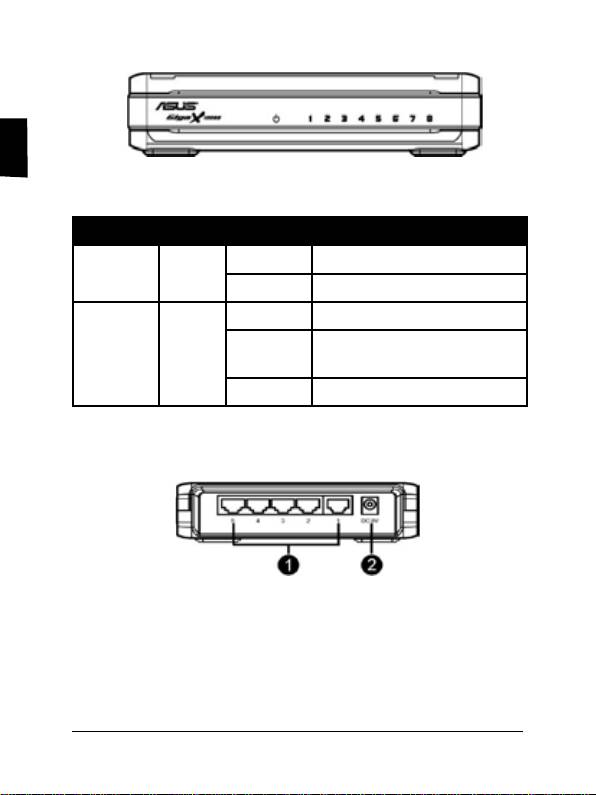
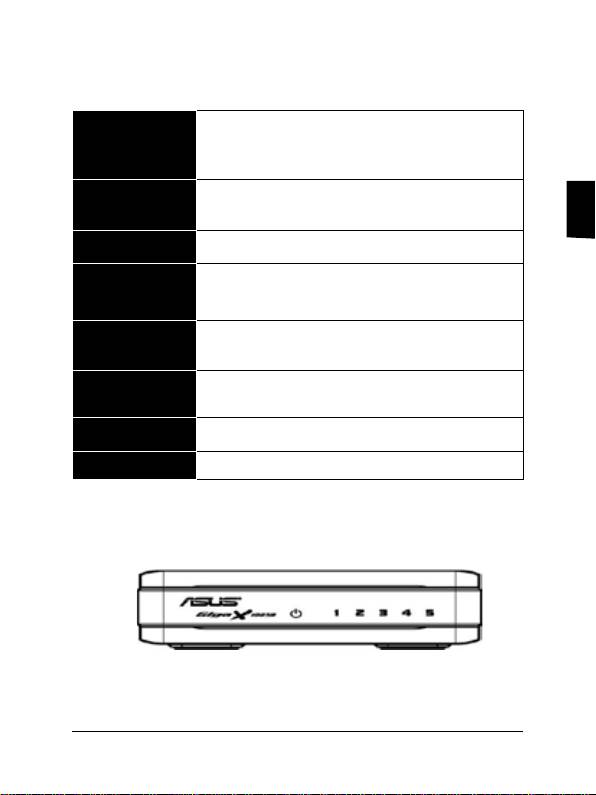
Front panel LED indicators
GX1005B
3Quick Installation Guide
English
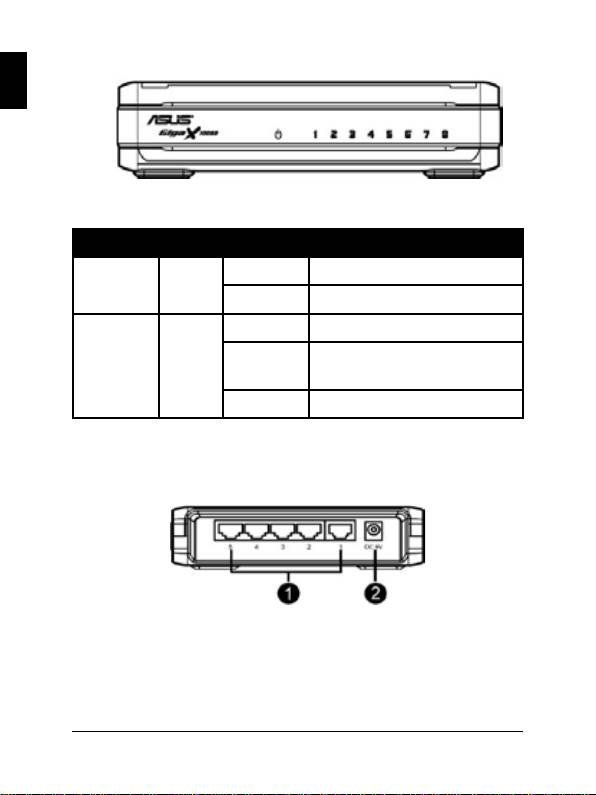
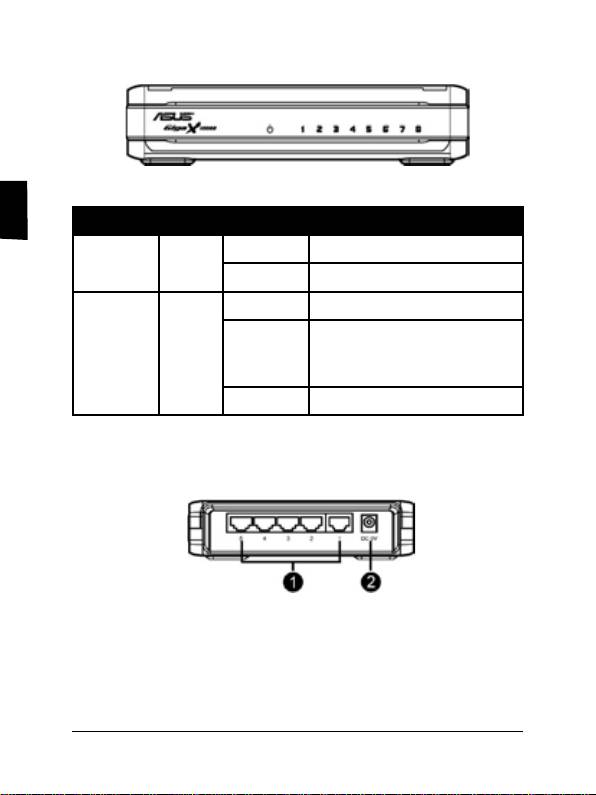
GX1008B
LED Color Status Description
POWER Green ON The switch is on
OFF The switch is off
LINK/ACT Green ON Link is established
BLINKING Link is established, and data is
being transmitted or received.
OFF No connection
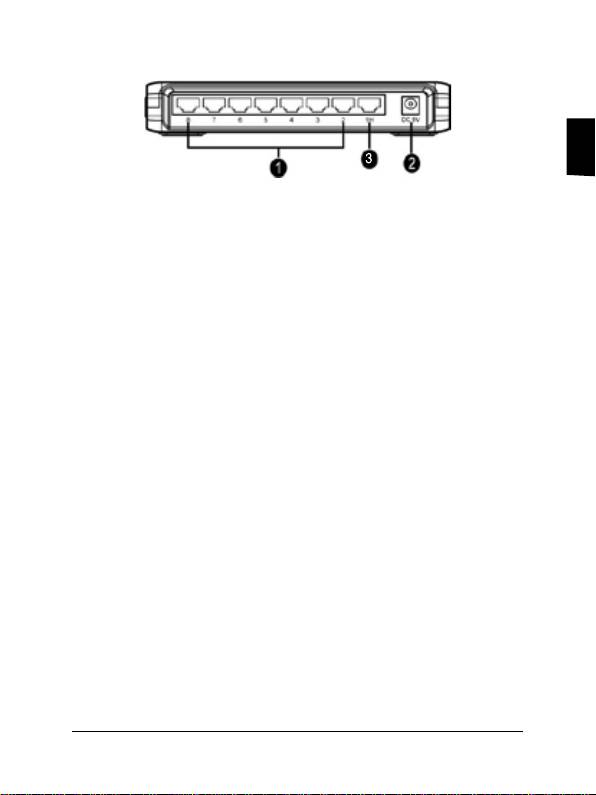
Rear panel ports
GX1005B
1. Ports 1-5. Five 10/100Mbps RJ-45 ports connect computers or
network devices.
2.
Power port. This port connects the AC power adapter.
4 Quick Installation Guide

English
GX1008B
1. Ports 1-8. Eight 10/100Mbps RJ-45 ports connect computers or
network devices.
2.
Power port. This port connects the AC power adapter.
3.
1H. This port has First Priority Bandwidth function.
Connecting computers to the switch
Plug the network cable to the switch. The switch automatically detects the
type of cable attached to it, and adjusts the speed and duplex.
Powering on
1. Connect the AC power adapter to the power port on the switch
rear panel.
2. Connect the plug of the adapter to an AC power source.
Warranty information
Refer to ASUS website or contact your retailer.
5Quick Installation Guide

Français
6 Guide d’installation rapide
Introduction
Merci pour votre achat d’un switch ASUS GigaX 1008B/1005B !
Ce switch Fast Ethernet 10/100Mbps hautement performant supporte les
fonctions auto-négociation, auto MDI/MDI-X, plug-and-play, la commutation
store-and-forward, et une connexion 10/100Mbps dédiée.
Caractéristiques
• Auto-négociation. Cette fonction permet au switch de négocier
la vitesse de transmission la plus haute possible entre deux
périphériques.
•
Auto MDI / MDI-X. Cette fonction vous permet d’utiliser chaque port
pour la connexion à un autre switch ou hub sans passer par un câble
RJ-45 croisé.
•
Plug-and-play. Le switch ne nécessite ni logiciel ni conguration spécique
et est pleinement compatible avec toutes sortes de protocoles réseau.
•
Commutation Store-and-forward. Ce mode de commutation permet
un faible temps d’attente et élimine toutes les erreurs réseau, y compris
les groupes d’erreurs de paquets runt et CRC. En mode full-duplex, la
transmission et la réception de trames ont lieu simultanément, et ce,
sans provoquer de collisions ou doubler la bande passante réseau.
•
Connexion 10/100Mbps dédiée. Le switch offre une connexion
10/100Mbps dédiée à chaque client attaché sans problèmes de
congestion de la bande passante.
Contenu de la boîte
Avant de commencer, vériez le contenu de la boîte de votre switch:
Un switch (Switch Fast Ethernet 10/100Mbps 5 ou 8 ports)
Adaptateur secteur
Guide d’installation rapide
Spécications techniques
IEEE 802.3 10BASE-T
Standards
IEEE 802.3u 100BASE-TX
IEEE 802.3x (avec full duplex et contrôle du ux)
Français
5 x Ports Fast Ethernet RJ-45 10/100Mbps
Interface
8 x Ports Fast Ethernet RJ-45 10/100Mbps
Liaison montante Auto MDI/MDI-X (Auto crossover)
Vitesse du
Auto détection de mode Full/Half duplex
réseau
10/100Mbps
Tableau
Cache d’adressage MAC 2K
d’adressage MAC
348 Ko (GX1005B)
Mémoire
448 Ko (GX1008B)
Alimentation Adaptateur d’alimentation externe 9VDC 0.5A
EMI CE, FCC et VCCI classe B
Indicateurs LED du panneau avant
GX1005B
7Guide d’installation rapide
Français
8 Guide d’installation rapide
GX1008B
LED Couleur Statut Description
POWER Vert Activé Le switch est activé.
Eteint Le switch est éteint.
LINK/ACT Vert Activé Lien établit.
Clignotant Lien établit. Des données sont
transmises ou reçues.
Eteint Pas de connexion.
Ports du panneau arrière
GX1005B
1. Ports 1-5. Cinq ports RJ-45 10/100Mbps pour la connexion
d’ordinateurs ou de périphériques réseau.
2.
Port d’alimentation. Ce port se connecte à l’adaptateur
secteur.
Français
GX1008B
1. Ports 1-8. Huit ports RJ-45 10/100Mbps pour la connexion
d’ordinateurs ou de périphériques réseau.
2.
Port d’alimentation. Ce port se connecte à l’adaptateur
secteur.
3.
1H. Ce port intègre une fonction de priorité du trac.
Connecter des ordinateurs au switch
Branchez le(s) câble(s) réseau au switch. Le switch détecte
automatiquement le type de câble connecté, et ajuste la vitesse et le
mode duplex en conséquence.
Démarrage
1. Connectez l’adaptateur secteur au port d’alimentation (Power)
situé à l’arrière du switch.
2. Connectez la prise de l’adaptateur secteur à une source
d’alimentation électrique.
Informations sur la garantie
Reportez-vous au site web ASUS ou contactez votre revendeur pour
plus de détails concernant la garantie de ce produit.
9Guide d’installation rapide

Deutsch
10 Schnellstartanleitung
Einführung
Vielen Dank, dass Sie den ASUS GigaX 1008B/1005B Switch gekauft
haben! Dieser Hochleistungs-10/100Mbps-Fast-Ethernet-Switch
beherrscht automatische Verhandlung, die automatische MDI/MDI-X-
Funktion, Plug-and-Play, den Store-and-Forward Switching-Modus und
fest zugeordnete 10/100Mbps-Verbindung.
Funktionen
• Automatische Verhandlung. Diese Funktion ermöglicht dem
Switch die automatische Verhandlung höchstmöglicher gebräuchlicher
Übertragungsraten zwischen zwei Geräten.
• Auto MDI- / MDI-X-Funktion. Diese Funktion ermöglicht Ihnen die
Benutzung jedes Ports, um einen anderen Switch oder Hub ohne ein
RJ-45-Crossover-Kabel anzuschließen.
• Plug-and-Play. Das Gerät benötigt keine Software und ist voll
kompatibel mit allen Arten von Netzwerkprotokollen.
• Store-and-forward-switching-Modus. Diese Funktion verspricht
eine geringe Latenz und verhindert alle Netzwerkfehler, eingeschlossen
Laufzeitfehler und CRC-Fehlerpakete. Im Vollduplex-Modus erfolgt
die Übertragung und der Empfang der Frames gleichzeitig und ohne
Kollisionen oder Verdoppelung der Netzwerkbandbreite.
• Fest zugeordnete 10/100Mbps-Verbindung. Der Switch bietet eine
fest zugeordnete 10/100Mbps-Verbindung, zu jeden angeschlossenen
Client und ohne Bandbreitenüberlastung.
Packungsinhalt
Bevor Sie beginnen, überprüfen Sie die Verpackung bitte auf folgenden Inhalt:
Ein Switch (5- oder 8-Port 10/100Mbps Fast Ethernet Switch)
Netzteil
Schnellstartanleitung
Technische Daten
IEEE 802.3 10BASE-T
Standard
IEEE 802.3u 100BASE-TX
IEEE 802.3x Vollduplex-Betrieb und Flusskontrolle
5 x 10/100Mbps RJ-45 Fast Ethernet-Ports
Schnittstelle
8 x 10/100Mbps RJ-45 Fast Ethernet-Ports
Deutsch
Uplink Auto MDI/MDI-X (Auto-Crossover)
Netzwerk-
10/100Mbps Full/Half-Duplexmodus
geschwindigkeit
(automatische Erkennung)
MAC-Adressen-
2K MAC-Adresseneinträge
tabelle
348 KB (GX1005B)
Speicher
448 KB (GX1008B)
Stromversorgung Externes Netzteil 9V Gleichspannung 0,5A
EMI CE, FCC und VCCI Klasse B
Fronttafel-LED-Anzeigen
GX1005B
11Schnellstartanleitung
Deutsch
12 Schnellstartanleitung
GX1008B
LED Farbe Status Beschreibung
POWER Grün EIN Der Switch ist eingeschaltet.
AUS Der Switch ist ausgeschaltet.
LINK/ACT Grün EIN Verbindung ist hergestellt.
BLINKEN Verbindung ist hergestellt und
Daten werden übertragen oder
empfangen.
AUS Keine Verbindung.
Rückseitenanschlüsse
GX1005B
1. Ports 1-5. Fünf 10/100Mbps RJ-45-Ports für Computer oder
Netzwerkgeräte.
2.
DC 5V. Dieser Anschluss ist für das Netzteil vorgesehen.
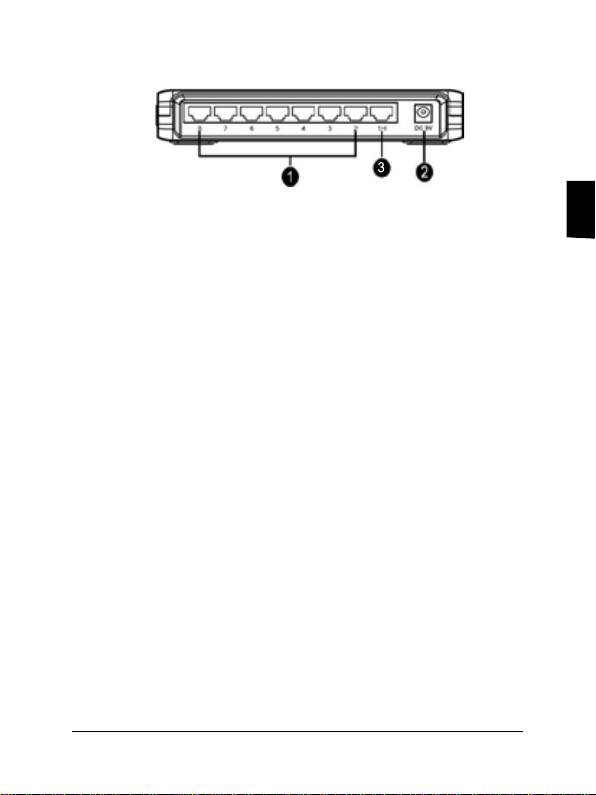
GX1008B
Deutsch
1. Ports 1-8. Acht 10/100Mbps RJ-45-Ports für Computer oder
Netzwerkgeräte.
2. DC 5V. Dieser Anschluss ist für das Netzteil vorgesehen.
3. 1H. An diesem Port steht die Funktion „Erste
Bandbreitenpriorität“ zur Verfügung.
Verbinden von Computern mit
dem Switch
Stecken Sie das Netzwerkkabel in den Switch. Der Switch erkennt
automatisch den Typ des angeschlossenen Kabels und stellt daraufhin
die Geschwindigkeit und den Duplex-Modus ein.
Einschalten
1. Verbinden Sie das Netzteil mit dem Stromanschluss an der
Rückseite des Switch.
2. Stecken Sie den Stecker des Netzteils in die Steckdose.
Garantieinformation
Beziehen Sie sich auf die ASUS-Webseite oder kontaktieren Sie Ihren
Händler.
13Schnellstartanleitung

Italiano
14 Guida Rapida all’ Installazione
Prefazione
Grazie per aver acquistato lo Switch ASUS GigaX 1008B/1005B!
Questo Switch Fast Ethernet 10/100Mbps ad elevate prestazioni è
caratterizzato da negoziazione automatica, funzione auto MDI/MDI-X,
plug-and-play, modalità commutazione store-and-forward e connessione
dedicata 10/100Mbps.
Caratteristiche
• Negoziazione Automatica. Questa funzionalità consente allo switch
di negoziare in forma automatica la più elevata velocità di trasmissione
possibile fra due dispositivi.
• Funzione Auto MDI / MDI-X. Questa funzionalità consente di utilizzare
ciascuna porta per la connessione ad un altro switch o hub senza cavo
incrociato RJ-45.
• Plug-and-play. Il dispositivo non necessita di software ed è anche
completamente compatibile con tutti i tipi di protocolli di rete.
• Modalità Commutazione Store-and-forward. Questa tecnica permette
bassa latenza ed elimina tutti gli errori di rete, compresi gli errori di
pacchetto Runt e CRC. In modalità full-duplex, trasmissione e ricezione
dei frame avvengono simultaneamente, senza causare collisioni,
raddoppiando l’ ampiezza di banda della rete .
• Connessione Dedicata 10/100Mbps. Lo switch invia una connessione
dedicata 10/100Mbps ad ogni client connesso, senza congestionare la
banda.
Contenuto della Confezione
Prima di iniziare, controllare il seguente contenuto:
Uno switch (Switch Fast Ethernet 10/100Mbps da 5 o 8 porte)
Alimentatore AC
Guida Rapida all’ Installazione
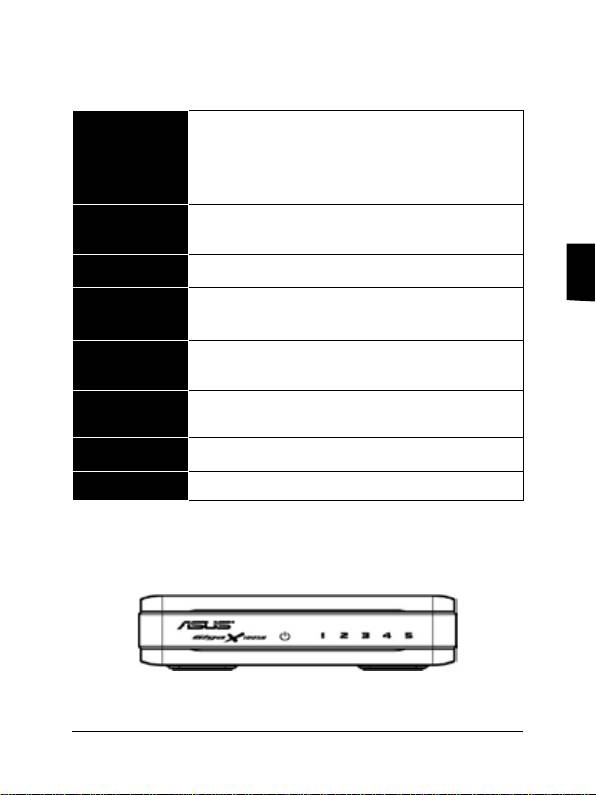
Speciche Tecniche
IEEE 802.3 10BASE-T
IEEE 802.3u 100BASE-TX
Standard
Controllo di usso IEEE 802.3x per operazioni
full duplex
5 x Porte Fast Ethernet RJ-45 10/100Mbps
Interfaccia
8 x Porte Fast Ethernet RJ-45 10/100Mbps
Uplink Auto MDI/MDI-X (Auto crossover)
Italiano
Rilevazione automatica della velocità (10/100Mbps)
Velocità di Rete
e della modalità operativa full/half duplex
Tabella MAC
2K MAC address
Address
348 KB (GX1005B)
Memoria
448 KB (GX1008B)
Alimentazione Alimentatore esterno 9VDC 0.5A
EMI CE, FCC e VCCI classe B
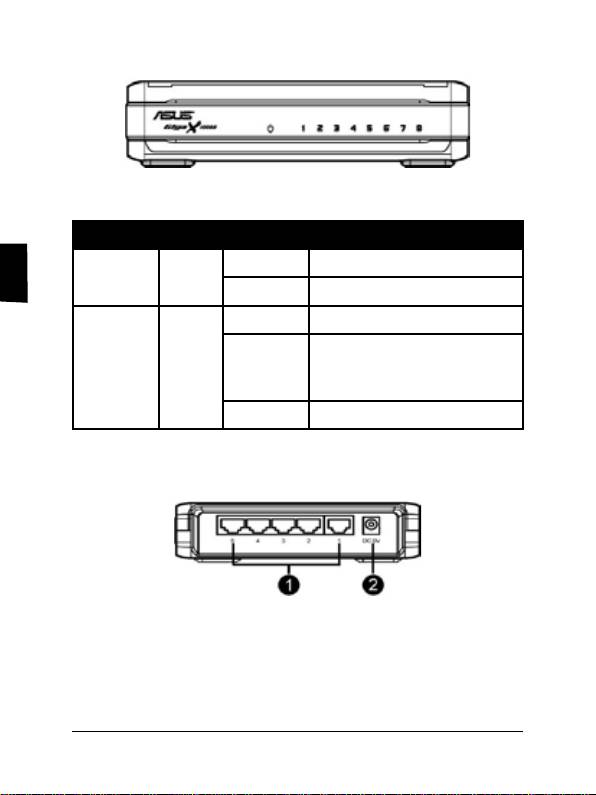
Indicatori LED sul Pannello Frontale
GX1005B
15Guida Rapida all’ Installazione
Italiano
16 Guida Rapida all’ Installazione
GX1008B
LED Colore Stato Descrizione
POWER Verde ACCESO Lo switch è acceso
SPENTO Lo switch è spento
LINK/ACT Verde ACCESO Collegamento stabilito
LAMPEG-
C o ll e g a m en t o s t ab i l i t o,
trasmissione o ricezione dati
GIANTE
in corso.
SPENTO Assenza di Connessione
Porte sul Pannello Posteriore
GX1005B
1. Porte 1-5. Cinque porte RJ-45 10/100Mbps collegano computer
o dispositivi di rete.
2.
Porta di Alimentazione. Questa porta collega l’ alimentatore
AC.
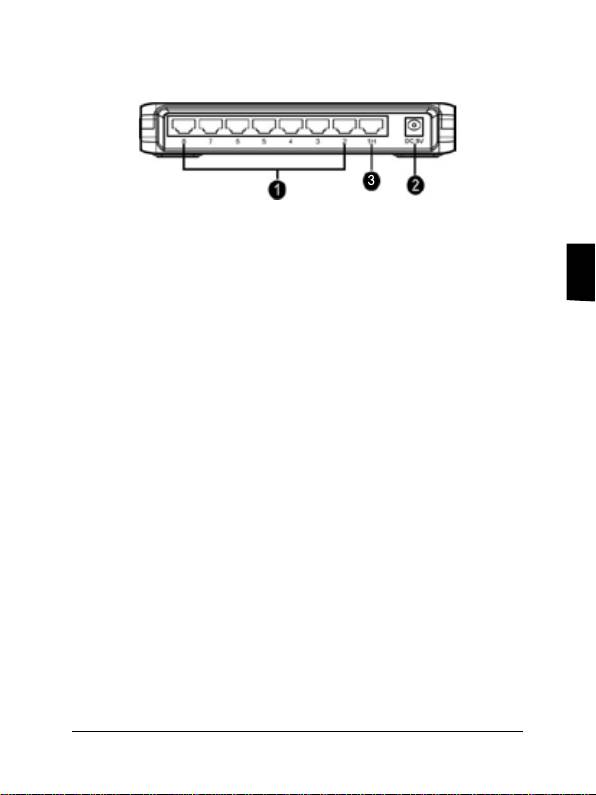
GX1008B
1. Porte 1-8. Otto porte RJ-45 10/100Mbps collegano computer o
dispositivi di rete.
2.
Porta Alimentazione. Questa porta collega l’ alimentatore AC.
Italiano
3. 1H. Questa porta gode di Priorità Assoluta di Larghezza di
Banda.
Collegamento Computer allo
Switch
Inserire il cavo di rete nello switch. Lo switch rileva automaticamente il
tipo di cavo collegato e regola velocità e duplex.
Accensione
1. Collegare l’ alimentatore AC alla porta di alimentazione sul pannello
posteriore dello switch.
2. Collegare la spina dell’ alimentatore ad una sorgente di
alimentazione AC.
Garanzia
Riferirsi al sito web ASUS o contattare il rivenditore.
17Guida Rapida all’ Installazione

Español
18 Guía de Instalación Rápida
Introducción
¡Felicitaciones por la adquisición del Switch ASUS GigaX 1008B/1005B!
Este Switch Fast Ethernet 10/100Mbps de alto rendimiento incluye
negociación automática, función MDI/MDI-X automática, “plug-and-play”,
modo “store-and-forward”, y conexión 10/100Mbps dedicada.
Funciones
• Negociación automática. Esta función permite negociar automáticamente
la velocidad de transmisión más alta entre dos dispositivos.
•
Función MDI / MDI-X automática. Esta función permite usar cualquier
puerto para conectar a otro Switch o Hub sin necesidad de usar un
cable RJ-45 cruzado.
•
Plug-and-play. Este dispositivo no necesita software y es totalmente
compatible con todo tipo de protocolos de red.
•
Modo “store-and-forward”. Este modo promete una baja latencia y elimina
errores de red, incluyendo “runt” y paquetes con error CRC. En modo full-
duplex, la transmisión y recepción de frames ocurre simultáneamente. Esto
ocurre sin causar colisiones y sin doblar el ancho de banda de la red.
•
Conexión dedicada a 10/100Mbps. Este Switch entrega una conexión
dedicada a 10/100Mbps para cada cliente conectado sin problemas de
congestión en ancho de banda.
Contenidos del embalaje
Antes de comenzar, compruebe los contenidos del embalaje:
Switch (Fast Ethernet de 5 u 8 puertos a 10/100Mbps)
Adaptador de corriente AC
Guía de instalación rápida
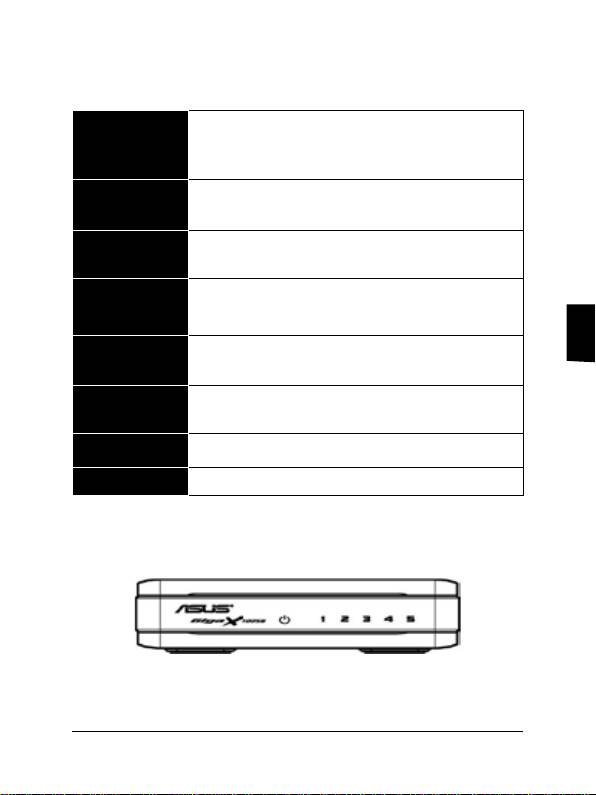
Especicaciones técnicas
IEEE 802.3 10BASE-T
Estándares
IEEE 802.3u 100BASE-TX
IEEE 802.3x Full dúplex y control de ujo
5 x Puertos Fast Ethernet 10/100Mbps RJ-45
Interfaz
8 x Puertos Fast Ethernet 10/100Mbps RJ-45
Auto MDI/MDI-X (Detección automática de cable
Uplink
cruzado)
Velocidad de
Detección automática de modo Full/Half dúplex a
red
10/100Mbps
Tabla de
Español
2K de entradas para direcciones MAC
direcciones MAC
348 KB (GX1005B)
Memoria
448 KB (GX1008B)
Alimentación Adaptador de corriente externo 9VDC 0.5A
EMI CE, FCC y VCCI clase B
Indicadores LED en panel frontal
GX1005B
19Guía de Instalación Rápida
