
Pioneer F-F3MK2-K: Controls and displays03
Controls and displays03: Pioneer F-F3MK2-K
Table of contents
- IMPORTANT
- POWER-CORD CAUTION IMPORTANT: THE MOULDED PLUG
- Chapter 1: Before you start Features What’s in the box
- Inserting the battery Installing the tuner
- Chapter 2: Connections Connecting antennas Making cable connections
- Connections02
- Connecting analog audio sources Plugging in
- Chapter 3: Controls and displays Front panel
- Remote control unit
- Controls and displays03
- Chapter 4: Listening to FM/AM Auto preset memory DEFAULT VALUE
- Manual tuning Search Mode Auto tuning
- Improving FM stereo sound Recalling preset stations
- Preset stations
- An introduction to RDS RDS Search/PTY Search/TP Search
- Naming station presets
- Last function memory Initialization of the microprocessor
- Chapter 5: Other connections Connecting external antennas Operating this tuner with the remote sensor of your Pioneer amplifier
- Chapter 6: Additional information Troubleshooting
- Additional information06 Problem Remedy
- Specifications
03_Part_names.fm 12 ページ 2009年4月7日 火曜日 午前9時48分
Controls and displays03
5
MENU
TUNER
DIMMER
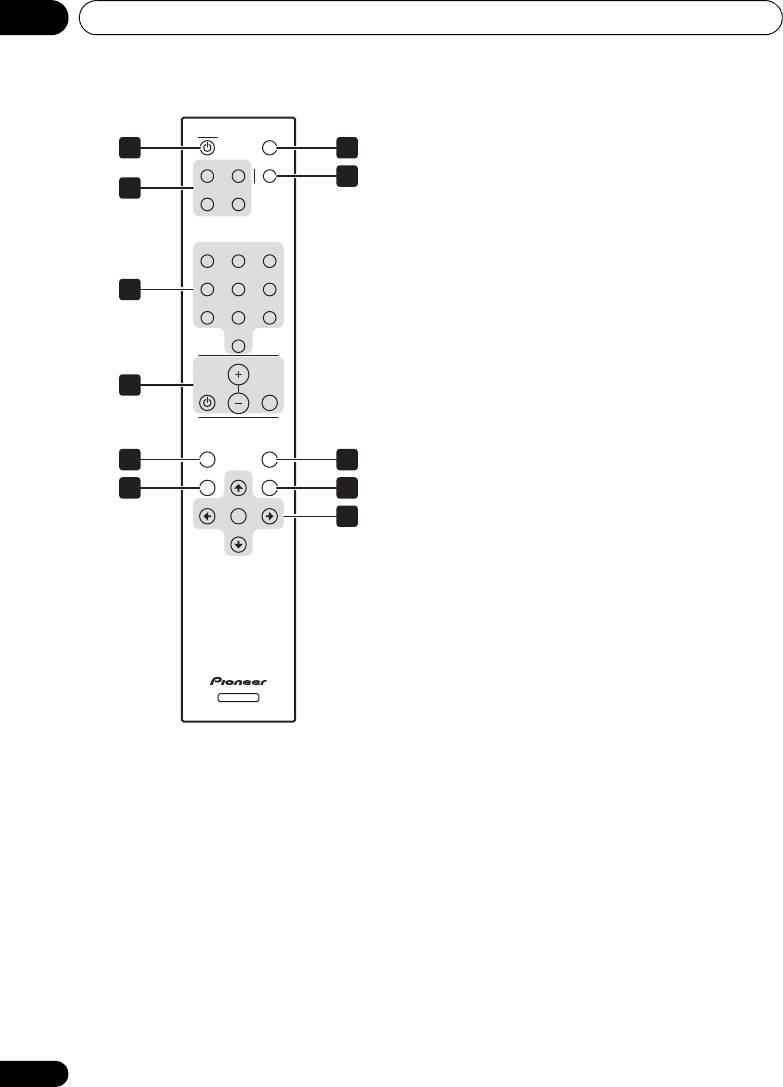
Use to enter/exit menu mode.
1 7
A/B/C D/E/F MPX
6
BAND
8
2
G/H I/ J
Selects FM or AM.
7
DIMMER
Dims or brightens the display (or switches the
123
backlight off).
456
3
8
MPX
78
9
Use to switch between stereo and mono
10
reception during FM broadcasts. If the signal is
VOLUME
weak, switching to mono may improve the
sound quality (page 15).
4
MUTEAMP
9
A.PRESET/A.TUNE
When pressed during FM or AM mode,
A.PRESET
MENU
A.TUNE
receivable stations are automatically stored in
5
9
the preset memory in order starting from
BAND TUNE
MEMORY
6
10
preset channel A1.
PRESET
ENTER
PRESET
11
10
MEMORY
TUNE
Use to preset stations. This button is also used
for manual station-name character selection
for FM and AM broadcasts, and for Program
Type search.
11 Tuning buttons
ENTER
Selects an option or executes a command.
TUNER
TUNE
Use to change reception frequency.
1
TUNER
PRESET
Switches the unit between standby and on.
Selects station preset when listening to the
radio.
2 Preset channel range buttons
(
A/B/C
,
D/E/F
,
G/H
,
I/J
)
Use to tune in preset broadcast stations.
3 Station call buttons (
1
to
10
)
Use these buttons to preset stations, and to
recall previously preset stations.
4 AMP controls
Use to control Pioneer amplifier.
AMP
VOLUME
MUTE
12
En
