
Asus V4-P5G43: Selecting the voltage Removing the side cover and front panel assembly
Selecting the voltage Removing the side cover and front panel assembly: Asus V4-P5G43
Table of contents
- Front panel features Rear panel features
- Internal components
- Selecting the voltage Removing the side cover and front panel assembly
- Installing a CPU
- Installing an AMD CPU Installing the CPU fan and heatsink assembly
- Installing an AMD CPU heatsink and fan
- Installing a DIMM Installing an expansion card
- Installing storage drives
- Reinstalling the front panel assembly and side cover
Selecting the voltage
The system’s power supply unit has a 115
English
V/230 V voltage selector switch located
beside the power connector. Use this
switch to select the appropriate system
input voltage according to the voltage
supply in your area.
If the voltage supply in your area is
100-127 V, set the switch to 115 V.
If the voltage supply in your area is
200-240 V, set the switch to 230 V.
NOTE: Refer to the system User Guide for the exact location of the voltage selector.
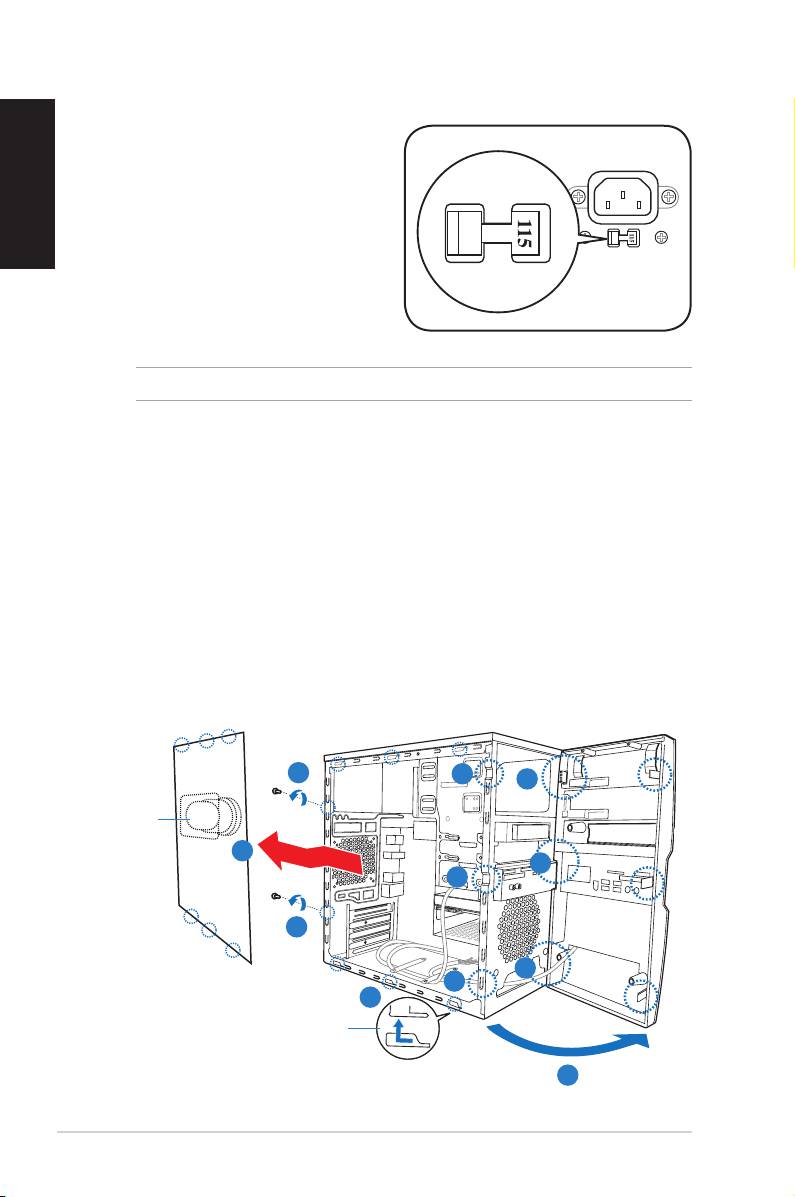
Removing the side cover and
front panel assembly
1. Remove the cover screws on the rear panel.
2. Pull the side cover toward the rear panel until its hooks disengage from the
chassis tab holes. Set the side cover aside.
3. Locate the front panel assembly hooks, then lift them until they disengage
from the chassis.
4. Swing the front panel assembly to the right, until the hinge-like tabs on the
right side of the assembly are exposed.
5. Remove the front panel assembly, then set aside.
1
3
4
Air ductduct
2
4
3
1
4
3
2
Chassis tab holes
4
4
Installation manual
