
Asus V3-P5G31: Removing the bay covers and reinstalling the front panel assembly and side cover
Removing the bay covers and reinstalling the front panel assembly and side cover: Asus V3-P5G31
Table of contents
- Front panel features Rear panel features
- Internal components
- Selecting the voltage Removing the side cover and front panel assembly
- Installing a CPU
- Installing an AMD CPU Installing the CPU fan and heatsink assembly
- Installing an AMD CPU heatsink and fan
- Installing a DIMM Installing an expansion card
- Installing storage drives
- Removing the bay covers and reinstalling the front panel assembly and side cover
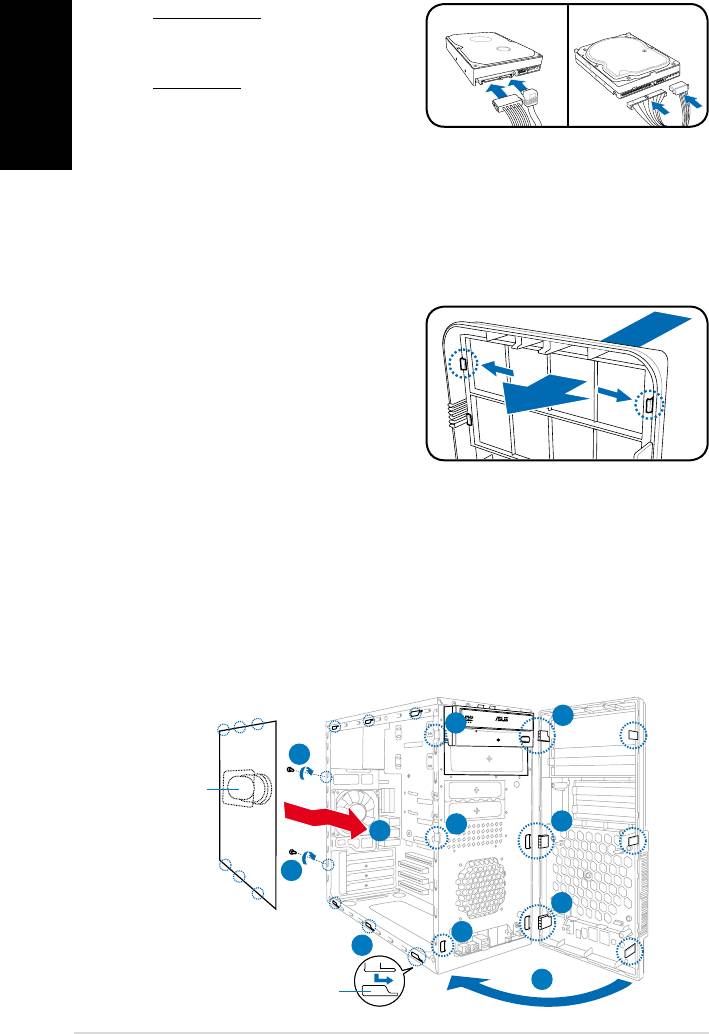
4. For SATA HDD: Connect the SATA
SATA IDE
signal and power plugs to the
English
connectors at the back of the drive.
For IDE HDD: Connect the IDE and
power plugs to the connectors at the
back of the drive.
Removing the bay covers and reinstalling the
front panel assembly and side cover
Ifyouinstalledanopticaland/oroppydiskdrive,removethebaycover(s)onthe
front panel assembly before reinstalling it to the chassis. To do this:
1. Locate the bay cover locks.
2. Press the locks outward to release
the bay cover.
3. Push the bay cover inward, then set
it aside.
4. Follow the same instructions to
remove the 3.5” drive bay cover.
To reinstall the front panel assembly and side cover:
1. Insert the front panel assembly hinge-like tabs to the holes on the right side
of the chassis.
2. Swing the front panel assembly to the left, then insert the hooks to the
chassisuntilthefrontpanelassemblytsinplace.
3. Insert the six side cover hooks into the chassis tab holes .
4. Pushthesidecovertothedirectionofthefrontpaneluntilittsinplace.
5. Secure the cover with two screws you removed earlier.
1
2
5
Air duct
2
1
4
5
1
2
3
2
Chassis tab holes
10
Installation manual


