
Asus V2-P5G965: Installing a DIMM Installing an expansion card
Installing a DIMM Installing an expansion card: Asus V2-P5G965
Table of contents
- Front panel features Rear panel features
- Internal components
- Selecting the voltage Removing the side cover and front panel assembly
- Installing a CPU
- Installing an AMD CPU Installing the CPU fan and heatsink assembly Installing an Intel Pentium 4 CPU heatsink and fan
- Installing an AMD CPU heatsink and fan
- Installing a DIMM Installing an expansion card
- Installing storage drives
- Removing the bay covers and reinstalling the front panel assembly and side cover
English
8
Installation manual
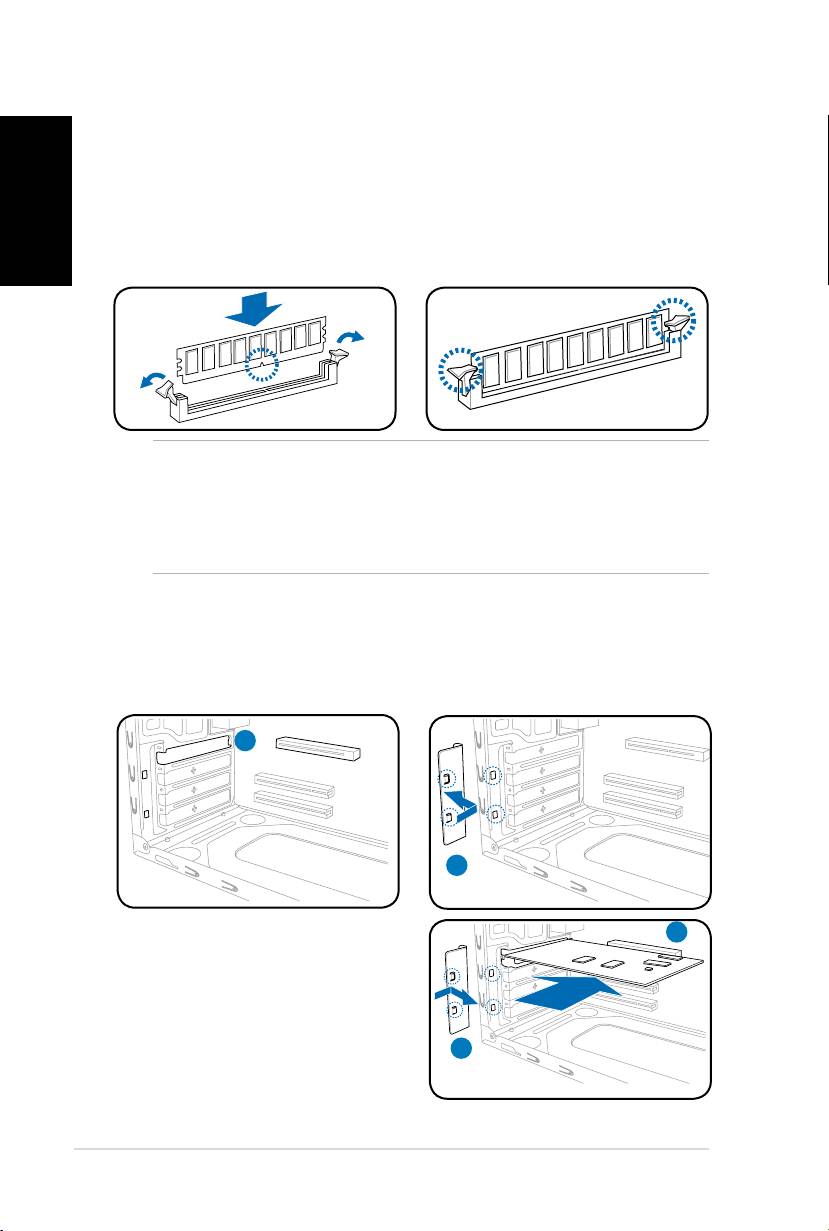
Installing a DIMM
1. Locate the DIMM sockets in the motherboard.
2. Unlock a DIMM socket by pressing the retaining clips outward.
3. Align a DIMM on the socket such that the notch on the DIMM matches the
break on the socket.
4. Push the DIMM to the socket until the retaining clips snap inward.
CAUTION:
• Unplug the power supply before adding or removing DIMMs. Failure to do so may
cause damage to the motherboard and/or components.
• ADDRDIMMiskeyedwithanotchsothatittsinonlyonedirection.Donotforce
a DIMM into a socket to avoid damaging the DIMM.
Installing an expansion card
2. Remove the metal bracket lock.1. Remove the metal cover opposite
the slot that you intend to use.
1
2
3
3. Insert the card connector to the
slot,thenpressthecardrmly
untilittsinplace.
4. Replace the metal bracket lock.
4
