
Asus V2-P5945G: Installing an AMD CPU heatsink and fan
Installing an AMD CPU heatsink and fan: Asus V2-P5945G
Table of contents
- Front panel features Rear panel features
- Internal components
- Selecting the voltage Removing the side cover and front panel assembly
- Installing a CPU
- Installing an AMD CPU Installing the CPU fan and heatsink assembly
- Installing an AMD CPU heatsink and fan
- Installing a DIMM Installing an expansion card
- Installing storage drives Optical drive Floppy disk drive Hard disk drive
- Removing the bay covers and reinstalling the front panel assembly and side cover
English
Installation manual
7
Installing an AMD CPU heatsink and fan
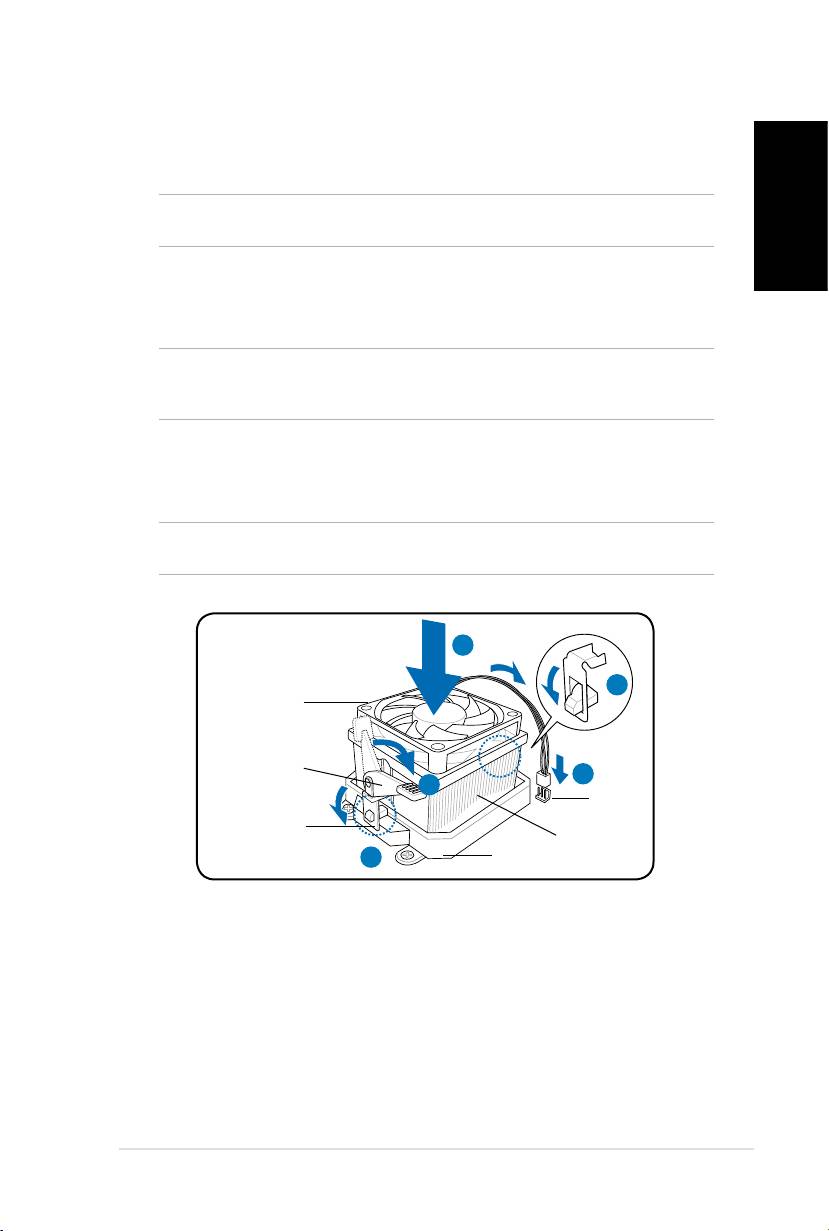
1. Place the heatsink on top of the installed CPU.
IMPORTANT.Makesurethatthefanandheatsinkassemblyperfectlytstheretention
mechanism module base; otherwise you can not lock the retention bracket.
2. Attach one end of the retention bracket to the retention module base.
3. Attach the other end of the retention bracket (near the retention bracket lock)
to the retention module base until it clicks in place.
NOTE. Your boxed CPU should come with installation instructions for the CPU, fan/heatsink
assembly, and the retention mechanism. If the instructions in this section do not match the
CPU documentation, follow the latter.
4. Push down the retention bracket lock on the retention mechanism to secure
the fan and heatsink to the module retention module base.
5. Connect the CPU fan cable to the connector on the motherboard.
CAUTION. Do not forget to connect the CPU fan connector! Hardware monitoring error
can occur if you fail to plug this connector.
1
2
CPU fan
Retention
bracket lock
5
4
CPU fan
connector
Retention bracket
CPU heatsink
3
Retention module base
