
Asus P3-P5G33: Internal components
Internal components: Asus P3-P5G33
Table of contents
- Front/Rear panel features
- Internal components
- Removing the cover Removing the front panel cover
- Installing a CPU
- Installing the CPU fan and heatsink assembly Installing a DIMM
- Installing an expansion card Installing an optical drive Installing a SATA hard disk drive
- Reinstalling the front panel cover Reinstalling the cover
15. Expansion slot metal brackets
17.** Voltage selector switch
16. Metal bracket lock
18. Power connector
NOTE: *The front/rear panel ports and their locations may vary, depending on the
English
model of your system. For detailed descriptions, refer to the system User Guide.
NOTE: **The system’s power supply unit has a 115V / 230V voltage selector switch
located beside the power connector. Use this switch to select the appropriate system
input voltage according to the voltage supply in your area.
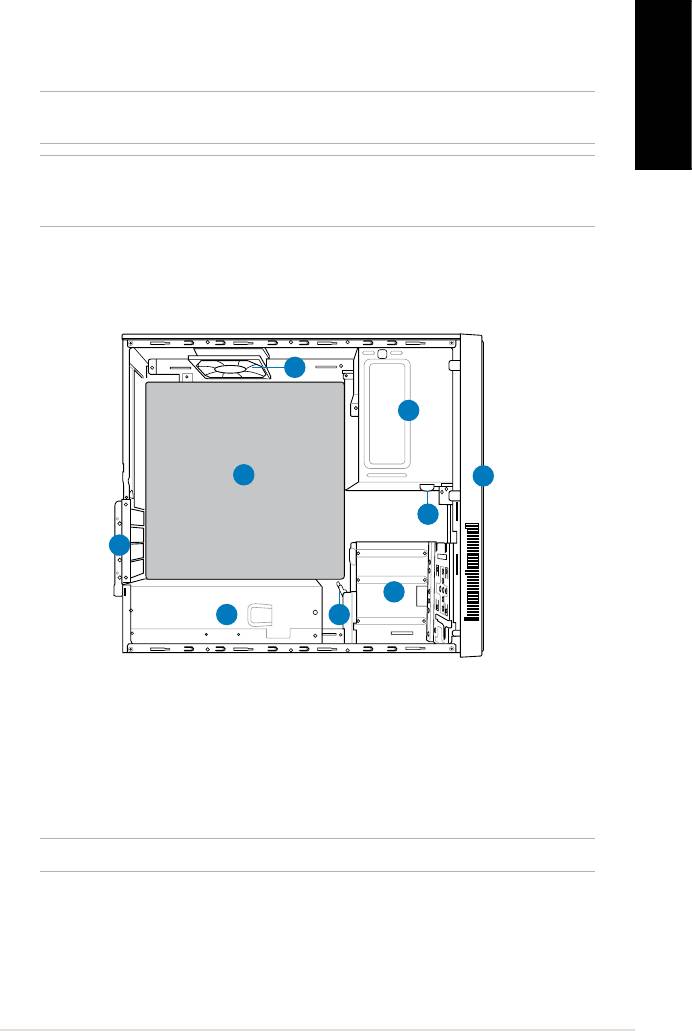
Internal components
9
1
8
2
3
7
4
6
5
1. 5.25-inch optical drive bay
6. Power supply unit
2. Front panel cover
7. Metal bracket lock
3. Optical drive lock
8.* ASUS motherboard
4. 3.5-inch hard disk drive bays
9. Chassis fan
5. Hard disk drive lock
NOTE: *Refer to the system User Guide for motherboard details.
3Installation manual


