
Asus P2-M2A690G: Reinstalling the storage drive assembly Installing the foot stand
Reinstalling the storage drive assembly Installing the foot stand: Asus P2-M2A690G
Table of contents
- Front panel features Front panel features Rear panel features
- Internal components Removing the cover
- Removing the front panel cover Removing the storage drive assembly Removing the CPU fan and heatsink
- Installing the CPU Installing a DIMM
- Installing an expansion card Installing optical and storage drives
- Reinstalling the storage drive assembly Installing the foot stand
- Reinstalling the front panel cover Reinstalling the cover
English
7Installation manual
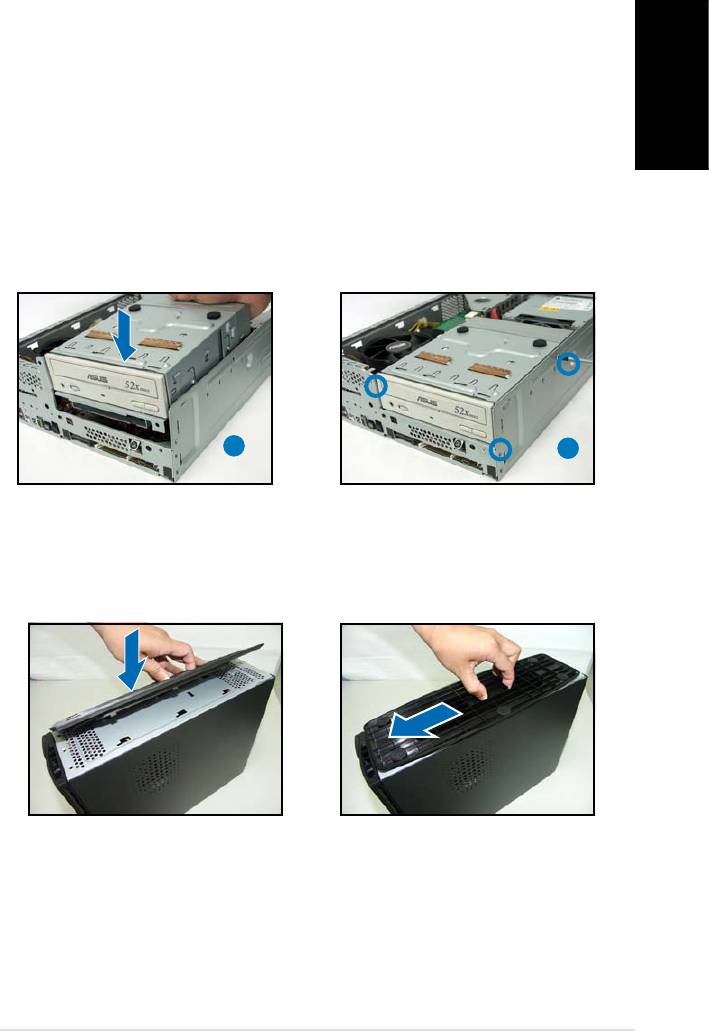
Reinstalling the storage drive assembly
Before reinstalling the storage drive assembly, connect the IDE/SATA and
power plugs to the IDE/SATA and power connectors at the back of the
drives.
1. Connect the black plug of the IDE cable to the optical drive, then the
gray plug to the hard disk drive. If you have the SATA HDD, connect
the SATA cable to the SATA HD.
2. Connect the 4-pin power plugs to the power connectors at the back
of the drives.
3. Install the storage drive assembly to the chassis.
4. Secure the storage drive assembly with three screws.
3
4
Installing the foot stand
1. Match the foot stand hooks to
2. Pull the foot stand to the
the holes on the chassis.
direction of the arrow until the
lock clicks in place.
To remove the foot stand, lift the lock, then slightly push the foot stand to
the direction of the rear panel until it disengages from the chassis.



