
Pioneer PLASMA DISPLAY: Front View Part Names and Function
Front View Part Names and Function: Pioneer PLASMA DISPLAY
Table of contents
- Precautions Important Information Warnings and Safety Precaution
- NOTE:
- Caution
- Contents
- How to use the safety metal fittings and the screws for safety metal fittings Ventilation Requirements for enclosure mounting Installation
- Creating a video wall Cable Management
- Caution on when the plasma monitor is installed vertically How to use the remote control
- Front View Part Names and Function
- Information Rear View/ Terminal Board
- Remote Control
- Basic Operations POWER VOLUME MUTING DISPLAY DIGITAL ZOOM AUTO SET UP OFF TIMER
- SCREEN SIZE Operation WIDE Operations
- SCREEN SIZE Operation with Computer Signals
- Menu Operations OSD (On Screen Display) Controls Setting the language for the menus
- Menu Tree
- Main menu
- Picture Settings Menu
- SOUND Settings Menu SCREEN Settings Menu
- Option1 Settings Menu
- Information
- Option2 Settings Menu
- ORBITER INVERSE
- SCREEN WIPER SOFT FOCUS
- Option3 Settings Menu
- PROGRAM TIMER
- Information
- DIVIDER DISP. MODE
- SCREEN ABL LINK
- REPEAT TIMER Advanced OSD Settings Menu Color System Settings Menu Source Information Menu
- mini D-Sub 15-pin connector (Analog) DVI-D 24-pin connector (Digital) Pin Assignments
- Table of Signals Supported Supported resolution
- Table of Signals Supported
- Troubleshooting
- Specifications
English
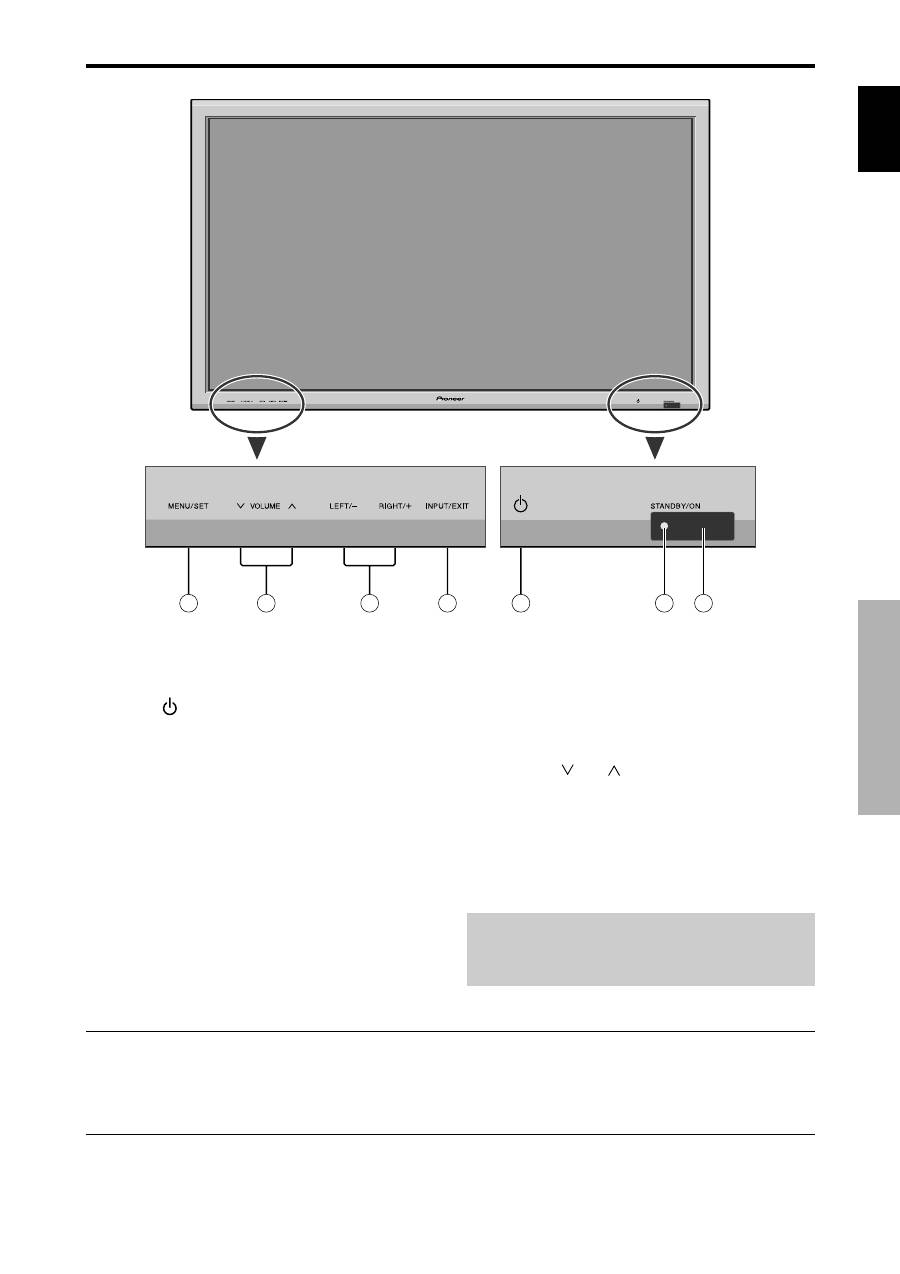
Part Names and Function
5
En
q
Power (
)
Turns the monitor’s power on and off.
w
Remote sensor window
Receives the signals from the remote control.
e
STANDBY/ON indicator
When the power is on ............................. Lights green.
When the power is in the standby mode ... Lights red.
r
INPUT/EXIT
Switches the input.
The available inputs depend on the setting of “BNC
INPUT”, “RGB SELECT”, “D-SUB SELECT” and
“DVI SET-UP”.
Functions as the EXIT buttons in the On-Screen
Display (OSD) mode.
Front View
4
5
6
7
1
3
2
t
LEFT/– and RIGHT/+
Functions as the CURSOR (
/
) buttons in the On-
Screen Display (OSD) mode.
y
VOLUME
and
Adjusts the volume. Functions as the CURSOR (
▲
/
▼
) buttons in the On-Screen Display (OSD) mode.
u
MENU/SET
Sets the On-Screen Display (OSD) mode and displays
the main menu.
WARNING
The Power on/off switch does not disconnect the plasma
display completely from the supply mains.
Part Names and Function
Note:
This plasma monitor has the capasity to display images when connected to European DVD players with a SCART
output signal, which is RGB with composite sync.
Your dealer can supply a special SCART cable, which will enable you to use the RGB with composite sync signal.
To obtain the special cable as well as for further information, please contact your dealer.
Please refer to page 19 for selection of the correct mode in the on-screen display.
