
Pioneer PDA-V100HD: Chapter 5 Part names
Chapter 5 Part names: Pioneer PDA-V100HD
Table of contents
- IMPORTANT
- VENTILATION CAUTION STANDBY/ON Button Operating Environment
- Contents
- Chapter 1 Important user information
- Chapter 2 Safety precautions
- Chapter 3 Features Supported Plasma Televisions
- Chapter 4 Supplied accessories
- Chapter 5 Part names
- Rear
- Remote control unit
- Chapter 6 Preparation Installing the unit Preparing the remote control unit
- Operating range of the remote control unit
- Chapter 7 Using the unit Operation modes Operations/Operation restrictions HDMI Control setting
- Connecting the unit to a Pioneer plasma television (see Chapter 8)
- Chapter 8 Using the unit with a Pioneer plasma television
- Chapter 9 Using the unit with other televisions
- Chapter 10 Advanced functions Connecting control cables
- Changing settings Changing HDMI output resolution Selecting the colour system Selecting the INPUT3 source signal Item Description
- Setting the video signal format Setting the audio signal when using HDMI input
- Chapter 11 Using with other components Connections to a television Connections to input components
- Using the HDMI input Connections to a HDMI- supported component About HDMI
- Connections to a component equipped with SCART connector Connections to a component with component connectors
- Chapter 12 Additional information Troubleshooting Problem Possible solution
- Problem Possible solution
- SCART pin assignments
- Specifications
- Operation of the unit’s indicators During normal operation PDP combination mode Independent 1 mode
- Independent 2 mode During setting mode When setting HDMI output resolution (when RESOLUTION button is pressed.) When setting colour system for analog signals (when COLOUR SYSTEM button is pressed.)
- When selecting INPUT 3 source signal (when SIGNAL SELECT button is pressed.) When setting HDMI video signal format (when VIDEO button is pressed.) When setting HDMI audio signal format (when AUDIO button is pressed.) Unsupported settings (when a remote control unit button not supported by currently selected input is pressed.)
Part names
05
9
En
English
Chapter 5
Part names
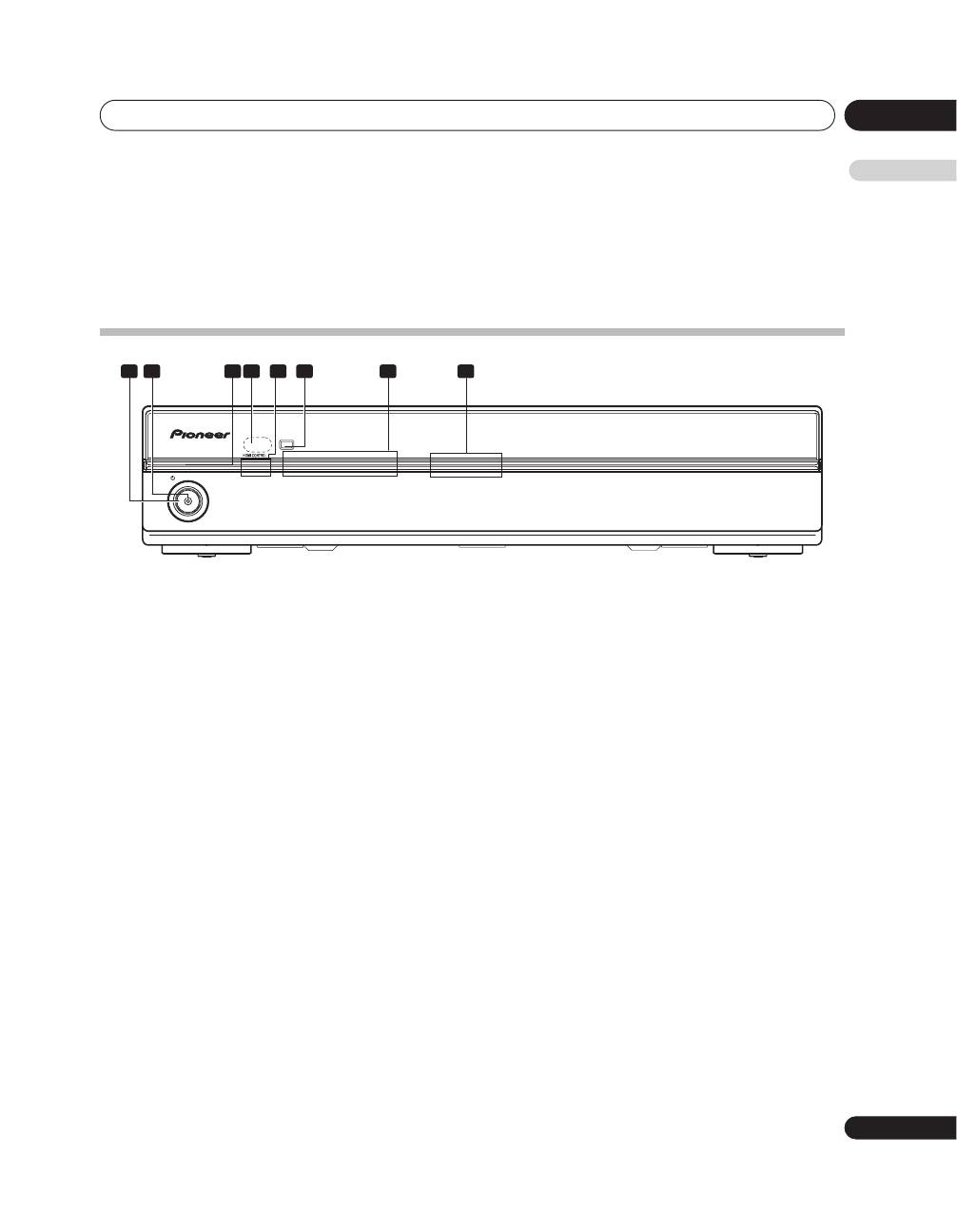
Front
1
STANDBY/ON button
Press to set power to ON/STANDBY.
2
Power ON indicator (blue)
Lights blue when unit power is turned ON.
3
STANDBY indicator (red)
Lights red when unit power is set to STANDBY.
4
Remote control unit sensor
Point the remote control unit at this sensor when
operating.
5
HDMI CONTROL indicators
(Left: orange/ Right: green)
When this unit is connected to a plasma television,
these indicators light under the following conditions:
a. PDP combination mode:
Lights green when
HDMI CONTROL
switch is set to
ON
, and the unit’s connected plasma television can
be operated using the latter’s remote control unit.
(See page 10.)
b. Independent 1 mode:
Lights orange when the
HDMI CONTROL
switch is
set to
ON
. (See page 10.)
c. Independent 2 mode:
Do not light when the
HDMI CONTROL
switch is
stet to
OFF
. (See page 10.)
6
INPUT button
Use to select the unit’s source INPUT 1 to INPUT 6.
7
Input indicators
Notifies user of currently selected input and currently
set mode.
8
Blue illumination
Lights blue when unit power is turned ON. Flashes blue
during setting mode.
PDA-V100HD
STANDBY
STANDBY/ON
1
2
3
4
5
6
INPUT
INPUT
1
2
3 4
5
6
7
8
