
Pioneer VSX-520-S: Making cable connections
Making cable connections: Pioneer VSX-520-S
Table of contents
- IMPORTANT VENTILATION CAUTION
- Operating Environment
- Contents
- Flow of settings on the receiver
- Chapter 1: Before you start
- Before you start01 Ventilation
- Chapter 2: Controls and displays
- Controls and displays02 Operating range of remote control
- Controls and displays 02 Display
- Controls and displays02
- Remote control
- Controls and displays02
- Controls and displays 02
- Chapter 3: Connecting your equipment Placing the speakers
- Hints on the speaker placement
- Connecting the speakers
- Making cable connections
- HDMI cables About HDMI Analog audio cables
- Digital audio cables About video outputs connection
- Connecting a TV and playback components Connecting using HDMI Connecting your component with no HDMI terminal
- Connecting a satellite receiver Connecting an HDD/DVD or other digital set-top box recorder, VCR and other video sources
- Using the component video jacks Connecting other audio components
- Connecting antennas
- Plugging in the receiver
- Chapter 4: Basic Setup Automatically setting up for surround sound (MCACC)
- Basic Setup04
- Chapter 5: Listening to your system Basic playback
- Auto playback Listening in surround sound
- Listening to your system 05
- Using Front Stage Surround Advance Listening in stereo
- Using Stream Direct Better sound using Phase Control Using the Sound Retriever
- Using surround back channel processing Listening with Acoustic Calibration EQ
- Setting the Audio options Setting the Up Mix function
- Setting What it does Option(s)
- Setting What it does Option(s)
- Choosing the input signal Using the headphone
- Chapter 6: The System Setup menu Using the System Setup menu Manual speaker setup
- Speaker setting
- Crossover network Channel level Speaker distance
- The Input Assign menu The Pre Out Setting
- Chapter 7 Using the tuner Listening to the radio Saving station presets
- Using the tuner07
- An introduction to RDS
- Using the tuner07 Displaying RDS information
- Chapter 8: Making recordings Making an audio or a video recording
- Chapter 9: Other connections
- Connecting Optional Bluetooth ADAPTER
- Other connections09
- Chapter 10: Additional information Troubleshooting Problem Remedy
- Problem Remedy
- Additional information 10
- HDMI Symptom Remedy
- Resetting the main unit
- Specifications Cleaning the unit
Connecting your equipment 03
19
En
English
Français
Español
CAUTION
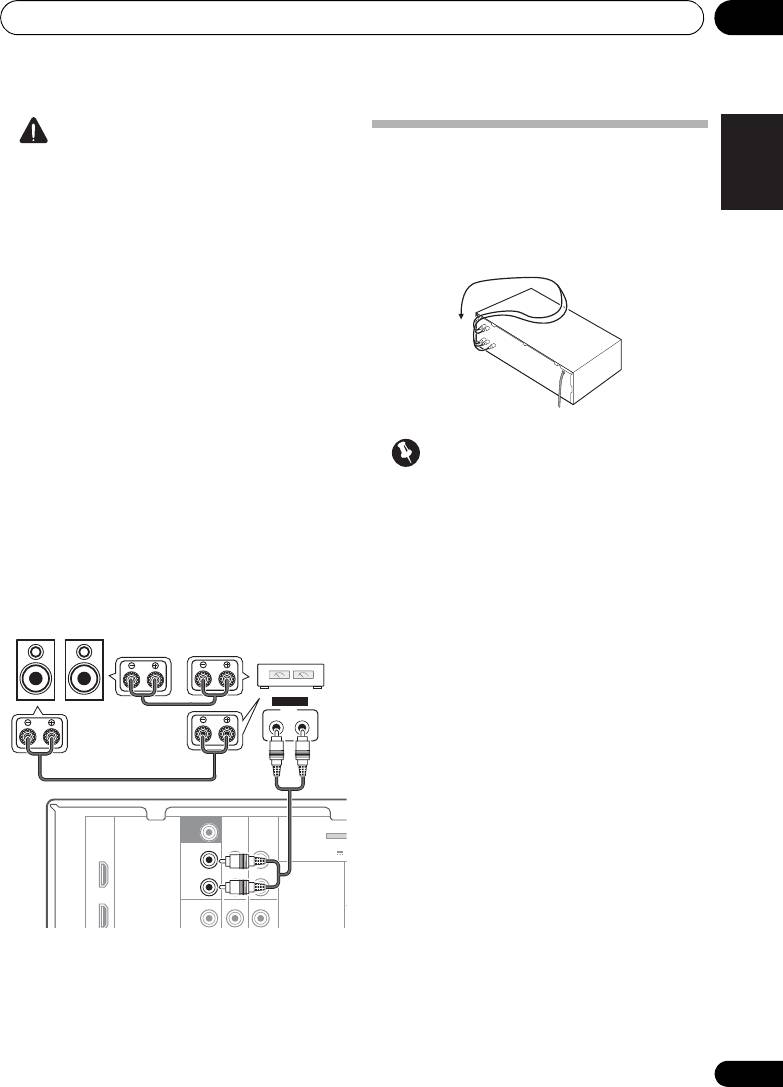
Making cable connections
• These speaker terminals carry
Make sure not to bend the cables over the top
HAZARDOUS LIVE voltage. To prevent
of this unit (as shown in the illustration). If this
the risk of electric shock when connecting
happens, the magnetic field produced by the
or disconnecting the speaker cables,
transformers in this unit may cause a
disconnect the power cord before touching
humming noise from the speakers.
any uninsulated parts.
• Make sure that all the bare speaker wire is
twisted together and inserted fully into the
speaker terminal. If any of the bare speaker
wire touches the back panel it may cause
the power to cut off as a safety measure.
Connect the surround back or front
height speakers
Connect the PRE OUT outputs of the unit and
Important
additional amplifier to add a surround back or
front height speaker.
• Before making or changing connections,
switch off the power and disconnect the
• If the surround back speaker or the front
power cord from the AC outlet.
height speaker is connected, set the Pre
Out setting (see The Pre Out Setting on
• Before unplugging the power cord, switch
page 42).
the power into standby.
• You can use the additional amplifier on the
surround back channel pre-outs for a
single speaker as well. In this case plug the
amplifier into the left (L (Single)) terminal
only.
SUBWOOFER
PRE OUT
CD-R/TAPE
DVR/VCR
SURR BACK /
ADAPTER
FRONT
(
BD
HEIGHT
OUTPUT 5 V 1
L
(
Single
)
OUT
R
DVD
PRE OUT
CD
CD-R/TAPE
DVR/VCR
L
SBL/FHL SBR/FHR
ANALOG
INPUT
LR
Surround back or
front height speakers
Surround back or
front height
channel amplifier
VSX-520_SYXCN_En.book 19 ページ 2010年4月12日 月曜日 午後7時13分
