
Pioneer PD-M406: DELETE PROGRAM PLAYBACK - TO DELETE UNDESIRED TRACKS/DISCS (PD-M426A only)
DELETE PROGRAM PLAYBACK - TO DELETE UNDESIRED TRACKS/DISCS (PD-M426A only): Pioneer PD-M406
Table of contents
- CONTENTS
- CAUTIONS REGARDING HANDLING
- CONFIRM SUPPLIED ACCESSORIES PUT BATTERIES INTO THE REMOTE CONTROL UNIT (PD-M426A only)
- REMOTE CONTROL OPERATIONS (PD-M426A only) BEFORE OPERATING THE PLAYER
- AFFIXING LABELS TO THE MAGAZINE
- CONNEXIONSCONNECTIONS Making connections
- CONNECTIONS CONNEXIONS AC POWER CORD CONNECTION AND FUNCTIONS
- NAMES AND FUNCTIONS OF PARTS FRONT PANEL
- DISPLAY WINDOW REMOTE CONTROL UNIT (PD-M426A only)
- BASIC OPERATION TO PLAY A COMPACT DISC
- FONCTIONNEMENT DE BASEBASIC OPERATION
- VARIOUS OPERATIONS DISC SEARCH - TO SEARCH FOR A PARTICULAR DISC TRACK SEARCH - TO SEARCH FOR A PARTICULAR TRACK
- MANUAL SEARCH - TO SEARCH FOR A PARTICULAR PASSAGE TO REPEAT PLAYBACK (REPEAT PLAY)
- RANDOM PLAYBACK - TO PLAY ALL TRACKS IN RANDOM ORDER MAGAZINE HI-LITE SCAN
- FONCTlONNEMENTS DIVERSVARIOUS OPERATIONS
- TO PLAY ONLY DESIRED TRACKS/DISCS PROGRAM PLAYBACK - TO PROGRAM TRACKS/DISCS IN DESIRED ORDER
- TO PLAY ONLY DESIRED TRACKS/DISCS
- PROGRAMMING A PAUSE (PD-M426A only)
- DELETE PROGRAM PLAYBACK - TO DELETE UNDESIRED TRACKS/DISCS (PD-M426A only)
- VOULUSTO PLAY ONLY DESIRED TRACKS/DISCS
- TROUBLESHOOTING SPECIFICATIONS
POUR LIRE UNIQUEMENT LES PISTES/DISQUES
VOULUSTO PLAY ONLY DESIRED TRACKS/DISCS
1
DELETE
2
6
3
2
DISC
DISC 1
DISC 2 DISC 3
1,4
DISC NUMBER
Î
'
DISC 4 DISC 5
DISC 6
LECTURE DE PROGRAMME AVEC ANNULATION - POUR
DELETE PROGRAM PLAYBACK - TO DELETE
ANNULER LES PISTES/ DISQUES QUI NE SONT PAS
UNDESIRED TRACKS/DISCS (PD-M426A only)
NECESSAIRES (PD-M426A seulement)
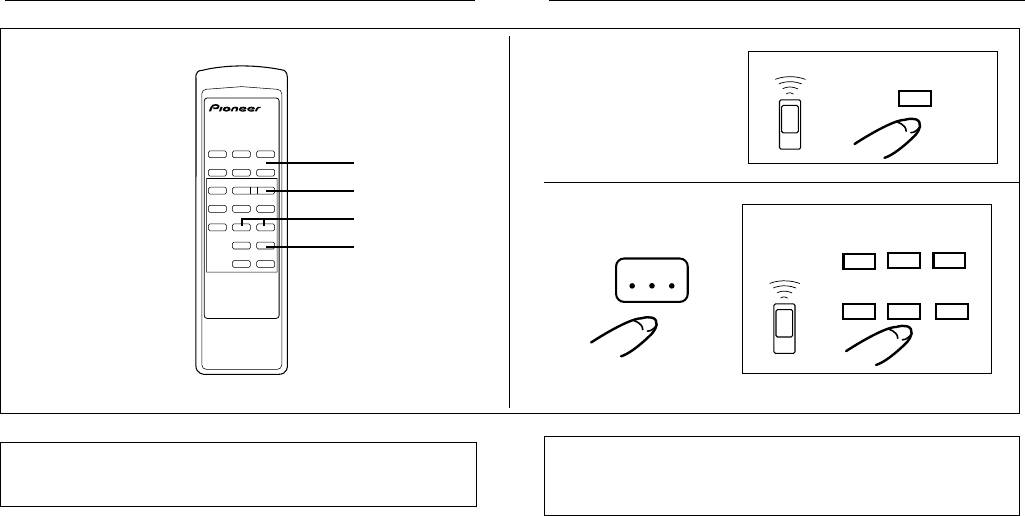
1. With the player stopped, press the DELETE button,
1. Avec le lecteur arrêté, appyuez sur la touche
so that the DELETE indicator lights.
d’effacement (DELETE) pour que l’indicateur
2. Use the DISC button or one of the DISC NUMBER
DELETE s’allume.
buttons to select the disc number.
2. Utilisez la touche DISC ou l’une des touches de
The selected disc number will be displayed.
numéro de disque (DISC NUMBER) pour
3. Then, press the 41 or ¡¢ button to
sélectionner le numéro du disque désiré.
select the track number.
Le numéro du disque sélectionné sera affiché.
The selected track number will be displayed.
3. Ensuite, appuyez sur la touche 41 ou ¡
4. Press the DELETE button, or wait two seconds;
¢ pour sélectionner la piste désirée.
the track to be deleted will be input.
Le numéro de la poste sélectionnée sera affiché.
If the DELETE button is pressed after selecting the disc
4. Appuyez sur la touche d’effacement (DELETE) ou
number only, the “AL” indicator will appear, indicating
attendez deux secondes; la piste à effacer sera
selection of the “Disc All Delete” mode (the entire disc
entrée.
contents will be deleted from the program memory). While
Si la touche d’effacement (DELETE) est enfoncée aprés la
the “AL” indicator is displayed, however, if the 41 or
sélection du numéro de disque seul, l’indicateur “AL” appataît,
¡¢ button is used to designate a track number and
indiquant la sélection du mode “Disc All Delete” (tout le
the DELETE button is then pressed (or after two seconds
contenu du disque sera effacé de la mémoire du programme).
elapses), the selected track will be deleted as that program
Toutefois, pendant que l’indicateur “AL” est allumé, si la
step.
touche 41 ou ¡ ¢ est utilisée pour désigner un
5. Repeat steps 2, 3 and 4 to delete other tracks.
numéro de piste et que la touche d’effacement (DELETE)
6. Press the 6 button.
est alors enfoncée (ou aprés deux secondes), la piste
All tracks other than deleted tracks/discs are played in the
sélectionnée sera effacée comme cette étape de programme.
order of the discs and track numbers. When tracks have
5. Répéter les étapes 2,3 et 4 pour les autres pistes
been played, the player enters stop mode.
à annuler.
6. Appuyer sur la touche 6.
Toutes les pistes autres que les pistes/disques annulés
sont lues dans l’ordre des numéros de disque et de piste.
Quand les pistes ont été lues, le lecteur entre en mode
d’arrêt.
22
En/Fr
