
Pioneer DDJ-SX: Operation Connections
Operation Connections: Pioneer DDJ-SX
Table of contents
- Operating Environment IMPORTANT
- POWER-CORD CAUTION WARNING
- Contents
- Before start What’s in the box Installing the software Installation Procedure (Windows)
- Installation procedure (Mac OS X)
- 11 If the following screen appears, drag and drop the [Serato DJ] icon on the [Applications] folder icon.
- Operation Connections
- 6 Connect the AC adapter. 7 Press the [STANDBY/ON] switch on this unit’s rear panel to turn this unit’s power on. 8 Turn on the power of the devices connected to the output terminals (powered speakers, power amplifier, components, etc.).
- Starting the system Launching Serato DJ
- Importing tracks Loading tracks and playing them
- Playing tracks and outputting the sound
- Monitoring sound with headphones Quitting the system Names of Parts
- Deck section Mixer section
- Acquiring the manual Downloading this unit’s operating Downloading the Serato DJ software manual
- About the AC adapter
- Mounting the power plug Removing the power plug Power plug
- Additional information
8
En
Operation
Wait until all connections between devices have been completed
before connecting the AC adapter.
Be sure to turn off the power and unplug the AC adapter from the
power outlet before making or changing connections between
devices.
Refer to the operating instructions for the component to be
connected.
Only use the AC adapter included with this unit.
Power is supplied to this unit by the AC adapter.
Connect this unit and the computer directly using the included USB
cable.
A USB hub cannot be used.
Connections
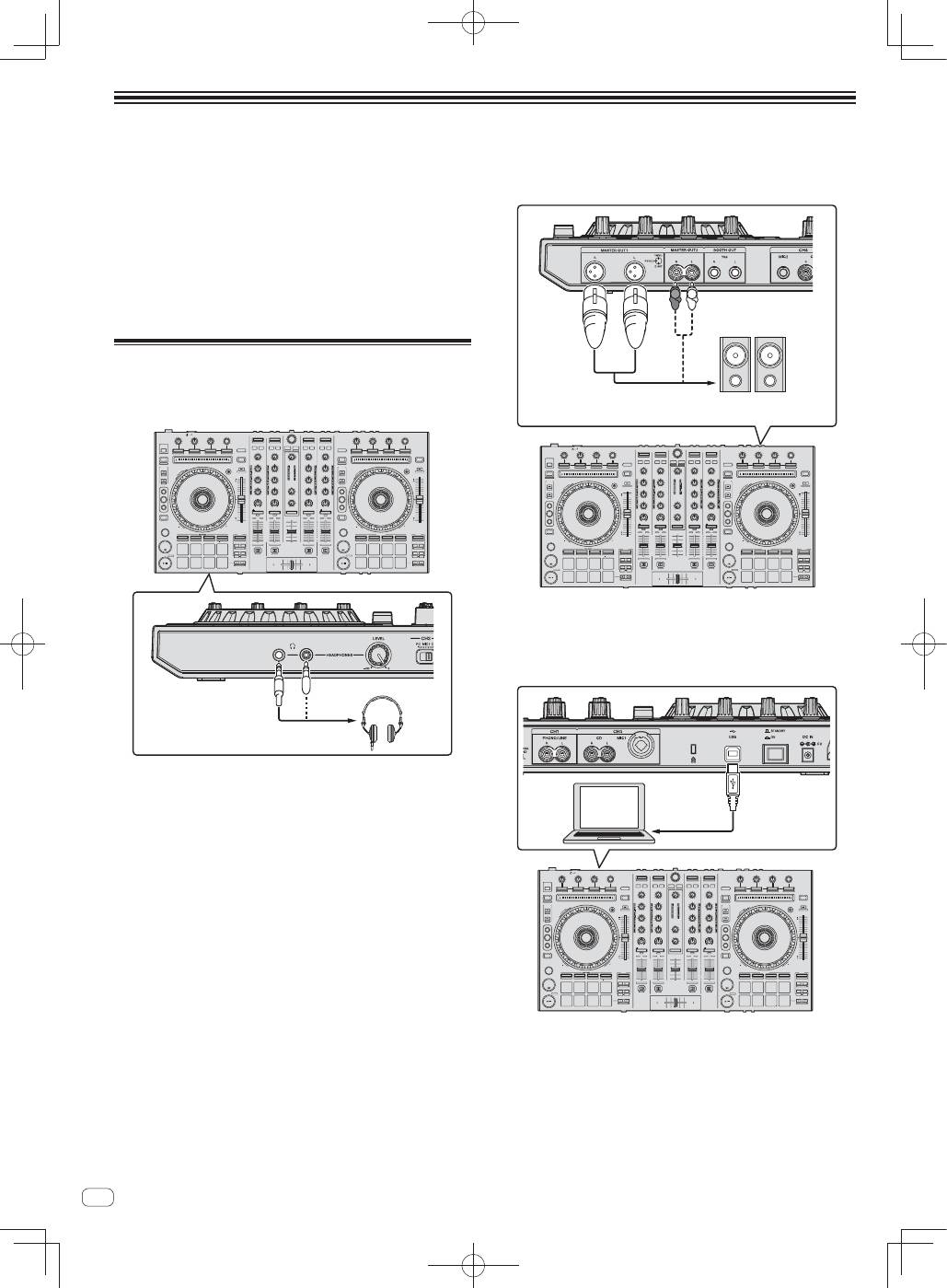
1 Connect headphones to one of the [PHONES]
terminals.
2 Connect powered speakers, a power amplifier,
components, etc., to the [MASTER OUT 1] or [MASTER
OUT 2] terminals.
R
L
Powered speaker, etc
To output the sound from the [
BOOTH
] terminals, connect speak-
ers or other devices to the [
BOOTH
] terminals.
For details on connecting the input/output terminals, see the
Operating Instructions.
3 Connect this unit to your computer via a USB cable.
4 Turn on the computer’s power.
5 Connect the power plug to the AC adapter.
Slide the power plug into the AC adapter’s guide rails as shown on the
diagram and press in until a click is heard.
