
Pioneer DDJ-S1: Mixer section Microphone/External input control section Front panel Effect section
Mixer section Microphone/External input control section Front panel Effect section: Pioneer DDJ-S1
Table of contents
- DJ Controller
- Operating Environment POWER-CORD CAUTION
- IMPORTANT
- The Safety of Your Ears is in Your Hands ESTABLISH A SAFE LEVEL: BE SURE TO OBSERVE THE FOLLOWING GUIDELINES:
- IMPORTANT
- For Europe
- Contents
- Before start What’s in the box Installing the software Before installing the software About the installation procedure About the driver software (Windows) Installation Procedure (Windows) About the Serato DJ software
- Installation procedure (Mac OS X)
- Checking the version of the driver software About the driver software and setting utility software
- Basic Operation 3 Connect this unit to your computer via a USB cable. Connections 1 Connect headphones to one of the [PHONES] terminals. 4 Turn on the computer’s power. 5 Connect the power plug to the AC adapter. 2 Connect powered speakers, a power amplifier, components, etc., to the [MASTER OUT 1] or [MASTER OUT 2] terminals.
- 6 Connect the AC adapter. 7 Slide the [ON/OFF] switch to the [ON] side. 8 Turn on the power of the devices connected to the output terminals (powered speakers, power amplifier, components, etc.).
- Starting the system Launching Serato DJ
- Importing tracks Loading tracks and playing them
- Playing tracks and outputting the sound Monitoring sound with headphones Quitting the system
- Part names and functions Browser section Deck section
- Mixer section Microphone/External input control section Front panel Effect section
- About the AC adapter Safety instructions Mounting the power plug
- Power plug
- Additional information Acquiring the manual Downloading the latest version of these operating instructions About trademarks and registered trademarks Cautions on copyrights Specifications Downloading the Serato DJ software manual
- For U.S.A. and Canada
English
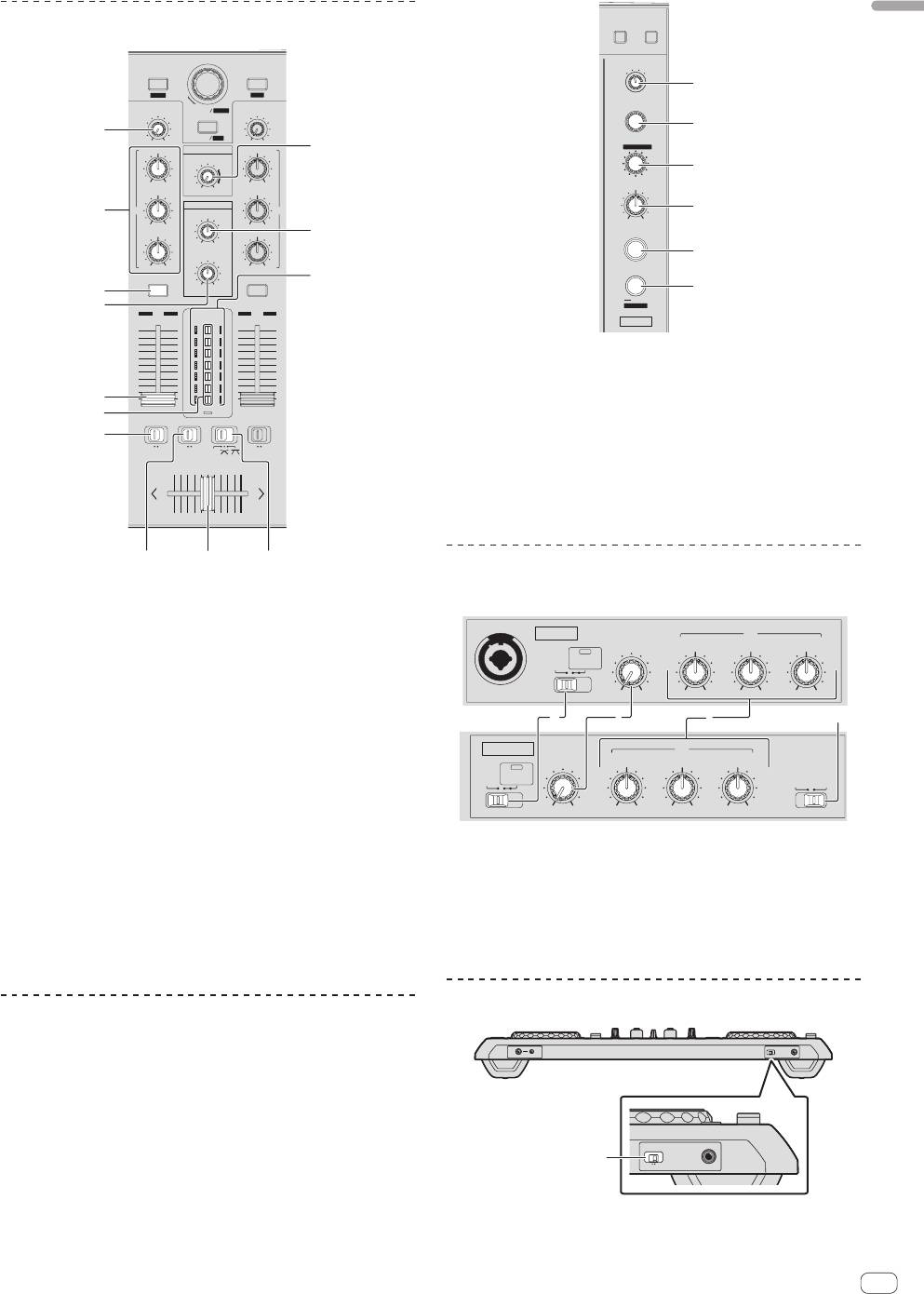
Mixer section
BROWSE PREPARE
FX CH SELECT
2 MASTER
BACK
LOAD PREPARE
1
MIC
/AUX
1
ZOOM
SAVE
EFFECT SELECT
TRIM
BROWSE
AREA
TRIM
2
1
MAXMIN
PANEL
REC
MAXMIN
BEATS
HI
MASTER
HI
4
/
PARAMETER
LEVEL
3
MIN MAX
MIN MAX
MID
MAXMIN
LEVEL / DEPTH
MID
HEADPHONES
2
EQ EQ
4
MIXING
MIN MAX
MIN MAX
LOW
LOW
5
ON / OFF
MASTERCUE
LEVEL
5
MIN MAX
MIN MAX
8
3
TAP
CUE
MAXMIN
CUE
6
AUTO
FX MODE
6
1
LEVEL
2
12
MASTER
FX2
10
10
9
9
8
8
7
7
6
6
5
5
1 FX CH SELECT control
4
4
3
3
2
2
1
1
7
0
0
2 EFFECT SELECT control
C.F.REV
9
FADER START
FADER START
3 BEATS (PARAMETER) control
a
ONOFF
THRU
ONOFFONOFF
C.F.REV
4 LEVEL/DEPTH control
5 FX ON/OFF button
6 TAP/AUTO (FX MODE) button
b
cd
Microphone/External input control
section
1 TRIM control
2 EQ (HI, MID, LOW) controls
MIC 1
EQ
LEVEL
LOW
MID
HI
3 Headphones CUE button
OFF ON
TALK
OVER
4 MASTER LEVEL control
MIC 1
MAXMIN
MAXMIN
MAXMIN
MAXMIN
1 23 4
5 HEADPHONES MIXING control
MIC 2 / AUX
EQ
6 HEADPHONES LEVEL control
LEVEL
LOW
MID
HI
INPUT
OFF ON
TALK
SELECT
OVER
7 Channel fader
AUXMIC 2
MAXMIN
MAXMIN
MAXMIN
MAXMIN
8 Channel Level Indicator
9 Master level indicator
1 OFF, ON, MIC TALK OVER selector switch
a FADER START switch
2 LEVEL control
b C.F. REV switch
3 EQ (HI, MID, LOW) controls
c Crossfader curve selector switch
4 MIC2/AUX selector switch
d Crossfader
Front panel
Effect section
The effect section is used to control two effect units (FX1 and FX2).
MIC/AUX THRU
PHONES
ONOFF
MIC 2
There are controls and buttons for operating FX1 on the left side of the
controller, controls and buttons for operating FX2 on the right side of the
controller. Also, the [FX CH SELECT] control is used to set the channel to
which the effect is applied.
MIC/AUX THRU
1
ONOFF
MIC 2
1 MIC/AUX THRU selector switch
En
17


