
Pioneer DDJ-S1: About the AC adapter Safety instructions Mounting the power plug
About the AC adapter Safety instructions Mounting the power plug: Pioneer DDJ-S1
Table of contents
- DJ Controller
- Operating Environment POWER-CORD CAUTION
- IMPORTANT
- The Safety of Your Ears is in Your Hands ESTABLISH A SAFE LEVEL: BE SURE TO OBSERVE THE FOLLOWING GUIDELINES:
- IMPORTANT
- For Europe
- Contents
- Before start What’s in the box Installing the software Before installing the software About the installation procedure About the driver software (Windows) Installation Procedure (Windows) About the Serato DJ software
- Installation procedure (Mac OS X)
- Checking the version of the driver software About the driver software and setting utility software
- Basic Operation 3 Connect this unit to your computer via a USB cable. Connections 1 Connect headphones to one of the [PHONES] terminals. 4 Turn on the computer’s power. 5 Connect the power plug to the AC adapter. 2 Connect powered speakers, a power amplifier, components, etc., to the [MASTER OUT 1] or [MASTER OUT 2] terminals.
- 6 Connect the AC adapter. 7 Slide the [ON/OFF] switch to the [ON] side. 8 Turn on the power of the devices connected to the output terminals (powered speakers, power amplifier, components, etc.).
- Starting the system Launching Serato DJ
- Importing tracks Loading tracks and playing them
- Playing tracks and outputting the sound Monitoring sound with headphones Quitting the system
- Part names and functions Browser section Deck section
- Mixer section Microphone/External input control section Front panel Effect section
- About the AC adapter Safety instructions Mounting the power plug
- Power plug
- Additional information Acquiring the manual Downloading the latest version of these operating instructions About trademarks and registered trademarks Cautions on copyrights Specifications Downloading the Serato DJ software manual
- For U.S.A. and Canada
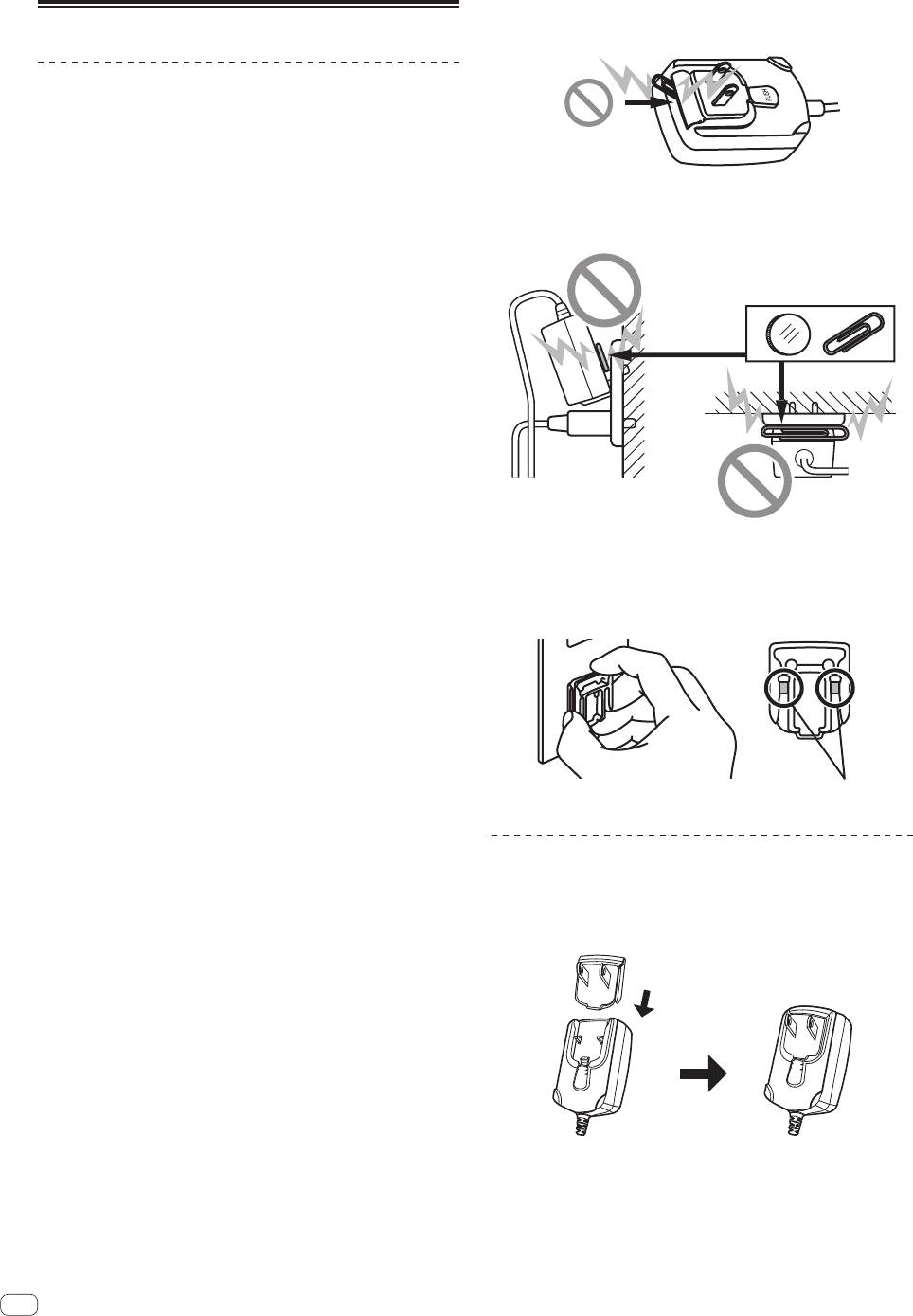
! Do not use this unit with a coin, paper clip or other metal object
stuck between the AC adapter and power plug. Doing so could cause
About the AC adapter
a short circuit, leading to fire or electric shock.
Safety instructions
To ensure your personal safety and to maximize the full operating poten-
tial of your unit, read and follow these safety instructions.
Read & Retain Instructions
Read all operating and user information provided with this product.
! When mounting the AC adapter on a wall outlet, make sure there is
no space between the AC adapter and the wall outlet. Faulty contact
Cleaning
or a coin, paper clip or other metal object getting stuck in the space
Use a damp cloth to clean the exterior housing. Avoid using any fluids
could cause a short circuit, leading to fire or electric shock.
including liquid, aerosol or alcohol-based cleaning products.
Water or Moisture
Avoid operating or locating this product near water or other sources of
Coin, paper clip or other metal object
fluid.
Accessories
Do not place this product on an unstable cart, stand, or table. The prod-
uct may fall and be seriously damaged.
Ventilation
Do not block or cover this product in use. This unit should not be placed
in a built-in installation unless properly ventilated.
Environment
Avoid placing this product in a location with exposure to large quantities
Side
Top
of dust, high temperatures, high humidity, or subject to excessive vibra-
tions or shocks.
! The power plug could come detached from the AC adapter and
Power Sources
remain in the power outlet if someone trips on the AC adapter’s
Operate this product only from the recommended power sources. If you are
power cord or if something hits the AC adapter. If this happens,
unsure of the power source, consult an authorized Pioneer representative.
remove the power plug remaining in the outlet with dry hands, hold-
ing it as shown on the diagram below and without touching metal
Power-Cord Protection
parts. Do not use any tools to remove it.
When unplugging the unit, pull on the plug – not on the cord. Do not
handle the cord or plug with wet hands; doing so could cause an electric
short or shock. Do not allow anything to pinch or rest on the power cord
and do not place in a walkway.
Power
Turn OFF the system before installing this or any other hardware device.
Overloading
Avoid connecting too many devices to a single wall socket or power
source as this can cause fires or short circuits.
Do not touch metal parts.
Object & Liquid Entry
Never push inappropriate objects in to the device. Avoid spilling any
liquids in to or on the outside of the drive.
Mounting the power plug
Servicing
Slide the power plug along the guide rails in the AC
Opening or removing the cover exposes you to possible electrical shock
adapter unit as shown on the diagram below, then press
or other danger. Contact a Pioneer authorized service representative for
repairing this product (refer to the enclosed Service & Support Card).
in until a click is heard.
Damage Requiring Service
Unplug the unit and refer servicing to qualified service personnel in the
following situations:
% When the power cord, plug, or chassis is damaged.
% If liquid has been spilled, or objects have fallen into the product.
% If the product has been exposed to rain or water.
% If the product does not operate normally when the operating instruc-
PUSH
PUSH
tions are followed. Adjust only those controls that are covered by the
operating instructions. Improper adjustment of other controls may
result in damage and can require extensive work by a qualified tech-
nician to restore the unit to its normal operation.
% When the product exhibits a distinct change in performance – this
indicates a need for service.
Check that there are no irregularities with the AC adapter or power plug,
then insert the power plug into the specified position of the AC adapter
using the specified procedure until a click is heard. For details, see
Mounting the power plug on page 18.
If there are irregularities with the AC adapter or power plug, ask your near-
est Pioneer authorized service center or your dealer to carry out repair work.
18
En


