
Pioneer DDJ-S1: Installation procedure (Mac OS X)
Installation procedure (Mac OS X): Pioneer DDJ-S1
Table of contents
- DJ Controller
- Operating Environment POWER-CORD CAUTION
- IMPORTANT
- The Safety of Your Ears is in Your Hands ESTABLISH A SAFE LEVEL: BE SURE TO OBSERVE THE FOLLOWING GUIDELINES:
- IMPORTANT
- For Europe
- Contents
- Before start What’s in the box Installing the software Before installing the software About the installation procedure About the driver software (Windows) Installation Procedure (Windows) About the Serato DJ software
- Installation procedure (Mac OS X)
- Checking the version of the driver software About the driver software and setting utility software
- Basic Operation 3 Connect this unit to your computer via a USB cable. Connections 1 Connect headphones to one of the [PHONES] terminals. 4 Turn on the computer’s power. 5 Connect the power plug to the AC adapter. 2 Connect powered speakers, a power amplifier, components, etc., to the [MASTER OUT 1] or [MASTER OUT 2] terminals.
- 6 Connect the AC adapter. 7 Slide the [ON/OFF] switch to the [ON] side. 8 Turn on the power of the devices connected to the output terminals (powered speakers, power amplifier, components, etc.).
- Starting the system Launching Serato DJ
- Importing tracks Loading tracks and playing them
- Playing tracks and outputting the sound Monitoring sound with headphones Quitting the system
- Part names and functions Browser section Deck section
- Mixer section Microphone/External input control section Front panel Effect section
- About the AC adapter Safety instructions Mounting the power plug
- Power plug
- Additional information Acquiring the manual Downloading the latest version of these operating instructions About trademarks and registered trademarks Cautions on copyrights Specifications Downloading the Serato DJ software manual
- For U.S.A. and Canada
5 “An internet environment is required to access the
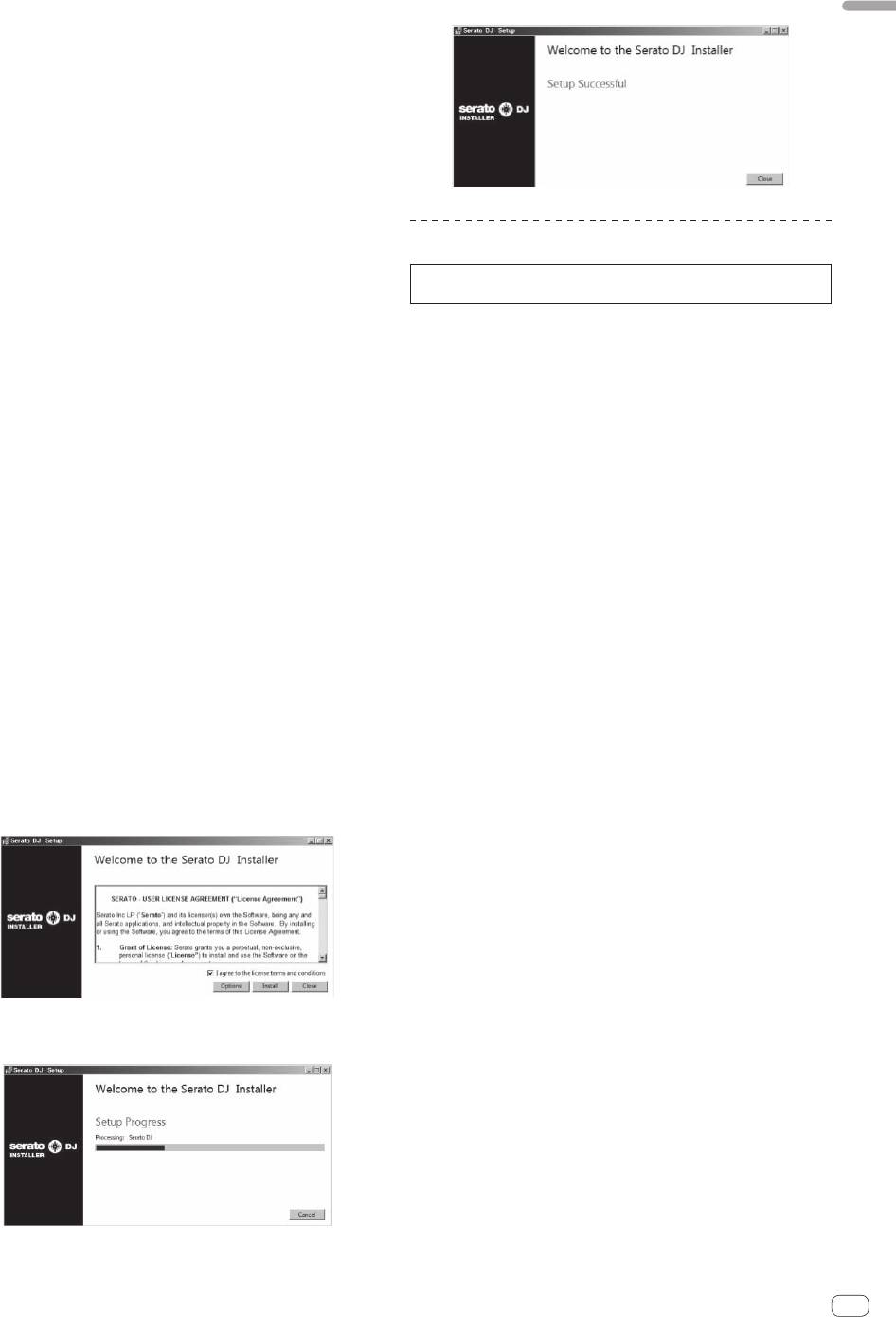
13 Click [Close] to quit the Serato DJ installer.
English
site. Connected to the internet?” is displayed. Click [Yes].
The web browser is launched and the Pioneer DJ support site is
displayed.
6 Click [Software Info] under [DDJ-S1 Serato DJ Edition]
on the Pioneer DJ support site.
[Serato DJ Support Information] is displayed.
7 Click the link to the Serato DJ download page.
The Serato DJ download page is displayed.
8 Log in to your “Serato.com” user account.
! If you have already registered a user account on “Serato.com”,
proceed to step 10.
Installation procedure (Mac OS X)
! If you have not completed registering your user account, do so
following the procedure below.
Do not connect this unit and the computer until installation is
— Following the instructions on the screen, input your e-mail
completed.
address and the password you want to set, then select the
! If any other programs are running on the computer, quit them.
region in which you live.
— If you check [E-mail me Serato newsletters], newsletters
1 Insert the CD-ROM into the computer’s optical drive.
providing the latest information on Serato products will be
The CD-ROM menu is displayed.
sent from Serato.
! If the CD-ROM menu does not appear on the screen when the
— Once user account registration is completed, you will receive
CD-ROM is inserted, open the optical driver from Finder, then dou-
an e-mail at the e-mail address you have input. Check the
ble-click the [CD_menu.app] icon.
contents of the e-mail sent from “Serato.com”.
! Be careful not to forget the e-mail address and password speci-
2 Select [Install DJ Software (Serato DJ/Download)]
fied when you performed user registration. They will be required
from the CD-ROM’s menu, then click [Start].
for updating the software.
! The personal information input when registering a new user
3 “An internet environment is required to access the
account may be collected, processed and used based on the
site. Connected to the internet?” is displayed. Click [Yes].
privacy policy on the Serato website.
The web browser is launched and the Pioneer DJ support site is
displayed.
9 Click the link in the e-mail message sent from “Serato.
com”.
4 Click [Software Info] under [DDJ-S1 Serato DJ Edition]
This takes you to the Serato DJ download page. Proceed to step 11.
on the Pioneer DJ support site.
[Serato DJ Support Information] is displayed.
10 Log in.
Input the e-mail address and password you have registered to log in to
5 Click the link to the Serato DJ download page.
“Serato.com”.
The Serato DJ download page is displayed.
11 Download the Serato DJ software from the download
6 Log in to your “Serato.com” user account.
page.
! If you have already registered a user account on “Serato.com”,
Unzip the downloaded file, then double-click the unzipped file to launch
proceed to step 8.
the installer.
! If you have not completed registering your user account, do so
following the procedure below.
12 Read the terms of the license agreement carefully,
— Following the instructions on the screen, input your e-mail
and if you agree, select [I agree to the license terms and
address and the password you want to set, then select the
conditions], then click [Install].
region in which you live.
— If you check [E-mail me Serato newsletters], newsletters
providing the latest information on Serato products will be
sent from Serato.
— Once user account registration is completed, you will receive
an e-mail at the e-mail address you have input. Check the
contents of the e-mail sent from “Serato.com”.
! Be careful not to forget the e-mail address and password speci-
fied when you performed user registration. They will be required
for updating the software.
! The personal information input when registering a new user
account may be collected, processed and used based on the
! If you do not agree to the contents of the usage agreement, click
privacy policy on the Serato website.
[Close] to cancel installation.
Installation begins.
7 Click the link in the e-mail message sent from “Serato.
com”.
This takes you to the Serato DJ download page. Proceed to step 9.
8 Log in.
Input the e-mail address and password you have registered to log in to
“Serato.com”.
9 Download the Serato DJ software from the download
page.
Unzip the downloaded file, then double-click the unzipped file to launch
The message of successful installation appears once installation is
the installer.
completed.
En
9


