
Pioneer VSX-921: Placing the speakers Connecting the speakers
Placing the speakers Connecting the speakers: Pioneer VSX-921
Table of contents
- IMPORTANT
- Contents
- Before you start
- Remote control
- Connecting your equipment
- Placing the speakers Connecting the speakers
- Bi-amping your speakers Installing your speaker system
- Selecting the Speaker system About the audio connection About the video converter
- About HDMI
- Connecting your TV and playback components Connecting your DVD player with no HDMI output
- Connecting an HDD/DVD recorder, BD recorder and other video sources
- Connecting a satellite/cable receiver or other set-top box Connecting other audio components
- MULTI-ZONE setup Sub Zone Input functions available Sub Zone Input functions available Connecting AM/FM antennas
- Connecting to the network through LAN interface Connecting to a wireless LAN Plugging in the receiver
- Basic Setup Canceling the demo display Automatically conducting optimum sound tuning (Full Auto MCACC)
- Operation Mode Setup
- Operable functions/ Descriptions Page
- Basic playback Playing a source Listening in surround sound Playing an iPod
- Listening to the radio Playing a USB device
- Playback with HOME MEDIA GALLERY inputs Bluetooth ADAPTER for Wireless Enjoyment of Music
En
7
02
Connecting your equipment
L
L
R
R
SL
SW
C
SR
Main zone
Sub zone
ZONE 2
Other speaker connections
!
Your favorite speaker connections can be
selected even if you have fewer than 5.1
speakers (except front left/right speakers).
!
When not connecting a subwoofer, connect
speakers with low frequency reproduction
capabilities to the front channel. (The
subwoofer’s low frequency component
is played from the front speakers, so the
speakers could be damaged.)
!
After connecting, be sure to conduct the
Full Auto MCACC
(speaker environment
setting) procedure. See
Automatically
conducting optimum sound tuning (Full Auto
MCACC)
on page 16 .
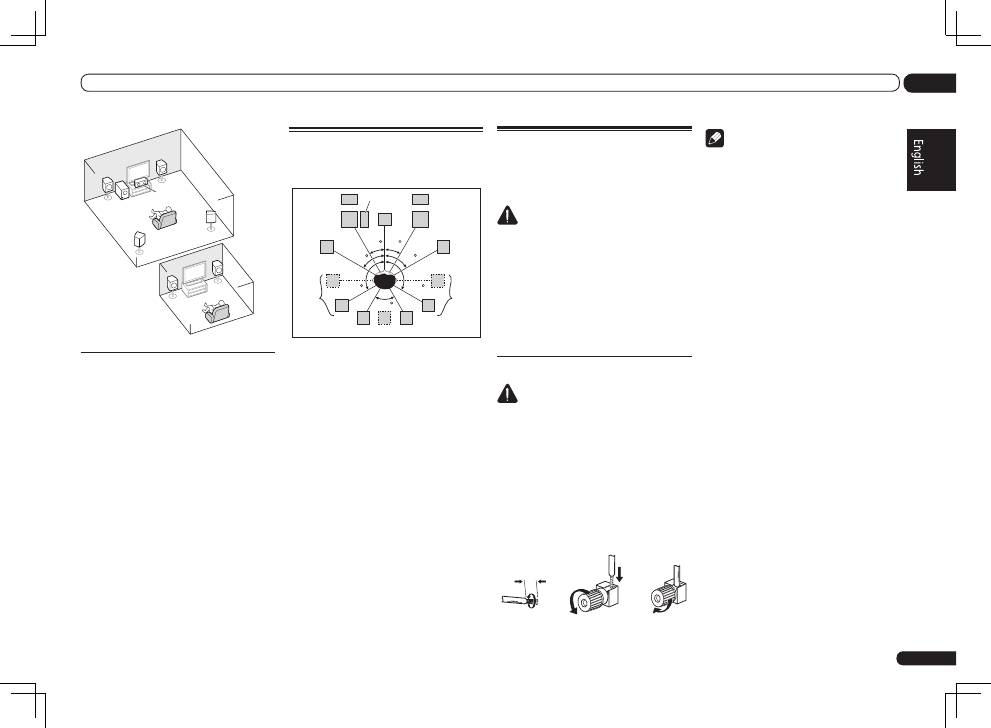
Placing the speakers
Refer to the chart below for placement of the
speakers you intend to connect.
L
SW
C
FHL
FWL
SL
SBL
SBR
SB
SR
FWR
R
FHR
30 30
60
60
60
120
120
!
Place the surround speakers at 120º from
the center. If you, (1) use the surround
back speaker, and, (2) don’t use the front
height speakers / front wide speakers, we
recommend placing the surround speaker
right beside you.
!
If you intend to connect only one surround
back speaker, place it directly behind you.
!
Place the left and right front height speakers
at least one meter directly above the left and
right front speakers.
Connecting the speakers
Each speaker connection on the receiver com-
prises a positive (+) and negative (–) terminal.
Make sure to match these up with the terminals
on the speakers themselves.
CAUTION
!
These speaker terminals carry
HAZARDOUS
LIVE
voltage. To prevent the risk of electric
shock when connecting or disconnecting the
speaker cables, disconnect the power cord
before touching any uninsulated parts.
!
Make sure that all the bare speaker wire is
twisted together and inserted fully into the
speaker terminal. If any of the bare speaker
wire touches the back panel it may cause the
power to cut off as a safety measure.
Bare wire connections
CAUTION
Make sure that all speakers are securely
installed. This not only improves sound quality,
but also reduces the risk of damage or injury
resulting from speakers being knocked over or
falling in the event of external shocks such as
earthquakes.
1 Twist exposed wire strands together.
2 Loosen terminal and insert exposed
wire.
3 Tighten terminal.
1
2
3
10 mm
Note
!
Please refer to the manual that came with
your speakers for details on how to connect
the other end of the speaker cables to your
speakers.
!
Use an RCA cable to connect the subwoofer.
It is not possible to connect using speaker
cables.
