
Pioneer VSX-921: Connecting your equipment
Connecting your equipment: Pioneer VSX-921
Table of contents
- IMPORTANT
- Contents
- Before you start
- Remote control
- Connecting your equipment
- Placing the speakers Connecting the speakers
- Bi-amping your speakers Installing your speaker system
- Selecting the Speaker system About the audio connection About the video converter
- About HDMI
- Connecting your TV and playback components Connecting your DVD player with no HDMI output
- Connecting an HDD/DVD recorder, BD recorder and other video sources
- Connecting a satellite/cable receiver or other set-top box Connecting other audio components
- MULTI-ZONE setup Sub Zone Input functions available Sub Zone Input functions available Connecting AM/FM antennas
- Connecting to the network through LAN interface Connecting to a wireless LAN Plugging in the receiver
- Basic Setup Canceling the demo display Automatically conducting optimum sound tuning (Full Auto MCACC)
- Operation Mode Setup
- Operable functions/ Descriptions Page
- Basic playback Playing a source Listening in surround sound Playing an iPod
- Listening to the radio Playing a USB device
- Playback with HOME MEDIA GALLERY inputs Bluetooth ADAPTER for Wireless Enjoyment of Music
Connecting your equipment
This receiver provides you with many connec-
tion possibilities, but it doesn’t have to be dif-
ficult. This chapter explains the kinds of compo-
nents you can connect to make up your home
theater system.
CAUTION
Before making or changing the connections,
switch off the power and disconnect the power
cord from the power outlet. Plugging in should
be the final step.
Important
Illustration shows the VSX-1021, however con-
nections for the VSX-921 are the same except
where noted.
Determining the speakers’
application
This unit permits you to build various surround
systems, in accordance with the number of
speakers you have.
!
Be sure to connect speakers to the front left
and right channels (
L
and
R
).
!
It is also possible to only connect one of the
surround back speakers (
SB
) or neither.
Choose one from Plans [A] to [E] below.
Important
!
The
Speaker System
setting must be made if
you use any of the connections shown below
other than [A] (see
Speaker system setting
on
Operating Instructions in CD-ROM).
!
Sound does not come through simultaneously
from the front height, front wide, speaker B
and surround back speakers. Output speakers
are different depending on the input signal or
listening mode.
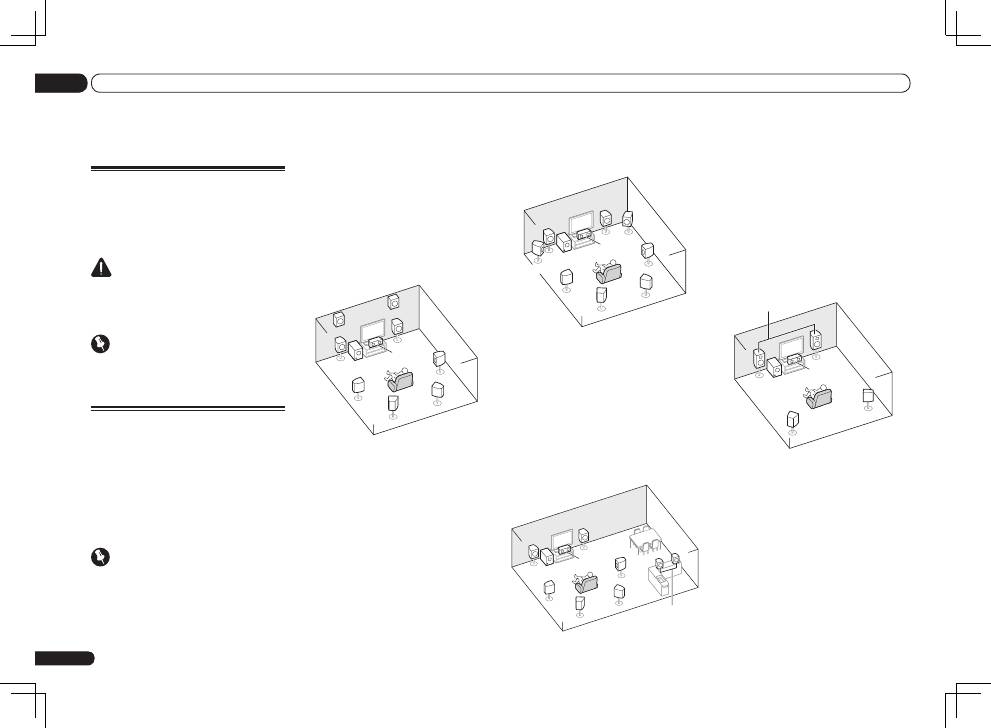
[A] 7.1 channel surround system (Front
height)
*Default setting
!
Speaker System
setting:
Normal(SB/FH)
SL
L
FHL
SW
C
R
FHR
SR
SBL
SBR
A 7.1 ch surround system connects the left and
right front speakers (
L
/
R
), the center speaker
(
C
), the left and right front height speakers
(
FHL
/
FHR
), the left and right surround speakers
(
SL
/
SR
), the left and right surround back speak-
ers (
SBL
/
SBR
), and the subwoofer (
SW
).
It is not possible to produce sound simultane-
ously from the front height or front wide speak-
ers and the surround back speakers.
This surround system produces a more true-to-
life sound from above.
En
6
02
Connecting your equipment
Connecting your equipment
[B] 7.1 channel surround system (Front
wide)
!
Speaker System
setting:
Normal(SB/FW)
FWR
FWL
SL
L
SW
C
R
SR
SBL
SBR
This plan replaces the left and right front height
speakers shown in [A] with the left and right
front wide speakers (
FWL
/
FWR
).
It is not possible to produce sound simultane-
ously from the front height or front wide speak-
ers and the surround back speakers.
This surround system produces a true-to-life
sound over a wider area.
[C] 7.1 channel surround system & Speaker
B connection
!
Speaker System
setting:
Speaker B
SL
L
SW
C
R
SR
SBL
SBR
L
R
Speaker B
With these connections you can simultaneously
enjoy 5.1-channel surround sound in the main
zone with stereo playback of the same sound
on the B speakers. The same connections also
allow for 7.1-channel surround sound in the
main zone when not using the B speakers.
[D] 5.1 channel surround system & Front
Bi-amping connection (High quality
surround)
!
Speaker System
setting:
Front Bi-Amp
Bi-amping connection of the front speakers for
high sound quality with 5.1-channel surround
sound.
L
R
SL
SW
C
SR
Front Bi-Amp
[E] 5.1 channel surround system & ZONE 2
connection (Multi Zone)
!
Speaker System
setting:
ZONE 2
With these connections you can simultaneously
enjoy 5.1-channel surround sound in the main
zone with stereo playback on another compo-
nent in ZONE 2. (The selection of input devices
is limited.)
