
Pioneer VSX-920-K: Connecting your equipment03
Connecting your equipment03: Pioneer VSX-920-K
Table of contents
- IMPORTANT IMPORTANT: THE MOULDED PLUG VENTILATION CAUTION
- Information for users on collection and disposal of old equipment and used batteries Operating Environment
- Contents
- 06 Listening to your system
- 12 Additional information
- Flow of settings on the receiver
- Chapter 1: Before you start Checking what’s in the box Loading the batteries Installing the receiver
- Chapter 2: Controls and displays Front panel
- Controls and displays02
- Display
- Controls and displays02
- Remote control
- Controls and displays02 Operating range of remote control unit
- Chapter 3: Connecting your equipment Rear panel
- Connecting your equipment03
- Determining the speakers’ application
- Connecting your equipment03
- Placing the speakers Some tips for improving sound quality
- Connecting the speakers
- Installing your speaker system
- Bi-amping your speakers Bi-wiring your speakers
- Selecting the Speaker system
- About the audio connection About the video converter
- Connecting your TV and playback components
- About HDMI
- Connecting your DVD player with no HDMI output
- Connecting your TV with no HDMI input
- Connecting a satellite/cable Connecting a HDD/DVD receiver or other set-top box recorder, VCR and other video sources
- Connecting other audio components
- Connecting AM/FM antennas
- MULTI-ZONE setup MULTI-ZONE listening options Sub Zone Input functions available
- Connecting Optional Bluetooth ADAPTER
- Connecting to the network Connecting an HDMI-equipped through LAN interface component to the front panel input
- Connecting to the front panel video terminal Connecting an iPod
- Connecting a USB device Connecting a USB device for Advanced MCACC output
- Connecting an IR receiver Operating other Pioneer components with this unit’s sensor
- Plugging in the receiver
- Chapter 4: Basic Setup Changing the OSD display language (OSD Language) Automatically conducting optimum sound tuning (Auto MCACC)
- Basic Setup04 THX
- Basic Setup 04
- The Input Setup menu
- Input function default and possible settings
- Chapter 5: Basic playback Playing a source
- Playing an iPod
- Finding what you want to play Switching the iPod controls Basic playback controls
- Playing back audio files stored on a Playing a USB device USB memory device
- Playing back photo files stored on a Slideshow Setup USB memory device Basic playback controls Button(s) What it does
- About playable file formats Music files Photo files
- Using Neural Surround Listening to the radio
- Saving station presets Listening to station presets Naming station presets
- An introduction to RDS Searching for RDS programs
- Wireless music play Bluetooth ® ADAPTER for Wireless Enjoyment of Music Remote control operation Pairing the Bluetooth ADAPTER and Bluetooth wireless technology device
- Listening to music contents of a Bluetooth wireless technology device with your system
- Listening to Internet radio stations Programming the Internet radio stations Programming with the GUI screen
- Basic playback05 Programming on the computer screen
- Chapter 6: Listening to your system Auto playback Listening in surround sound
- Listening to your system06
- Using the Advanced surround effects Listening in stereo
- Using Front Stage Surround Using Stream Direct Advance
- Selecting MCACC presets Choosing the input signal
- Better sound using Phase Control
- Chapter 7: Control with HDMI function Making Control with HDMI connections
- HDMI Setup
- Before using synchronization About synchronized operations
- About connections with a product of Setting the PQLS function a different brand that supports the Control with HDMI function
- Cautions on the Control with HDMI function
- Chapter 8: Using other functions Setting the Audio options Setting What it does Option(s)
- Setting What it does Option(s)
- Setting What it does Option(s)
- Setting the Video options Setting What it does Option(s)
- Setting What it does Option(s)
- Switching the speaker terminals Using the MULTI-ZONE controls
- Making an audio or a video recording MULTI-ZONE remote controls Button What it does
- Dimming the display Reducing the level of an analog signal Checking your system settings Using the sleep timer
- Setting Default Resetting the system Default system settings Setting Default
- Chapter 9: Controlling the rest of your system Operating multiple receivers Setting the remote to control other components
- Selecting preset codes directly Programming signals from other remote controls
- Erasing one of the remote control button settings
- Resetting the input assignment Direct function of one of the input function buttons
- Multi operation and System off
- Using System off Erasing the settings for the multi- operation Using multi operations
- Clearing all the remote control settings Default preset codes Controlling components
- Controlling the rest of your system09 Button(s) TV TV (Monitor) BD/DVD HDD/DVR VCR SAT/CATV
- Button(s) LD
- Chapter 10: The Advanced MCACC menu Making receiver settings from the Advanced MCACC menu
- Automatic MCACC (Expert)
- The Advanced MCACC menu10
- The Advanced MCACC menu 10
- Manual MCACC setup
- The Advanced MCACC menu 10 Fine Speaker Distance Fine Channel Level
- Standing Wave
- Acoustic Calibration EQ Adjust Acoustic Calibration EQ Professional
- The Advanced MCACC menu10 Using Acoustic Calibration EQ Professional
- The Advanced MCACC menu 10
- Checking MCACC Data Speaker Setting Channel Level Speaker Distance
- Standing Wave Output MCACC data Acoustic Cal EQ
- Renaming MCACC presets Data Management Copying MCACC preset data
- The Advanced MCACC menu 10
- Chapter 11: The System Setup and Other Setup menus Making receiver settings from the System Setup menu Manual speaker setup
- The System Setup and Other Setup menus 11 Speaker system setting
- Speaker Setting
- Speaker Distance Channel Level
- Network Setup menu IP address/Proxy setting
- Checking the MAC address
- Volume Setup The Other Setup menu
- Remote Control Mode Setup Flicker Reduction Setup
- Chapter 12: Additional information Troubleshooting Symptom Remedy
- Symptom Remedy No sound Symptom Remedy
- Symptom Remedy Other audio problems Symptom Remedy
- Symptom Remedy
- Video Symptom Remedy
- Settings Symptom Remedy
- Professional Calibration EQ graphical output Symptom Remedy Display Symptom Remedy
- Symptom Remedy Remote control Symptom Remedy
- HDMI Symptom Remedy
- Symptom Remedy Important information regarding the HDMI connection
- USB interface Symptoms Causes Remedies
- ADAPTER PORT Symptom Remedy Internet radio Symptoms Causes Remedies
- Symptoms Causes Remedies
- About iPod Surround sound formats
- Auto Surround, ALC and Stream Direct with different input signal formats Stereo (2 channel) signal formats
- Additional information 12 Preset code list
- Additional information12
- Additional information 12
- DVD
- BD DVR (BDR, HDR) VCR
- Satellite Set Top Box
- Additional information 12
- Additional information12 Satellite Set Top Box (SAT/PVR Combination)
- Cable Set Top Box Cable Set Top Box (Cable/PVR Combination) CD CD-R Laser Disc Player Cassete Deck Digital Tape MD
- Specifications
- Cleaning the unit
Connecting your equipment03
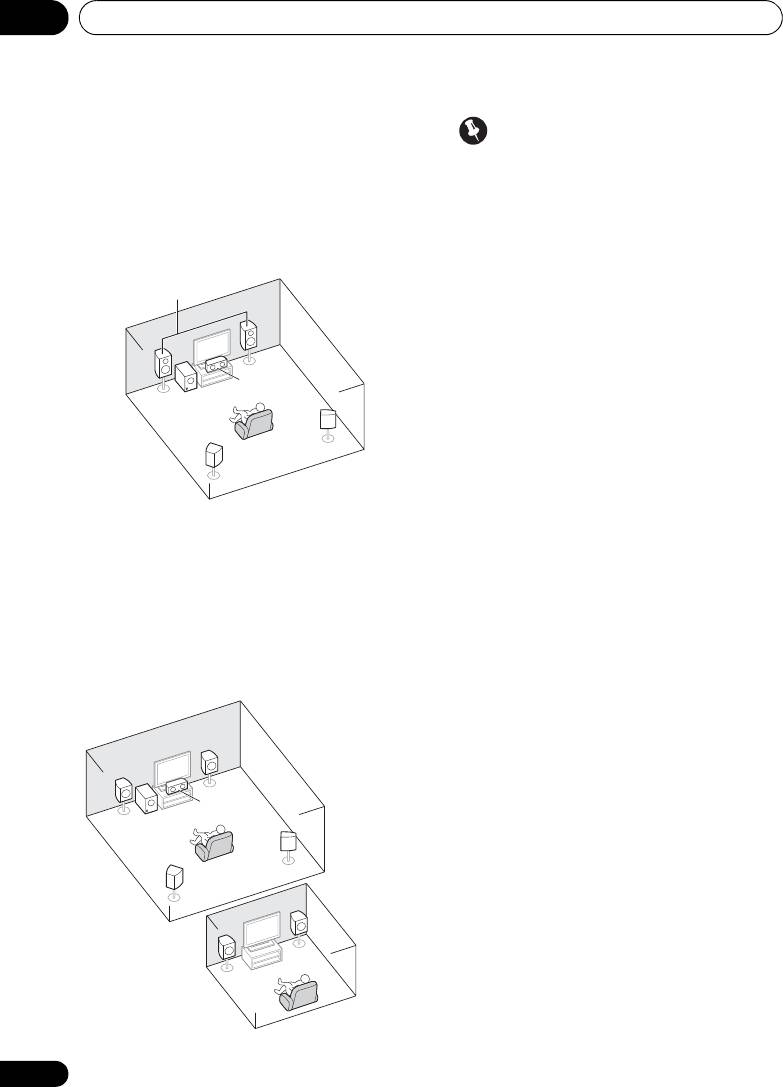
[D] 5.1 channel surround system & Front
Important
Bi-amping connection (High quality
•The Speaker System setting must be
surround)
made if you use any of the connections
• Speaker System setting: Front Bi-Amp
shown above other than [A] (see Speaker
Bi-amping connection of the front speakers for
system setting on page 101).
high sound quality with 5.1-channel surround
• Sound does not come through
sound.
simultaneously from the front height, front
wide, speaker B and surround back
speakers. Output speakers are different
depending on the input signal or listening
mode.
Other speaker connections
• Your favorite speaker connections can be
selected even if you have fewer than 5.1
speakers (except front left/right speakers).
• When not connecting a subwoofer,
connect speakers with low frequency
reproduction capabilities to the front
[E] 5.1 channel surround system & ZONE
channel. (The subwoofer’s low frequency
2 connection (Multi Zone)
component is played from the front
• Speaker System setting: ZONE 2
speakers, so the speakers could be
damaged.)
With these connections you can
simultaneously enjoy 5.1-channel surround
• After connecting, be sure to conduct
sound in the main zone with stereo playback
the Auto MCACC (speaker environment
on another component in ZONE 2 (The
setting) procedure.
selection of input devices is limited.)
See Automatically conducting optimum
sound tuning (Auto MCACC) on page 39.
18
En
R
L
C
SW
SR
SL
Front Bi-Amp
R
L
C
SW
SR
SL
R
L
Main zone
Sub zone
ZONE 2
VSX-1020_SYXCN.book 18 ページ 2010年3月12日 金曜日 午前9時10分
