
Pioneer VSX-420-K: Connecting an HDD/DVD recorder, VCR and other video components
Connecting an HDD/DVD recorder, VCR and other video components: Pioneer VSX-420-K
Table of contents
- IMPORTANT
- Operating Environment
- Contents
- Flow of settings on the receiver
- Chapter 1: Before you start Checking what’s in the box Installing the receiver Loading the batteries
- Chapter 2: Controls and displays Front panel
- Operating range of remote control unit Display
- Controls and displays 02
- Remote control
- Controls and displays 02
- Controls and displays02
- Chapter 3: Connecting your equipment Placing the speakers
- Connecting the speakers
- Making cable connections
- About video outputs connection
- Connecting a TV and Blu-ray Disc player
- Connecting a TV and DVD player
- Connecting your component with no HDMI terminal
- Connecting an HDD/DVD recorder, VCR and other video components
- Connecting a satellite receiver Connecting the multichannel or other digital set-top box analog outputs
- Connecting other audio components Connecting to the front panel audio mini jack
- Connecting antennas
- Connecting an IR receiver Plugging in the receiver
- Chapter 4: Listening to your system Basic playback
- Choosing the input signal Auto playback Listening in surround sound
- Listening in stereo
- Using Front Stage Surround Using Stream Direct Advance Using the Sound Retriever
- Using Phase Control
- Setting the Audio options Setting What it does Option(s)
- Setting What it does Option(s)
- analog inputs Using the headphone
- Chapter 5: The System Setup menu Using the System Setup menu Manual speaker setup
- Channel level Crossover network
- Speaker Distance The Input Assign menu
- Chapter 6: Using the MULTI-ZONE feature MULTI-ZONE listening
- Using the MULTI-ZONE controls Button What it does
- Chapter Using the tuner Listening to the radio Saving station presets
- An introduction to RDS
- Displaying RDS information
- Chapter 8: Making recordings Making an audio or a video recording
- Chapter 9: Additional information Troubleshooting Problem Remedy
- Problem Remedy
- HDMI Symptom Remedy Resetting the main unit
- Specifications Cleaning the unit
Connecting your equipment03
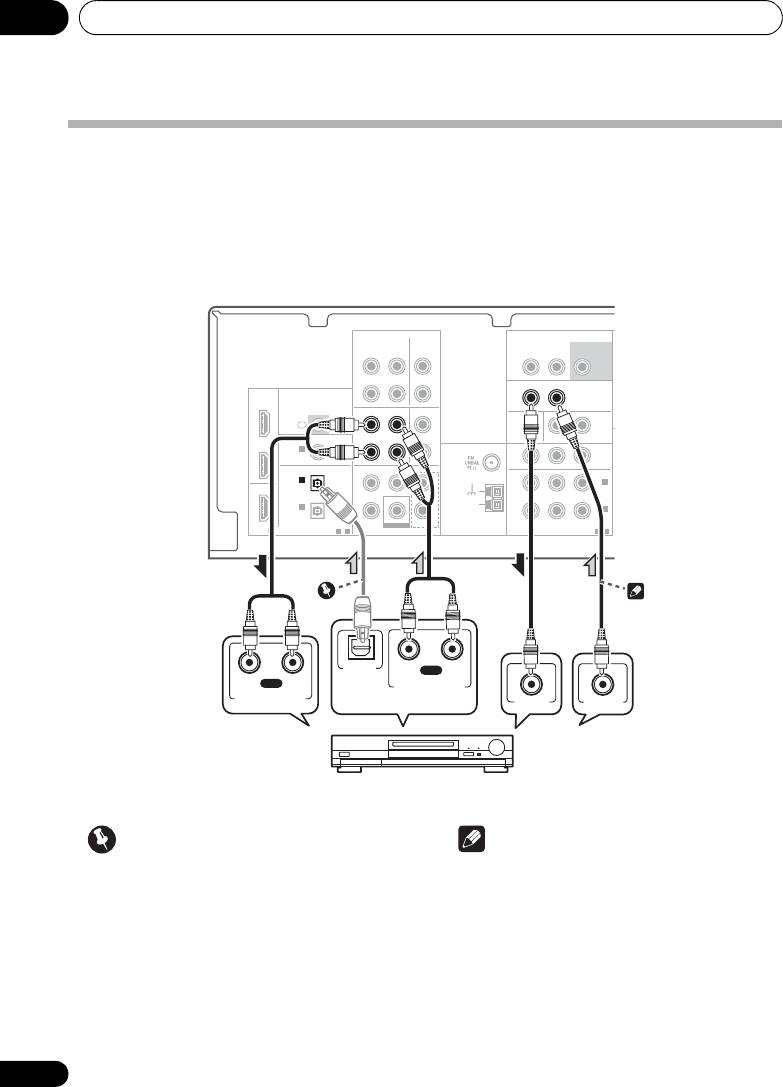
Connecting an HDD/DVD recorder, VCR and other video components
This receiver has audio/video inputs and outputs suitable for connecting analog or digital video
recorders, including HDD/DVD recorders and VCRs.
• Only the signals that are input to the VIDEO IN terminal can be output from the VIDEO OUT
terminal.
• Audio signals that are input through the digital terminal will not be output from the analog
terminal.
AUDIO
AUDIO
ZONE2 OUT
SUBWOOFER
OUT
CD-R/TAPE CD
IN IN
L R
PRE OUT
L
OUT
OUT
DVR/VCR VIDEO
DVR/VCR VIDEO
IN
IN
HDMI
R
BD/TV
IN
IR
OUT
OUT
DVR/VCR
DVR/VCR
IN
IN
DVD/SAT
IN
IN
L
L
DVD/SAT
COAXIAL
COAXIAL
ASSIGNABLE
MONITOR OUT BD/DVD IN DVD/SAT IN
IN
IN 1
IN 1
ANTENNA
P
R
B
YP
R
R
MONITOR
(CD)
(CD)
OUT
OPTICAL
OPTICAL
CENTERSURROUND
FRONT
IN 2
IN 2
L
IN 2
OUT
(DVD/SAT)
(DVD/SAT)
AM
IN 1
R
LOOP
IN 1
(BD/TV)
(BD/TV)
ASSIGNABLE
SUBWOOFER
BD/TV IN
ASSIGNABLE
DIGITAL
DIGITAL
1
-
2
BD/TVD MULTI CH IN
COMPONENT VIDEO
1
-
2
OPTICAL
RL
PLAY
DIGITAL
RL
REC
AUDIO OUT
ANALOG AUDIO OUT
ANALOG AUDIO IN
VIDEO IN
VIDEO OUT
Important
Note
•
If the connection was made using
an
• If the video components and TV also has an
optical cable
, press
SIGNAL SEL
repeatedly
HDMI or a component video jacks, you can
to select
O2
(see page 26).
connect this too. See Connecting using
HDMI on page 18 or Connecting your
component with no HDMI terminal on
page 19 for more on this.
20
En
Select one
DVR, VCR, LD player, etc.
VSX-420_SY_En.book 20 ページ 2010年3月19日 金曜日 午前9時37分
