
Pioneer AVD-W7900: Basic Operations Power ON/OFF Turning the unit off Display unit Selecting a source Changing the wide screen mode Operating this unit
Basic Operations Power ON/OFF Turning the unit off Display unit Selecting a source Changing the wide screen mode Operating this unit: Pioneer AVD-W7900
Table of contents
- IMPORTANT SAFEGUARDS
- Precautions
- Before You Start About this unit
- For viewing LCD comfortably Changing the wide screen size Installing the display unit Changing the picture adjustment Installing and removing the display unit
- Removing the display unit Resetting the microprocessor
- Basic Operations Power ON/OFF Turning the unit off Display unit Selecting a source Changing the wide screen mode Operating this unit
- Switching the dimmer setting Setup
- Selecting the video format
- Connection and installation Connections
- Connection Diagram
- Installation Mounting with flush mounting bracket
- Additional Information Using the display correctly Liquid crystal display (LCD) screen Handling the display Keeping the display in good condition
- Small fluorescent tube
- Specifications
Basic Operations
Power ON/OFF
Turning the unit on
% Press SOURCE/POWER to turn the unit
on.
When you select a source, the unit is turned
on.
Turning the unit off
% Press SOURCE/POWER and hold until
the unit turns off.
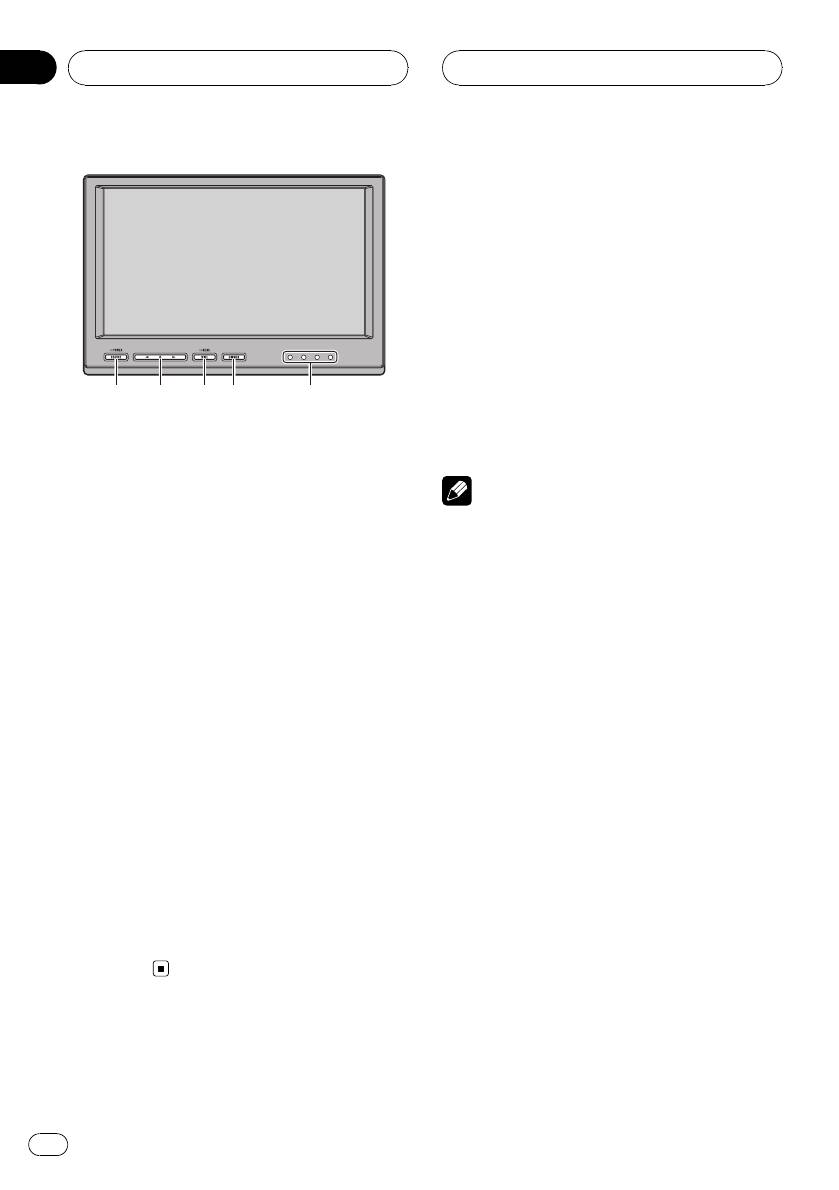
What’s What
Note
Display unit
Take off your headphones when turning the dis-
1 SOURCE/POWER button
play unit on or off. If you leave your headphones
This unit is turned on by selecting a source.
on, a noise may be heard when the volume is
Press to cycle through all the available
high.
sources.
Press and hold to turn the unit off.
Selecting a source
2 c/d buttons
You can select a source you want to listen to.
Press to change the settings when the
! This unit is equipped with two video inputs,
setup menu is displayed.
VIDEO 1 INPUT and VIDEO 2 INPUT.
3 WIDE/MENU button
% Press SOURCE/POWER to select a
Press to select a desired mode for enlarging
source.
a 4:3 picture to a 16:9 one.
Press SOURCE/POWER repeatedly to switch
Press and hold to display the setup menu.
between the following sources:
VCR1 (VCR1)—VCR2 (VCR2)
4 DIMMER button
Press to switch between the dimmer levels.
Changing the wide screen mode
5 IR transmitter
You can listen to stereo audio with sepa-
You can select a desired mode for enlarging a
rately sold cordless headphones (e.g., SE-
4:3 picture to a 16:9 one.
IRM290).
% Press WIDE/MENU to select the desired
setting.
Press WIDE/MENU repeatedly to switch be-
tween the following settings:
FULL (full)—JUST (just)—CINEMA (cinema)—
ZOOM (zoom)—NORMAL (normal)
1
3
4
2
5
Section
03
Operating this unit
8
En


