
Pioneer VSX-521: Remote control
Remote control: Pioneer VSX-521
Table of contents
- IMPORTANT VENTILATION CAUTION
- Information for users on collection and disposal of old equipment and used batteries
- Contents
- Before you start Checking what’s in the box Loading the batteries Flow of settings on the receiver
- Remote control
- Connecting your equipment Hints on the speaker placement Placing the speakers
- Connecting the speakers
- Making cable connections
- Analog audio cables Digital audio cables Video cables About video outputs connection
- Connecting a TV and playback components Connecting using HDMI
- Connecting your component with no HDMI terminal Connecting a satellite receiver or other digital set-top box
- Connecting an HDD/DVD recorder, Blu-ray Disc recorder and other video sources Using the component video jacks
- Connecting other audio components Using external antennas Connecting antennas To improve FM reception To improve AM reception
- Plugging in the receiver
- Basic Setup Canceling the demo display Automatically setting up for surround sound (MCACC)
- Other problems when using the Auto MCACC setup
- Basic playback Playing a source Listening in surround sound
- Listening to the radio
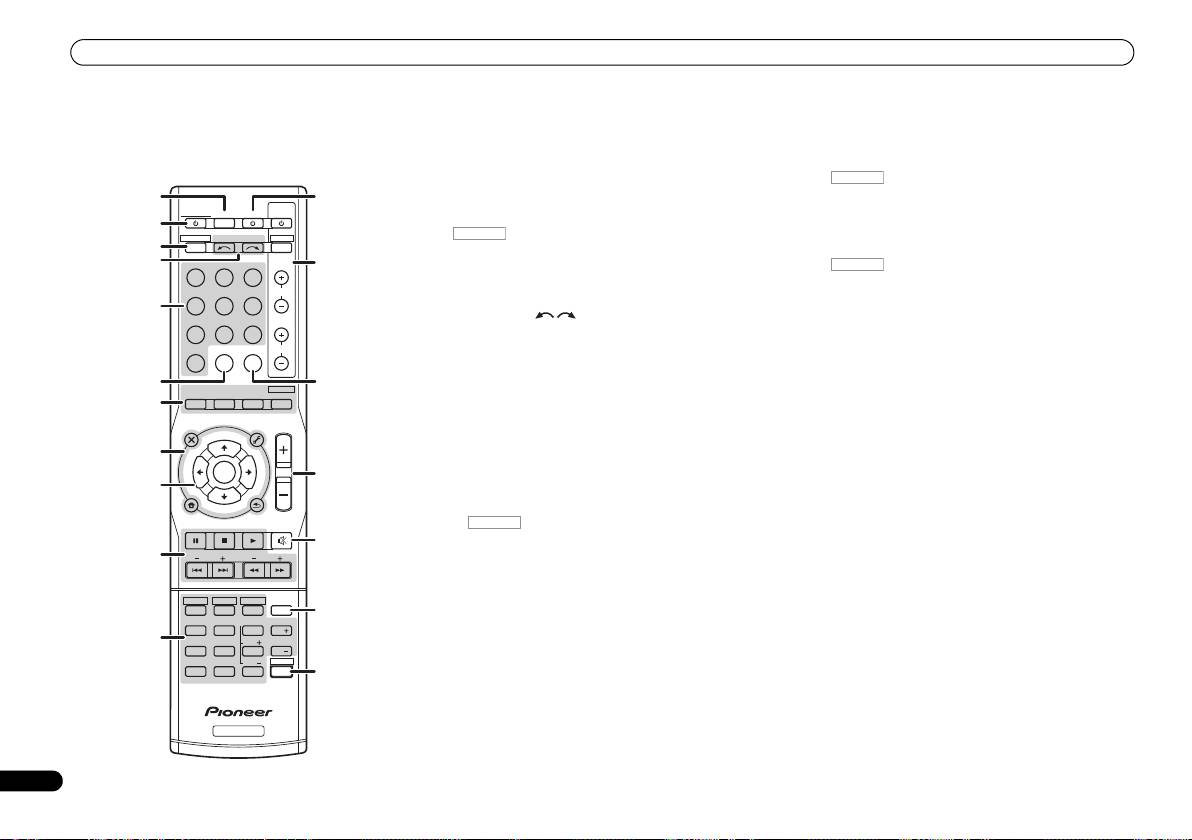
Remote control
1 SLEEP
Use TUNE / can be used to find radio frequencies and
Remote control
Press to change the amount of time before the receiver
PRESET / can be used to select preset radio stations
switches into standby (30 min – 60 min – 90 min – Off). You
(page 19).
This section explains how to operate the remote control for
can check the remaining sleep time at any time by pressing
10 Receiver control buttons
the receiver.
SLEEP once.
Press first to access:
1
2
RECEIVER
12
BASS –/+, TRE –/+ – Use to adjust Bass or Treble.
RECEIVER
TV
Switches the receiver between standby and on.
SOURCESLEEP
CONTROL
• These controls are disabled when the listening mode is
2
3
set to DIRECT or PURE DIRECT.
RECEIVER DTV/TV
INPUT SELECT
3
INPUT
Switches the remote to control the receiver (used to select
11 Receiver control buttons
4
BD DVD
TV
13
the white commands above the number buttons
Press first to access:
(MIDNIGHT, etc)). Also use this button to set up surround
SB CH – Press to select ON, AUTO or OFF the surround
DVR/BDR
CD
CD-R
CH
sound or Audio parameters.
back channel.
5
4 INPUT SELECT
CH SELECT – Press repeatedly to select a channel, then
ADAPTER
TUNER
PORTABLE
Use to select the input source (page 18).
use LEV +/– to adjust the level.
VIDEO
SIGNAL SELS.RETRIEVER
VOL
5 Input function buttons
LEV +/– – Use to adjust the channel level.
Use to select the input source to this receiver (page 18). This
EQ – Press to switch on/off Acoustic Calibration EQ
6
14
will enable you to control other Pioneer components with the
AUTO/
ALC/
BD MENU
setting.
DIRECT
STEREO
STANDARD
ADV SURR
remote control.
7
MIDNIGHT – Switches to Midnight or Loudness listening.
AUDIO
TUNER EDIT
MASTER
6 S.RETRIEVER
SPEAKERS – Use to change the speaker system on or off.
PARAMETER
TOOLS
VOLUME
T
U
N
MENU
Press to restore CD quality sound to compressed audio
TOP
E
MENU
PHASE – Press to switch on/off Phase Control.
sources.
8
T
P
R
DIMMER – Dims or brightens the display.
S
E
E
E
ENTER
S
7 Listening mode buttons
R
T
E
15
P
Press to select a listening mode (page 18).
12
SOURCE
9
HOME
Press to turn on/off other components connected to the
MENU
T
U
N
E
8 Receiver setting buttons
BAND
receiver.
SETUP
RETURN
PTY SEARCH
MUTE
Press first to access:
13 TV CONTROL buttons
16
AUDIO PARAMETER – Use to access the Audio options.
These buttons can control only be used with Pioneer TVs.
10
BASS
TRE
SETUP – Press to access the System Setup menu.
14 SIGNAL SEL
RETURN – Confirm and exit the current menu screen.
Press to select the audio input signal of the component to
HDD
DVD
VCR
Press TUNER first to access:
play back.
1
2
3
DISP
17
TUNER EDIT – Memorizes/names stations for recall
SB CH
CH SELECT
EQ
15 MASTER VOLUME +/–
4
5
6
CH
(page 19).
11
Use to set the listening volume.
MIDNIGHT
SPEAKERS
LEV
PHASE
7
8
9
CH
BAND – Switches between AM, FM ST (stereo) and FM
16 MUTE
DIMMER
LEV
SHIFT
MONO radio bands (page 19).
CLR
0
ENTER
18
Mutes/unmutes the sound.
+
10
PTY SEARCH – Use to search for RDS program types.
17 DISP
9
///
(TUNE
/
, PRESET
/
), ENTER
Switches the display of this unit.
Use the arrow buttons when setting up your surround sound
RECEIVER
18 SHIFT
system.
Press to access the ‘boxed’ commands (above the buttons)
on the remote.
6
En
RECEIVER
RECEIVER
RECEIVER
RECEIVER
VSX-521_SYXCN_QSG_En.book 6 ページ 2011年3月1日 火曜日 午前9時44分
