
Pioneer VSX-521: Connecting other audio components Using external antennas Connecting antennas To improve FM reception To improve AM reception
Connecting other audio components Using external antennas Connecting antennas To improve FM reception To improve AM reception: Pioneer VSX-521
Table of contents
- IMPORTANT VENTILATION CAUTION
- Information for users on collection and disposal of old equipment and used batteries
- Contents
- Before you start Checking what’s in the box Loading the batteries Flow of settings on the receiver
- Remote control
- Connecting your equipment Hints on the speaker placement Placing the speakers
- Connecting the speakers
- Making cable connections
- Analog audio cables Digital audio cables Video cables About video outputs connection
- Connecting a TV and playback components Connecting using HDMI
- Connecting your component with no HDMI terminal Connecting a satellite receiver or other digital set-top box
- Connecting an HDD/DVD recorder, Blu-ray Disc recorder and other video sources Using the component video jacks
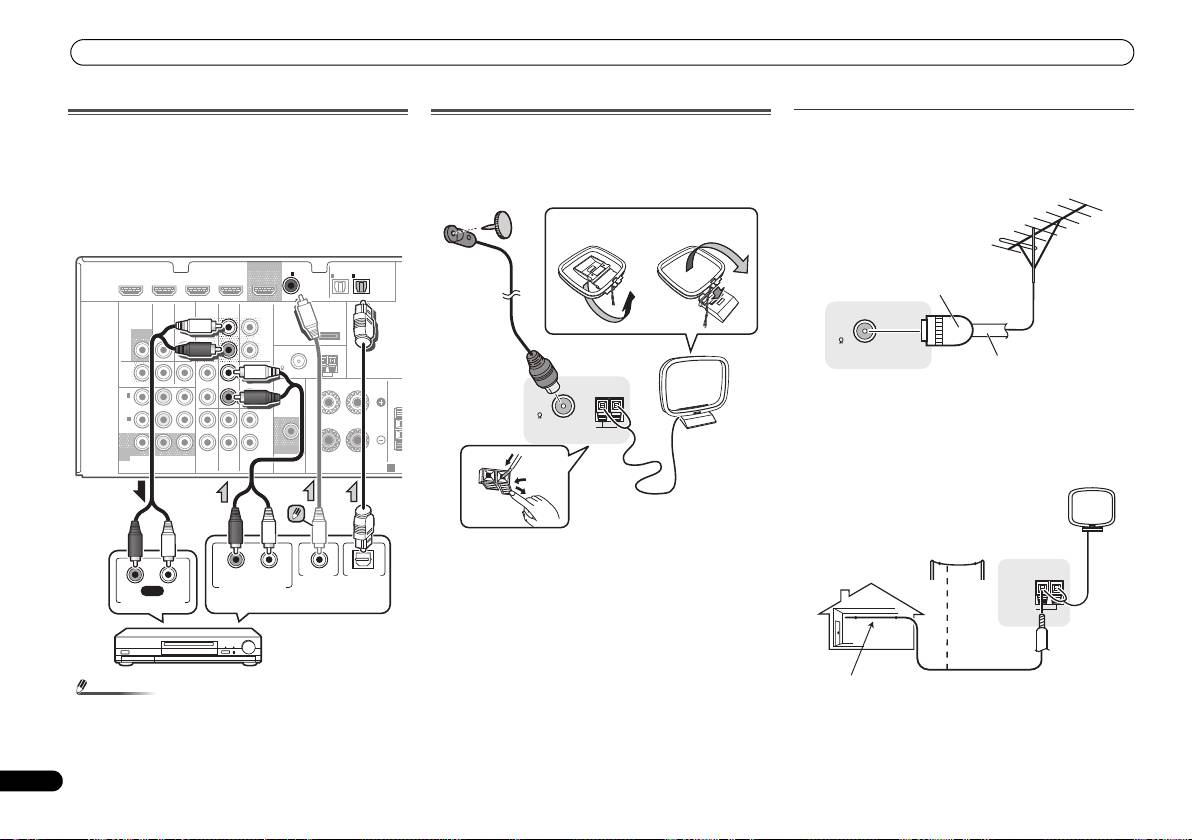
- Connecting other audio components Using external antennas Connecting antennas To improve FM reception To improve AM reception
- Plugging in the receiver
- Basic Setup Canceling the demo display Automatically setting up for surround sound (MCACC)
- Other problems when using the Auto MCACC setup
- Basic playback Playing a source Listening in surround sound
- Listening to the radio
Connecting your equipment
Connecting other audio components
The number and kind of connections depends on the kind of
component you’re connecting. Follow the steps below to
connect a CD-R, MD, DAT, tape recorder or other audio
component.
• Note that you must connect digital components to analog
audio jacks if you want to record to/from digital
components (like an MD) to/from analog components.
14
En
Note
Using external antennas
Connecting antennas
Connect the AM loop antenna and the FM wire antenna as
To improve FM reception
shown below. To improve reception and sound quality,
Use a PAL connector (not supplied) to connect an external
connect external antennas (see Using external antennas
FM antenna.
below).
HDMI
DVR/BDR IN
DVD IN
BD IN VIDEO IN
OUT
COAXIAL
IN
OPTICAL
IN
1
IN
1
2
ASSIGNABLE
ASSIGNABLE
(
CD
)
(
TV/SAT
)
(
CD-R/TAPE
)
VIDEO
AUDIO
SURR BACK/
DVR/BDR
CD-R/TAPE
FRONT HEIGHT
L
ADAPTER PORT
MONITOR
TV/SAT
BD
(
Single
)
OUT
(
OUTPUT 5
V
IN
IN
OUT
PRE OUT
0.1 A MAX
)
R
ANTENNA
FM
DVR /
CD
UNBAL
BDR
75
L
AM LOOP
OUT
IN
DVD IN
IN IN
FRONT
RL
IN
1
R
CE
To improve AM reception
(
DVD
)
ASSIGNABLE
Connect a 5 m to 6 m length of vinyl-coated wire to the AM
IN
2
L
(
DVR /
BDR
)
antenna terminal without disconnecting the supplied AM
IN
IN
R
loop antenna.
MONITOR
SUBWOOFER
OUT
YP
B PR
TV/SAT
BD
DVD
For the best possible reception, suspend horizontally
COMPONENT
VIDEO
PRE OUT
SPEAKERS
A
outdoors.
1
Push open the tabs, then insert one wire fully into each
terminal, then release the tabs to secure the AM antenna
wires.
2
Fix the AM loop antenna to the attached stand.
To fix the stand to the antenna, bend in the direction
indicated by the arrow (fig. a) then clip the loop onto the
stand (fig. b).
3
Place the AM antenna on a flat surface and in a direction
giving the best reception.
4
Connect the FM wire antenna into the FM antenna
• In order to listen to the audio from the CD player that is
socket.
connected to this receiver using a coaxial cable, first,
For best results, extend the FM antenna fully and fix to a wall
switch to the CD-R input, then press SIGNAL SEL to
or door frame. Don’t drape loosely or leave coiled up.
choose the audio signal C1 (COAXIAL1).
N
RL
OPTICALCOAXIAL
RL
REC
DIGITAL AUDIO OUTANALOG AUDIO OUT
ANALOG AUDIO IN
Select one
CD-R, MD, DAT,
Tape recorder, etc.
2
4
ANTENNA
FM
UNBAL
75
AM LOOP
3
1
fig. a
fig. b
ANTENNA
FM
UNBAL
75
One-touch
PAL connector
75 Ω coaxial cable
ANTENNA
AM LOOP
Outdoor
antenna
Indoor antenna
5 m to 6 m
(vinyl-coated wire)
VSX-521_SYXCN_QSG_En.book 14 ページ 2011年3月1日 火曜日 午前9時44分
