
Pioneer VSX-521: Basic playback Playing a source Listening in surround sound
Basic playback Playing a source Listening in surround sound: Pioneer VSX-521
Table of contents
- IMPORTANT VENTILATION CAUTION
- Information for users on collection and disposal of old equipment and used batteries
- Contents
- Before you start Checking what’s in the box Loading the batteries Flow of settings on the receiver
- Remote control
- Connecting your equipment Hints on the speaker placement Placing the speakers
- Connecting the speakers
- Making cable connections
- Analog audio cables Digital audio cables Video cables About video outputs connection
- Connecting a TV and playback components Connecting using HDMI
- Connecting your component with no HDMI terminal Connecting a satellite receiver or other digital set-top box
- Connecting an HDD/DVD recorder, Blu-ray Disc recorder and other video sources Using the component video jacks
- Connecting other audio components Using external antennas Connecting antennas To improve FM reception To improve AM reception
- Plugging in the receiver
- Basic Setup Canceling the demo display Automatically setting up for surround sound (MCACC)
- Other problems when using the Auto MCACC setup
- Basic playback Playing a source Listening in surround sound
- Listening to the radio
Basic playback
If you selected the proper input source and there is still no
Basic playback
sound, press SIGNAL SEL to select the audio input signal for
playback.
4
Press AUTO/DIRECT to select ‘AUTO SURROUND’ and
Playing a source
start playback of the source.
Here are the basic instructions for playing a source (such as
If you’re playing a Dolby Digital or DTS surround sound DVD
a DVD disc) with your home theater system.
disc, with a digital audio connection, you should hear
surround sound. If you’re playing a stereo source or if the
connection is an analog audio connection, you will only hear
sound from the front left/right speakers in the default
listening mode.
1
Switch on your system components and receiver.
Start by switching on the playback component (for example a
DVD player), your TV and subwoofer (if you have one), then
the receiver (press RECEIVER).
• Make sure the setup microphone is disconnected.
2
Switch the TV input to the input that connects this
receiver.
For example, if you connected this receiver to the VIDEO
jacks on your TV, make sure that the VIDEO input is now
selected.
3
Press input function buttons to select the input function
you want to play.
• The input of the receiver will switch over, and you will be
able to operate other components using the remote
control. To operate the receiver, first press on
the remote control, then press the appropriate button to
operate.
• The input source can also be selected by using INPUT
SELECT buttons on the remote control, or by
using the front panel INPUT SELECTOR dial. In this case,
the remote control won’t switch operational modes.
18
En
Note
®
Bluetooth
ADAPTER for Wireless Enjoyment
of Music
• You may need to check the digital audio output settings
on your DVD player or digital satellite receiver. It should
be set to output Dolby Digital, DTS and 88.2 kHz/96 kHz
PCM (2 channel) audio, and if there is an MPEG audio
option, set this to convert the MPEG audio to PCM.
5
Use MASTER VOLUME to adjust the volume level.
Listening in surround sound
Using this receiver, you can listen to any source in surround
sound.
Standard surround sound
This receiver provide basic surround sound for stereo and
multichannel sources.
While listening to a source, press ALC/STANDARD
repeatedly to select a listening mode.
Using the Advanced surround effects
The Advanced surround effects can be used for a variety of
additional surround sound effects.
While listening to a source, press ADV SURR repeatedly
to select a listening mode.
AUTO/
ALC/
BD MENU
DIRECT
STEREO
STANDARD
ADV SURR
RECEIVER
TV
SOURCESLEEP
CONTROL
AUDIO
TUNER EDIT
MASTER
PARAMETER
TOOLS
VOLUME
U
N
E
MENU
RECEIVER
INPUT SELECT
DTV/TV
TOP
T
MENU
INPUT
P
BD DVD TV
E
T
R
S
E
E
ENTER
E
S
P
R
T
DVR/BDR
CD
CD-R
CH
HOME
MENU
T
U
N
E
BAND
SETUP
RETURN
ADAPTER
TUNER
PORTABLE
PTY SEARCH
MUTE
VIDEO
SIGNAL SELS.RETRIEVER
VOL
BASS
TRE
RECEIVER
AUTO/
ALC/
BD MENU
DIRECT
STEREO
STANDARD
ADV SURR
AUDIO
TUNER EDIT
MASTER
PARAMETER
TOOLS
MENU
VOLUME
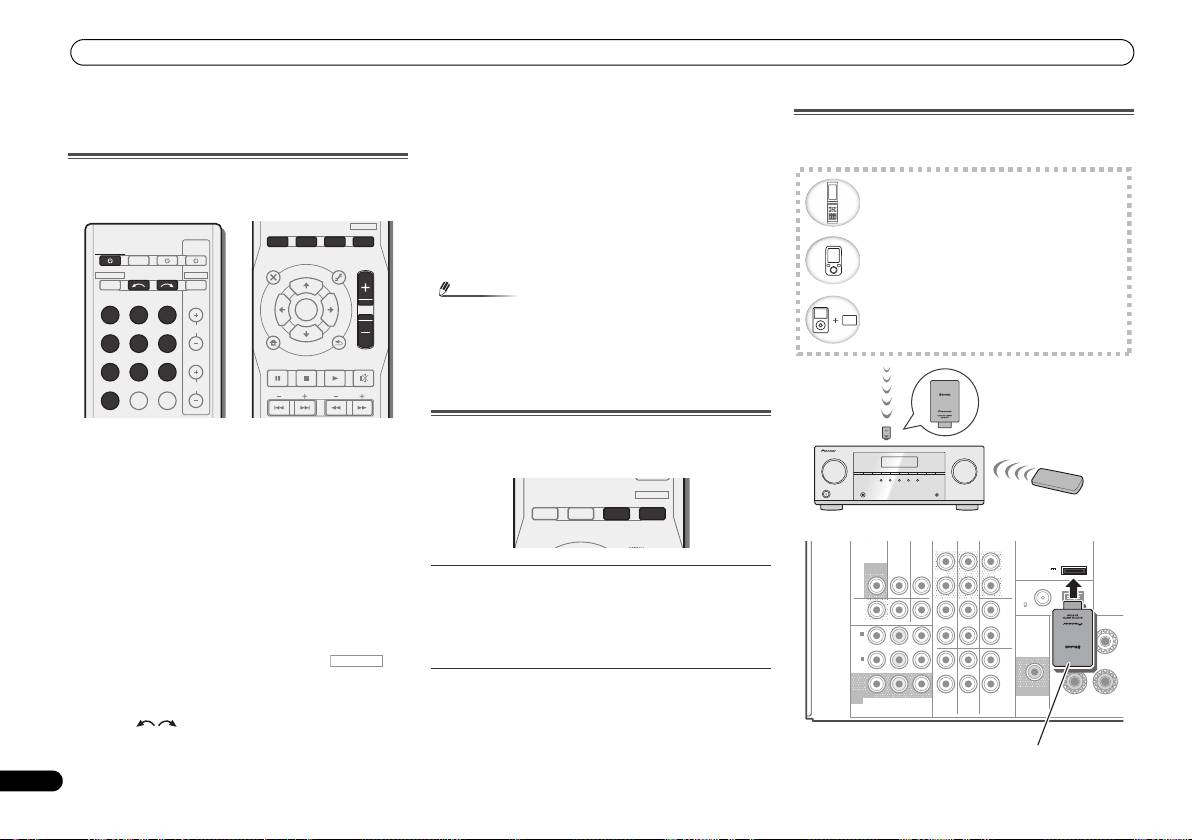
Bluetooth wireless technology enabled device:
cell phone
Bluetooth wireless technology enabled device:
Digital music player
Device not equipped with Bluetooth wireless
technology: Digital music player + Bluetooth
audio transmitter (sold commercially)
®
Bluetooth
ADAPTER
Music data
AS-BT100 or AS-BT200
(sold separately)
Remote control
This receiver
operation
VIDEO
SURR BACK/
DVR/BDR
CD-R/TAPE
FRONT HEIGHT
L
ADAPTER PORT
MONITOR
TV/SAT
BD
(
Single
)
OUT
(
OUTPUT 5
V
IN
IN
OUT
PRE OUT
0.1 A MAX
)
R
ANTENNA
FM
DVR/
CD
UNBAL
BDR
75
L
AM LOOP
OUT
IN
DVD IN
IN IN
FRONT
RL
IN
1
(
R
DVD
)
ASSIGNABLE
IN
2
L
(
DVR/
BDR
)
IN
IN
R
MONITOR
SUBWOOFER
OUT
YP
B PR
TV/SAT
BD
DVD
COMPONENT
VIDEO
PRE OUT
SPEAKE
®
Bluetooth
ADAPTER
VSX-521_SYXCN_QSG_En.book 18 ページ 2011年3月1日 火曜日 午前9時44分
