
Pioneer VSX-521: Connecting your equipment Hints on the speaker placement Placing the speakers
Connecting your equipment Hints on the speaker placement Placing the speakers: Pioneer VSX-521
Table of contents
- IMPORTANT VENTILATION CAUTION
- Information for users on collection and disposal of old equipment and used batteries
- Contents
- Before you start Checking what’s in the box Loading the batteries Flow of settings on the receiver
- Remote control
- Connecting your equipment Hints on the speaker placement Placing the speakers
- Connecting the speakers
- Making cable connections
- Analog audio cables Digital audio cables Video cables About video outputs connection
- Connecting a TV and playback components Connecting using HDMI
- Connecting your component with no HDMI terminal Connecting a satellite receiver or other digital set-top box
- Connecting an HDD/DVD recorder, Blu-ray Disc recorder and other video sources Using the component video jacks
- Connecting other audio components Using external antennas Connecting antennas To improve FM reception To improve AM reception
- Plugging in the receiver
- Basic Setup Canceling the demo display Automatically setting up for surround sound (MCACC)
- Other problems when using the Auto MCACC setup
- Basic playback Playing a source Listening in surround sound
- Listening to the radio
Connecting your equipment
7
En
English
Français
Italiano
Nederlands
Español
Deutsch
Connecting your equipment
Hints on the speaker placement
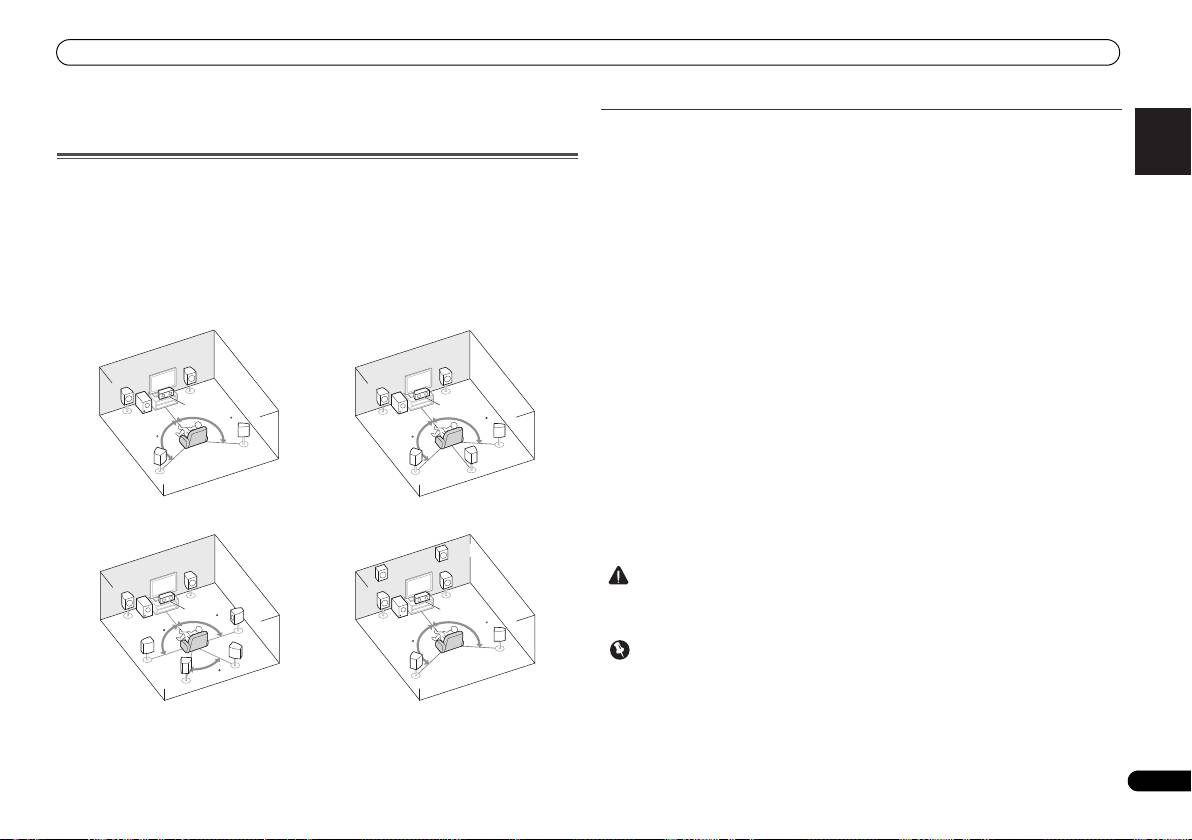
Where you put your speakers in the room has a big effect on the quality of the sound. The
following guidelines should help you to get the best sound from your system.
Placing the speakers
• The subwoofer can be placed on the floor. Ideally, the other speakers should be at about
By connecting the left and right front speakers (
L
/
R
), the center speaker (
C
), the left and right
ear-level when you’re listening to them. Putting the speakers on the floor (except the
surround speakers (
SL
/
SR
), and the subwoofer (
SW
), a 5.1 ch surround system can be enjoyed.
subwoofer), or mounting them very high on a wall is not recommended.
Further, by using an external amplifier, you can connect the left and right surround back
• For the best stereo effect, place the front speakers 2 m to 3 m apart, at equal distance from
speakers (SBL/SBR) or the left and right front height speaker (FHL/FHR) to boost your system
the TV.
up to a 7.1 ch surround system.
• If you’re going to place speakers around your CRT TV, use shielded speakers or place the
• You can also connect one surround back speaker (SB) and enjoy a 6.1 ch surround system.
speakers at a sufficient distance from your CRT TV.
To achieve the best possible surround sound, install your speakers as shown below.
• If you’re using a center speaker, place the front speakers at a wider angle. If not, place
them at a narrower angle.
• Place the center speaker above or below the TV so that the sound of the center channel is
localized at the TV screen. Also, make sure the center speaker does not cross the line
formed by the leading edge of the front left and right speakers.
• It is best to angle the speakers towards the listening position. The angle depends on the
size of the room. Use less of an angle for bigger rooms.
• Surround and surround back speakers should be positioned 60 cm to 90 cm higher than
your ears and titled slight downward. Make sure the speakers don’t face each other. For
DVD-Audio, the speakers should be more directly behind the listener than for home
theater playback.
• If the surround speakers cannot be set directly to the side of the listening position with a
7.1-channel system, the surround effect can be enhanced by turning off the Up Mix
function (see Setting the Up Mix function on Operating Instructions in CD-ROM).
• Try not to place the surround speakers farther away from the listening position than the
front and center speakers. Doing so can weaken the surround sound effect.
• Place the left and right front height speakers at least one meter directly above the left and
right front speakers.
a. This layout is available only when the additional amplifier is connected to the unit and the
surround back or front height speakers are connected to the amplifier. For details, see Connect
the surround back or front height speakers on page 8.
CAUTION
• Make sure that all speakers are securely installed. This not only improves sound quality,
but also reduces the risk of damage or injury resulting from speakers being knocked over
or falling in the event of external shocks such as earthquakes.
Important
• To connect the surround back or front height speakers, an additional amplifier is required.
Connect the additional amplifier to the PRE OUT SURR BACK/FRONT HEIGHT outputs of
this unit and connect the surround back or front height speakers to the additional amplifier
(see Connect the surround back or front height speakers on page 8).
R
R
L
L
C
C
SW
120
SW
120
120
120
SR
SR
SB
SL
SL
FHR
R
FHL
R
L
L
C
C
SR
90
SW
SW
120
90
120
SBR
SR
SL
60
SBL
SL
5.1 channel surround system:
6.1 channel surround
a
(Surround back) system:
7.1 channel surround
7.1 channel surround
a
a
(Surround back) system:
(Front height) system:
VSX-521_SYXCN_QSG_En.book 7 ページ 2011年3月1日 火曜日 午前9時44分
