
Pioneer VSX-421: Remote control
Remote control: Pioneer VSX-421
Table of contents
- AUDIO/VIDEO MULTI-CHANNEL RECEIVER
- IMPORTANT IMPORTANT: THE MOULDED PLUG VENTILATION CAUTION
- WARNING
- Contents
- Before you start
- Remote control
- Connecting your equipment
- Connecting the speakers
- Making cable connections HDMI cables
- Analog audio cables Digital audio cables Video cables About video outputs connection
- Connecting your component with no HDMI terminal Connecting a TV and playback components Connecting using HDMI
- Connecting a satellite receiver or other digital set-top box Connecting an HDD/DVD recorder, Blu-ray Disc recorder and other video sources Connecting other audio components
- Using the component video jacks Connecting antennas
- Using external antennas Plugging in the receiver Canceling the demo display
- Basic playback
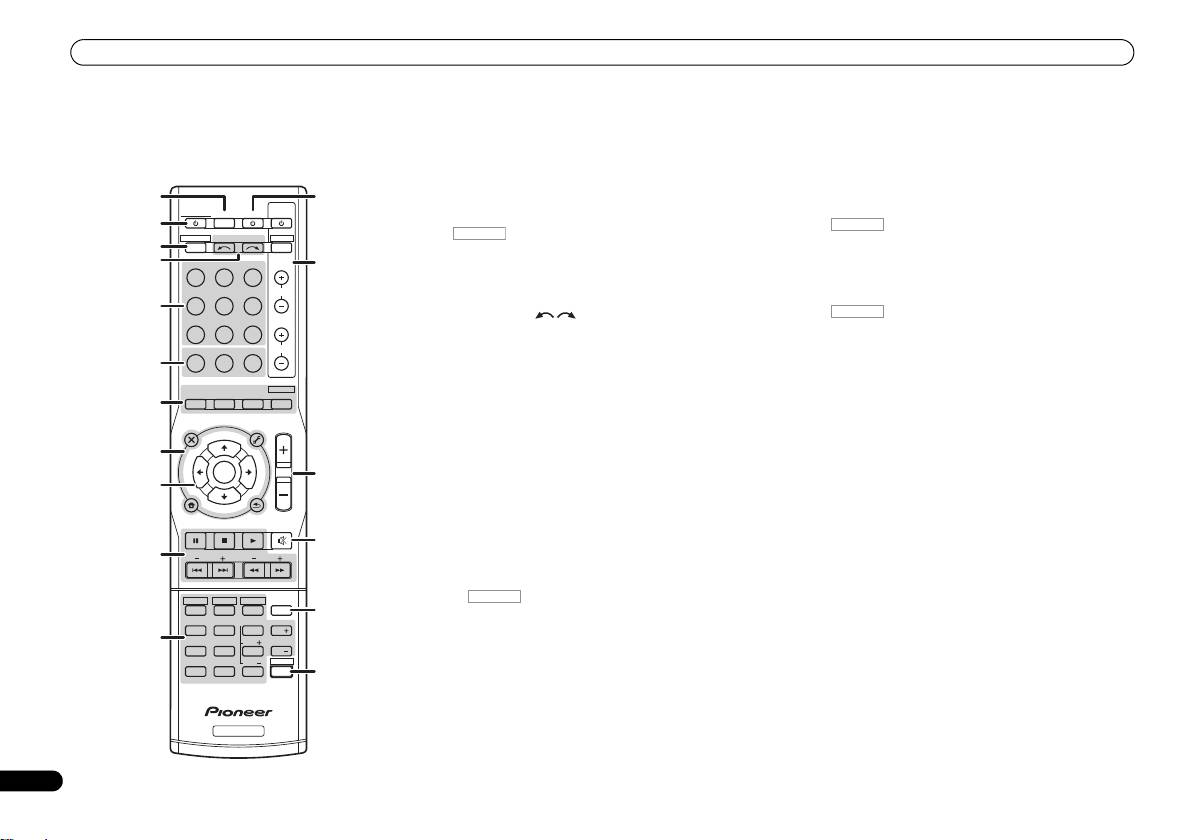
Remote control
1 SLEEP
9
///
(TUNE
/
, PRESET
/
), ENTER
Remote control
Press to change the amount of time before the receiver
Use the arrow buttons when setting up your surround sound
switches into standby (30 min – 60 min – 90 min – Off). You
system.
This section explains how to operate the remote control for
can check the remaining sleep time at any time by pressing
Use TUNE / can be used to find radio frequencies and
the receiver.
SLEEP once.
PRESET / can be used to select preset radio stations
(page 15).
1
2
RECEIVER
12
RECEIVER
TV
Switches the receiver between standby and on.
SOURCESLEEP
CONTROL
10 Receiver control buttons
2
Press first to access:
3
RECEIVER DTV/TV
INPUT SELECT
BASS –/+, TRE –/+ – Use to adjust Bass or Treble.
3
INPUT
Switches the remote to control the receiver (used to select
4
BD DVD
TV
13
the white commands above the number buttons
• These controls are disabled when the listening mode is
(MIDNIGHT, etc)). Also use this button to set up surround
set to DIRECT or PURE DIRECT.
DVR/BDR
CD
CD-R
CH
sound or Audio parameters.
11 Receiver control buttons
5
4 INPUT SELECT
Press first to access:
ADAPTER
TUNER
PORTABLE
Use to select the input source (page 15).
SB CH – Press to select ON, AUTO or OFF the surround
back channel.
PHASE
SIGNAL SELS.RETRIEVER
VOL
5 Input function buttons
6
Use to select the input source to this receiver (page 15). This
CH SELECT – Press repeatedly to select a channel, then
will enable you to control other Pioneer components with the
use LEV +/– to adjust the level.
AUTO/
ALC/
BD MENU
DIRECT
STEREO
STANDARD
ADV SURR
remote control.
LEV +/– – Use to adjust the channel level.
7
• ADAPTER button is not used with this receiver.
MIDNIGHT – Switches to Midnight or Loudness listening.
AUDIO
TUNER EDIT
MASTER
PARAMETER
TOOLS
VOLUME
TOP
T
U
N
E
MENU
6 Receiver control buttons
SPEAKERS – Use to change the speaker system on or off.
MENU
8
PHASE – Press to switch on/off Phase Control.
DIMMER – Dims or brightens the display.
T
P
R
S
E
E
ENTER
S
S.RETRIEVER – Press to restore CD quality sound to
P
R
E
T
E
14
12
SOURCE
9
compressed audio sources.
Press to turn on/off other components connected to the
HOME
MENU
T
U
N
E
SIGNAL SEL – Press to select the audio input signal of the
receiver.
BAND
SETUP
RETURN
PTY SEARCH
component to play back.
MUTE
13 TV CONTROL buttons
15
7 Listening mode buttons
These buttons can control only be used with Pioneer TVs.
10
BASS
TRE
Press to select a listening mode (page 15).
14 MASTER VOLUME +/–
8 Receiver setting buttons
Use to set the listening volume.
HDD
DVD
VCR
Press first to access:
15 MUTE
1
2
3
DISP
16
AUDIO PARAMETER – Use to access the Audio options.
Mutes/unmutes the sound.
TEST TONE
SB CH
CH SELECT
4
5
6
CH
11
SETUP – Press to access the System Setup menu.
16 DISP
MIDNIGHT
SPEAKERS
LEV
7
8
9
CH
RETURN – Confirm and exit the current menu screen.
Switches the display of this unit.
DIMMER
LEV
SHIFT
CLR
0
ENTER
17
Press TUNER first to access:
17 SHIFT
+
10
TUNER EDIT – Memorizes stations for recall (page 15).
Press to access the ‘boxed’ commands (above the buttons)
on the remote.
BAND – Switches between AM, FM ST (stereo) and FM
MONO radio bands (page 15).
RECEIVER
PTY SEARCH – Use to search for RDS program types.
6
En
RECEIVER
RECEIVER
VSX-421_SYXCN_QSG_En.book 6 ページ 2011年3月7日 月曜日 午後4時25分
RECEIVER
RECEIVER
