
Pioneer VSX-421: Connecting your component with no HDMI terminal Connecting a TV and playback components Connecting using HDMI
Connecting your component with no HDMI terminal Connecting a TV and playback components Connecting using HDMI: Pioneer VSX-421
Table of contents
- AUDIO/VIDEO MULTI-CHANNEL RECEIVER
- IMPORTANT IMPORTANT: THE MOULDED PLUG VENTILATION CAUTION
- WARNING
- Contents
- Before you start
- Remote control
- Connecting your equipment
- Connecting the speakers
- Making cable connections HDMI cables
- Analog audio cables Digital audio cables Video cables About video outputs connection
- Connecting your component with no HDMI terminal Connecting a TV and playback components Connecting using HDMI
- Connecting a satellite receiver or other digital set-top box Connecting an HDD/DVD recorder, Blu-ray Disc recorder and other video sources Connecting other audio components
- Using the component video jacks Connecting antennas
- Using external antennas Plugging in the receiver Canceling the demo display
- Basic playback
Connecting your equipment
11
En
English
Français
Italiano
Nederlands
Español
Deutsch
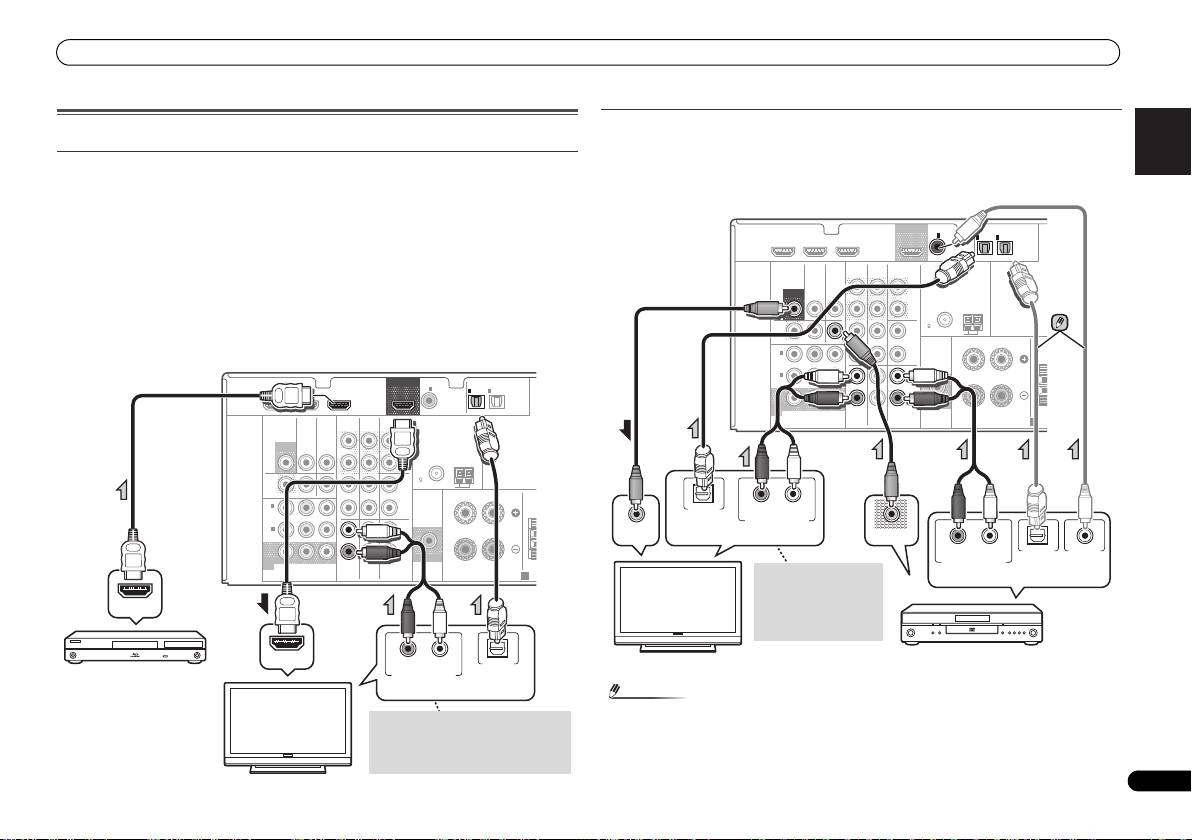
Connecting your component with no HDMI terminal
Connecting a TV and playback components
This diagram shows connections of a TV and DVD player (or other playback component) with
no HDMI terminal to the receiver.
Connecting using HDMI
• If both TV and player has a component video jacks, you can connect these too. See Using
If you have an HDMI or DVI (with HDCP) equipped component (Blu-ray Disc player, etc.), you
the component video jacks on page 13 for more on this.
can connect it to this receiver using a commercially available HDMI cable.
If the TV and playback components support the Control with HDMI feature, the convenient
Control with HDMI functions can be used (see Control with HDMI function on Operating
Instructions in CD-ROM).
• The following connection/setting is required to listen to the sound of the TV over this receiver.
-
If the TV does not support the HDMI Audio Return Channel function, connect the receiver
and TV with audio cables (as shown).
-
If the TV supports the HDMI Audio Return Channel function, the sound of the TV is input
to the receiver via the HDMI terminal, so there is no need to connect an audio cable. In
this case, set ARC at HDMI SET to ON (see HDMI Setup on Operating Instructions in CD-
ROM).
Note
• In order to listen to the audio from the DVD player that is connected to this receiver using
an optical cable or a coaxial cable, first, switch to the DVD input, then press SIGNAL SEL
to choose the audio signal O2 (OPTICAL2) or C1 (COAXIAL1).
VIDEO
MONITOR
OUT
HDMI
DVR/BDR IN
DVD IN
BD IN
OUT
COAXIAL
IN
1
IN
IN
OPTICAL
1
2
ASSIGNABLE
ASSIGNABLE
(
CD
)
(
TV/SAT
)
(
CD-R/TAPE
)
VIDEO
AUDIO
DVR/BDR
CD-R/TAPE
SURR BACK
L
MONITOR
TV/SAT
BD
(
Single
)
OUT
IN
IN
OUT
PRE OUT
R
ANTENNA
FM
DVR /
CD
UNBAL
BDR
75
L
AM LOOP
OUT
IN
DVD IN
IN IN
RL
FRONT
IN
1
R
CEN
(
DVD
)
ASSIGNABLE
IN
2
L
(
DVR /
BDR
)
IN
IN
R
MONITOR
SUBWOOFER
OUT
YP
B
P
R
TV/SAT
BD
DVD
COMPONENT
VIDEO
PRE OUT
SPEAKERS
A
HDMI OUT
HDMI IN
RL
OPTICAL
DIGITAL AUDIO OUTANALOG AUDIO OUT
HDMI/DVI-compatible
Blu-ray Disc player
Select one
If the TV does not support the HDMI
Audio Return Channel function, this
HDMI/DVI-
connection is required to listen to the
compatible TV
TV sound over the receiver.
HDMI
DVR/BDR IN
DVD IN
BD IN
OUT
COAXIAL
IN
1
IN
IN
OPTICAL
1
2
ASSIGNABLE
ASSIGNABLE
(
CD
)
(
TV/SAT
)
(
CD-R/TAPE
)
VIDEO
AUDIO
DVR/BDR
CD-R/TAPE
SURR BACK
L
MONITOR
TV/SAT
BD
(
Single
)
OUT
IN
IN
OUT
PRE OUT
R
ANTENNA
FM
DVR /
CD
UNBAL
BDR
75
L
AM LOOP
OUT
IN
DVD IN
IN IN
RL
FRONT
IN
1
R
CEN
(
DVD
)
ASSIGNABLE
IN
2
L
(
DVR /
BDR
)
IN
IN
R
MONITOR
SUBWOOFER
OUT
YP
B
P
R
TV/SAT
BD
DVD
COMPONENT
VIDEO
PRE OUT
SPEAKERS
A
T
OPTICAL
RL
DIGITAL AUDIO OUT ANALOG AUDIO OUT
VIDEO IN
VIDEO OUT
RL
OPTICAL COAXIAL
DIGITAL AUDIO OUTANALOG AUDIO OUT
Select one
This connection is
Select one
required in order to
listen to the sound of
the TV over the
receiver.
TV
DVD player
VSX-421_SYXCN_QSG_En.book 11 ページ 2011年3月7日 月曜日 午後4時25分
