
Pioneer VSX-421: Connecting the speakers
Connecting the speakers: Pioneer VSX-421
Table of contents
- AUDIO/VIDEO MULTI-CHANNEL RECEIVER
- IMPORTANT IMPORTANT: THE MOULDED PLUG VENTILATION CAUTION
- WARNING
- Contents
- Before you start
- Remote control
- Connecting your equipment
- Connecting the speakers
- Making cable connections HDMI cables
- Analog audio cables Digital audio cables Video cables About video outputs connection
- Connecting your component with no HDMI terminal Connecting a TV and playback components Connecting using HDMI
- Connecting a satellite receiver or other digital set-top box Connecting an HDD/DVD recorder, Blu-ray Disc recorder and other video sources Connecting other audio components
- Using the component video jacks Connecting antennas
- Using external antennas Plugging in the receiver Canceling the demo display
- Basic playback
Connecting your equipment
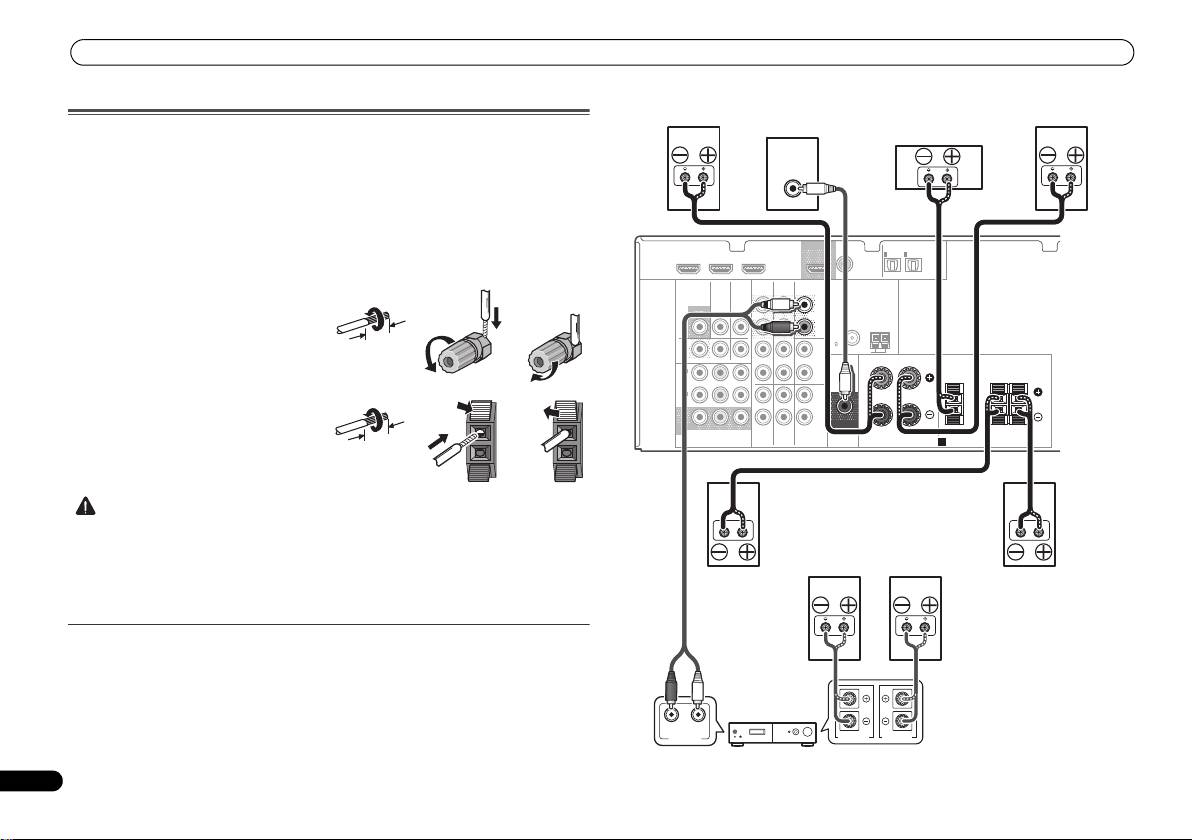
Connecting the speakers
The receiver will work with just two stereo speakers (the front speakers in the diagram) but
using at least three speakers is recommended, and a complete setup is best for surround
sound.
Make sure you connect the speaker on the right to the right (R) terminal and the speaker on
the left to the left (L) terminal. Also make sure the positive and negative (+/–) terminals on the
receiver match those on the speakers.
Be sure to complete all connections before connecting this unit to the AC power source.
Bare wire connections
8
En
CAUTION
Front speaker terminals:
1
Twist exposed wire strands together.
2
Loosen terminal and insert exposed wire.
3
Tighten terminal.
Center and surround speaker terminals:
1
Twist exposed wire strands together.
2
Push open the tabs and insert exposed
wire.
3
Release the tabs.
• These speaker terminals carry HAZARDOUS LIVE voltage. To prevent the risk of electric
shock when connecting or disconnecting the speaker cables, disconnect the power cord
before touching any uninsulated parts.
• Make sure that all the bare speaker wire is twisted together and inserted fully into the
speaker terminal. If any of the bare speaker wire touches the back panel it may cause the
power to cut off as a safety measure.
Connect the surround back speakers
Connect the PRE OUT SURR BACK outputs of the unit and additional amplifier to add a
surround back speaker.
• You can use the additional amplifier on the surround back channel pre-outs for a single
speaker as well. In this case plug the amplifier into the left (L (Single)) terminal only.
12 3
10 mm
12 3
10 mm
HDMI
DVR/BDR IN
DVD IN
BD IN
OUT
COAXIAL
IN
IN
OPTICAL
IN
1
1
2
ASSIGNABLE
ASSIGNABLE
(
CD
)
(
TV/SAT
)
(
CD-R/TAPE
)
VIDEO
AUDIO
DVR/BDR
CD-R/TAPE
SURR BACK
L
MONITOR
TV/SAT
BD
(
Single
)
OUT
IN
IN
OUT
PRE OUT
R
ANTENNA
FM
DVR/
CD
UNBAL
BDR
75
L
AM LOOP
OUT
IN
DVD IN
IN IN
FRONT
RL
IN
1
(
DVD
)
R
CENTER
SURROUND
RL
ASSIGNABLE
IN
2
L
(
DVR/
BDR
)
IN
IN
R
MONITOR
SUBWOOFER
OUT
YP
B PR
TV/SAT
BD
DVD
COMPONENT
VIDEO
PRE OUT
SPEAKERS
A
LINE LEVEL
INPUT
RL
ANALOG
AUDIO IN
SPEAKER R SPEAKER L
Front right
Front left
Subwoofer
Center
Surround right
Surround left
Surround back
Surround back
right
left
Surround back channel amplifier
VSX-421_SYXCN_QSG_En.book 8 ページ 2011年3月7日 月曜日 午後4時25分
