
Pioneer PD-D9MK2-K: Chapter 3 Controls and displays Front panel Display
Chapter 3 Controls and displays Front panel Display: Pioneer PD-D9MK2-K
Table of contents
- IMPORTANT
- POWER-CORD CAUTION IMPORTANT: THE MOULDED PLUG
- Contents
- Chapter 1 Before you start
- What’s in the box Inserting the battery
- Disc/content format playback compatibility About WMA Disc compatibility table About DualDisc playback
- Chapter 2 Connecting up Connecting to an amplifier Using the remote sensor of another Pioneer component
- Connecting up 02 Plugging in
- Chapter 3 Controls and displays Front panel Display
- Remote control
- Chapter 4 Getting started Switching on Playing discs
- Getting started 04 Other playback features Button What it does Button What it does
- Chapter 5 Other settings and features Listening to Pure Audio Using Legato Link Pro Using the SACD/CD Dimming the display Displaying disc information
- Chapter 6 Additional information Hints on installation Taking care of your player and discs
- Additional information06 Cleaning the pickup lens Cleaning discs Condensation Moving the player Cleaning the unit’s exterior
- Troubleshooting Problem Remedy
- Glossary Specifications
- Accessories
Controls and displays03
Chapter 3
Controls and displays
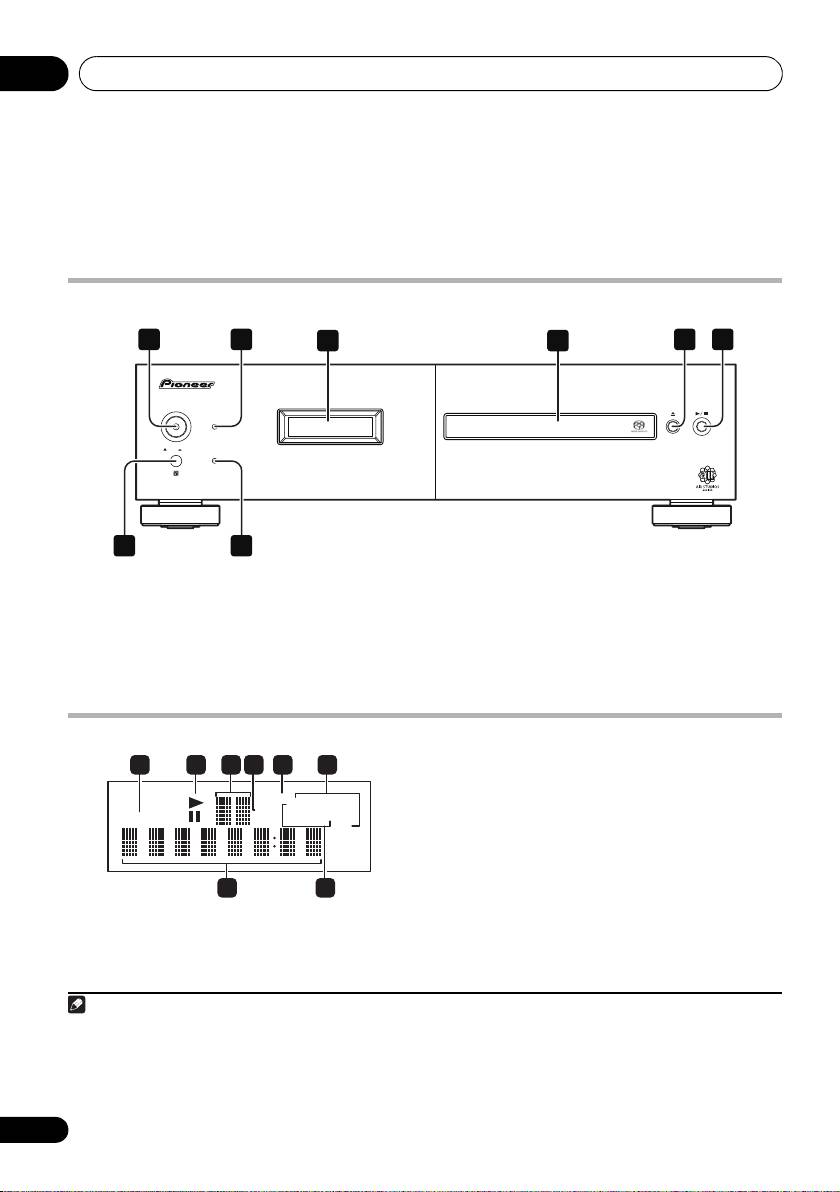
Front panel
1
2 5 6
3 4
D9
POWER
STANDBY
ONOFF
PURE AUDIO
7
8
1
5 (page 12)
1
POWER
OFF
ON
(page 12)
6 / (page 12)
2 STANDBY indicator
7 Remote sensor
3Display
(below)
8
PURE AUDIO
indicator
(page 14)
4 Disc tray
Display
3 Scan display
– Shows the scan speed.
4 SACD
–
Lights during SACD playback.
5
LEGATO
–
Lights when Legato Link Pro is
switched on (page 14).
6(ALL)
REPEAT
/
RANDOM
/
PGM
–
Light to
indicate the playback mode (page 13).
1
TRACK – Lights when the track number is
7 Character display
indicated.
8 TOTAL/REMAIN
–
Indicate the disc/track
2
/
–
Light during playback/when paused.
information currently displayed (page 14).
10
En
Note
PD-D9MK2_SYXJ5.book 10 ページ 2009年4月15日 水曜日 午後6時9分
1 2 3 4 5 6
LEGA TOLEGA TO
ALLALL
REPEA TREPEA T
SACDSACD
TOTALTOTAL
RANDOMRANDOM
TRACKTRACK
REMAINREMAIN
PGMPGM
7 8
1 • When the unit is in the standby mode, if the power is turned off by pressing the main unit’s POWER button, the power will
not turn on if the button is pressed again. To turn on the power in this case, press either the remote control unit’s
CD PLAYER button or a different button (other than the POWER button) on the main unit.
• When the unit is in the standby mode, if the power is turned off by unplugging the power cord, the power will not turn merely
by reconnecting the power cord. To turn on the power in this case, reconnect the power cord and then press either the remote
control unit’s CD PLAYER button or a different button (other than the POWER button) on the main unit.
