
Pioneer FH-P80BT: Installation
Installation: Pioneer FH-P80BT
Installation
Note
Before installing this unit
•
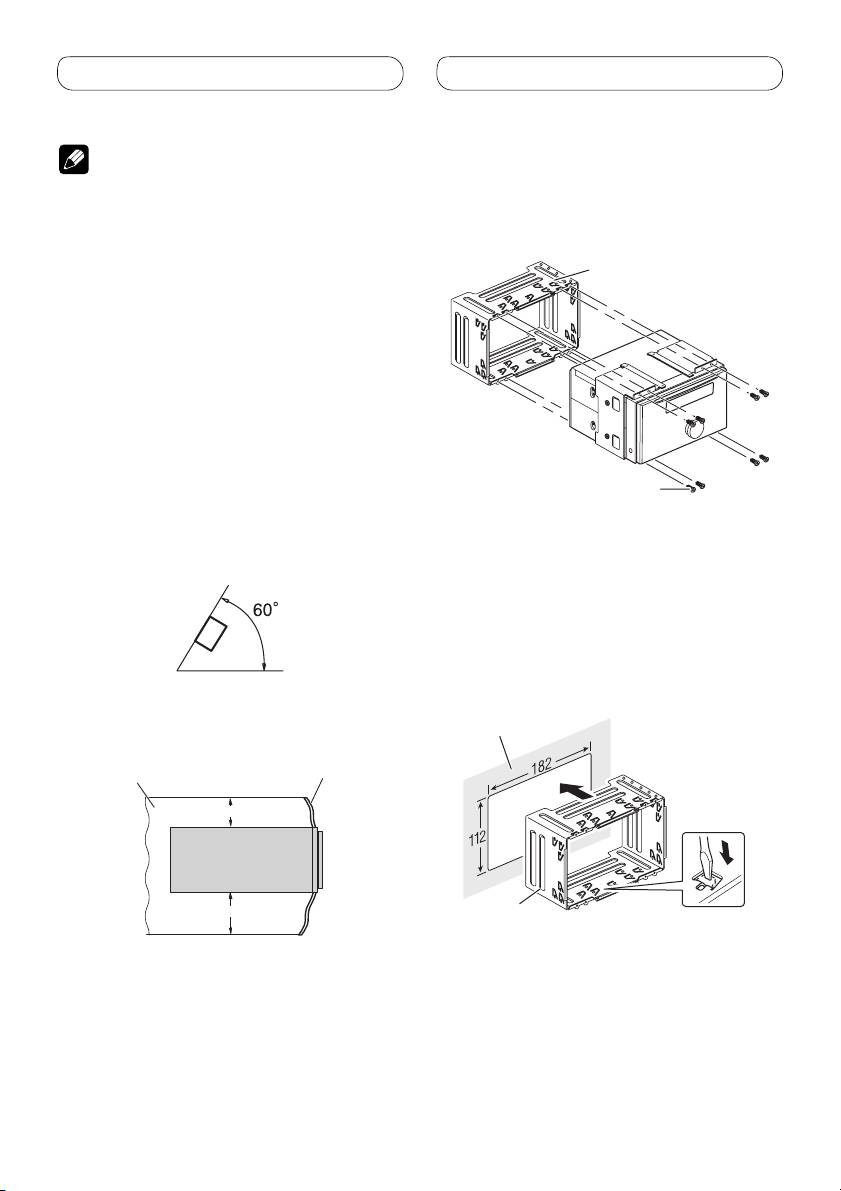
Remove the holder.
• Check all connections and systems before final
Loosen the screws (3 × 6 mm) to remove the
installation.
holder.
• Do not use unauthorized parts. The use of
unauthorized parts may cause malfunctions.
• Consult with your dealer if installation requires
Holder
drilling of holes or other modifications of the
vehicle.
• Do not install this unit where:
— it may interfere with operation of the vehicle.
— it may cause injury to a passenger as a result
of a sudden stop.
• Do not install the display where it may (i) obstruct
the driver’s vision, (ii) impair the performance of
any of the vehicle’s operating systems or safety
features, including air bags, hazard lamp buttons
or (iii) impair the driver’s ability to safely operate
the vehicle.
• The semiconductor laser will be damaged if it
Screw (3 × 6 mm)
overheats. Install this unit away from hot places
such as near the heater outlet.
Installation with the holder
• Optimum performance is obtained when the unit
and side bracket
is installed at an angle of less than 60°.
1. Install the holder into the dashboard.
After inserting the holder into the dashboard,
select and bend the tabs appropriate to the
thickness of the dashboard material. (Install
this unit as firmly as possible using the top
and bottom tabs. To secure this unit, bend the
tabs 90 degrees.)
• When installing, to ensure proper heat dispersal
when using this unit, make sure you leave ample
space behind the rear panel and wrap any loose
Dashboard
cables so they are not blocking the vents.
Leave ample space
Dashboard
5cm
10cm
Holder
8
Table of contents
- Contents Connecting the units
- Connecting the units
- Connecting the units
- Connecting the units
- Installation
- Installation
- Installation
- Installation
- Contenido Conexión de las unidades
- Conexión de las unidades
- Conexión de las unidades
- Conexión de las unidades
- Instalación
- Instalación
- Instalación
- Instalación
- Inhalt Anschließen der Geräte
- Anschließen der Geräte
- Anschließen der Geräte
- Anschließen der Geräte
- Einbauverfahren
- Einbauverfahren
- Einbauverfahren
- Einbauverfahren
- Table des matières Connexions des appareils
- Connexions des appareils
- Connexions des appareils
- Connexions des appareils
- Installation
- Installation
- Installation
- Installation
- Indice Collegamento delle unità
- Collegamento delle unità
- Collegamento delle unità
- Collegamento delle unità
- Installazione
- Installazione
- Installazione
- Installazione
- Inhoud Aansluiten van de toestellen
- Aansluiten van de toestellen
- Aansluiten van de toestellen
- Aansluiten van de toestellen
- Installeren
- Installeren
- Installeren
- Installeren
- Содержание Подключение устройств
- Подключение устройств
- Подключение устройств
- Подключение устройств
- Установка
- Установка
- Установка
- Установка


