
Pioneer FH-P80BT: Connecting the units
Connecting the units: Pioneer FH-P80BT
Connecting the units
English
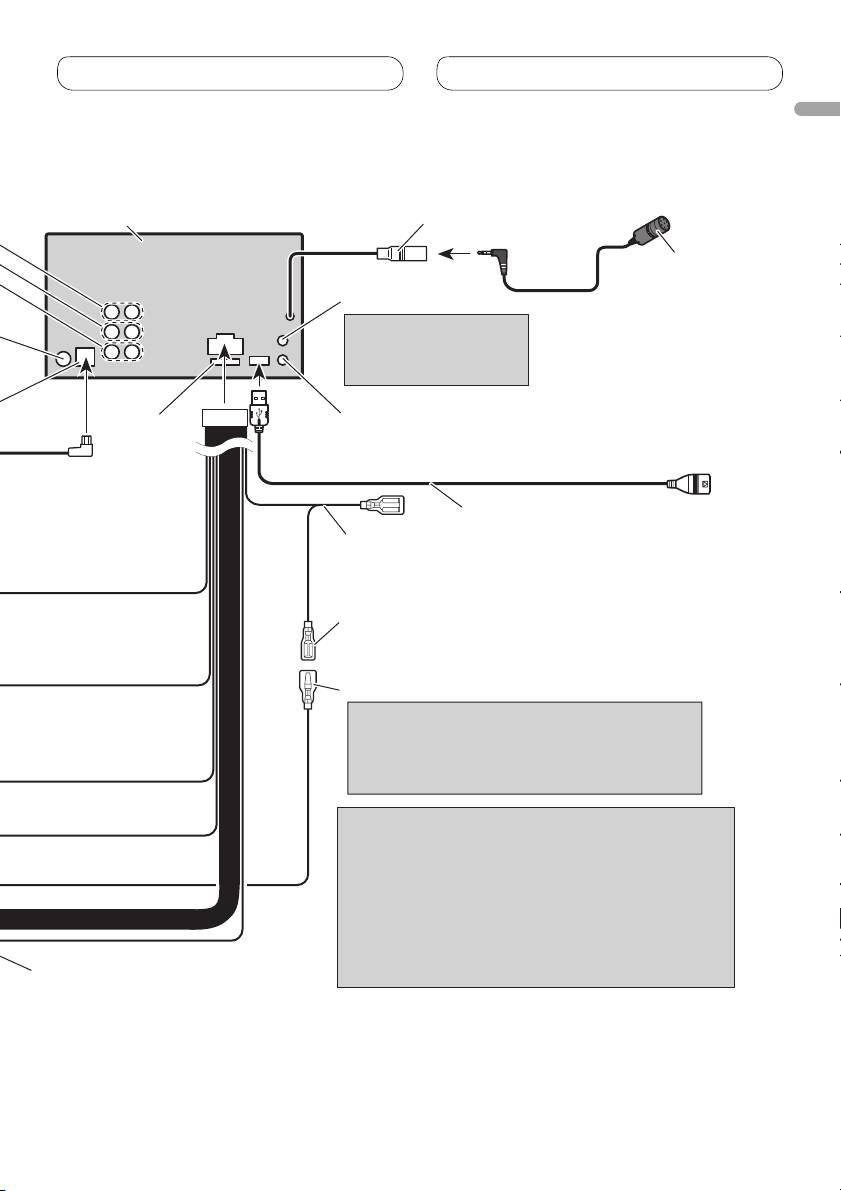
This product
Microphone input
14 cm
Microphone
4 m
AUX jack (3.5 ø)
Use a stereo mini
plug cable to connect
with auxiliary device.
Wired remote input
Fuse (10 A)
Hard-wired remote control adaptor can
be connected (sold separately).
1.5 m
USB cable
Connect to separately sold USB device.
Blue/white
Connect to system control terminal of the
power amp (max. 300 mA 12 V DC).
Blue/white (7*)
Connect to auto-antenna relay control
terminal (max. 300 mA 12 V DC).
Blue/white (6*)
The pin position of the ISO connector will differ
depends on the type of vehicle. Connect 6* and
7* when Pin 5 is an antenna control type. In
another type of vehicle, never connect 6* and 7*.
Notes
• Change the initial setting of this unit (refer to the
operation manual). The subwoofer output of this
unit is monaural.
• When using a subwoofer of 70 W (2 Ω), be sure to
connect with Violet and Violet/black leads of this
unit. Do not connect anything with Green and
Green/black leads.
Speaker leads
White: Front left
White/black: Front left
Gray: Front right
Gray/black: Front right
Green: Rear left or subwoofer
Green/black: Rear left or subwoofer
Violet: Rear right or subwoofer
Violet/black: Rear right or subwoofer
5
Connecting the units
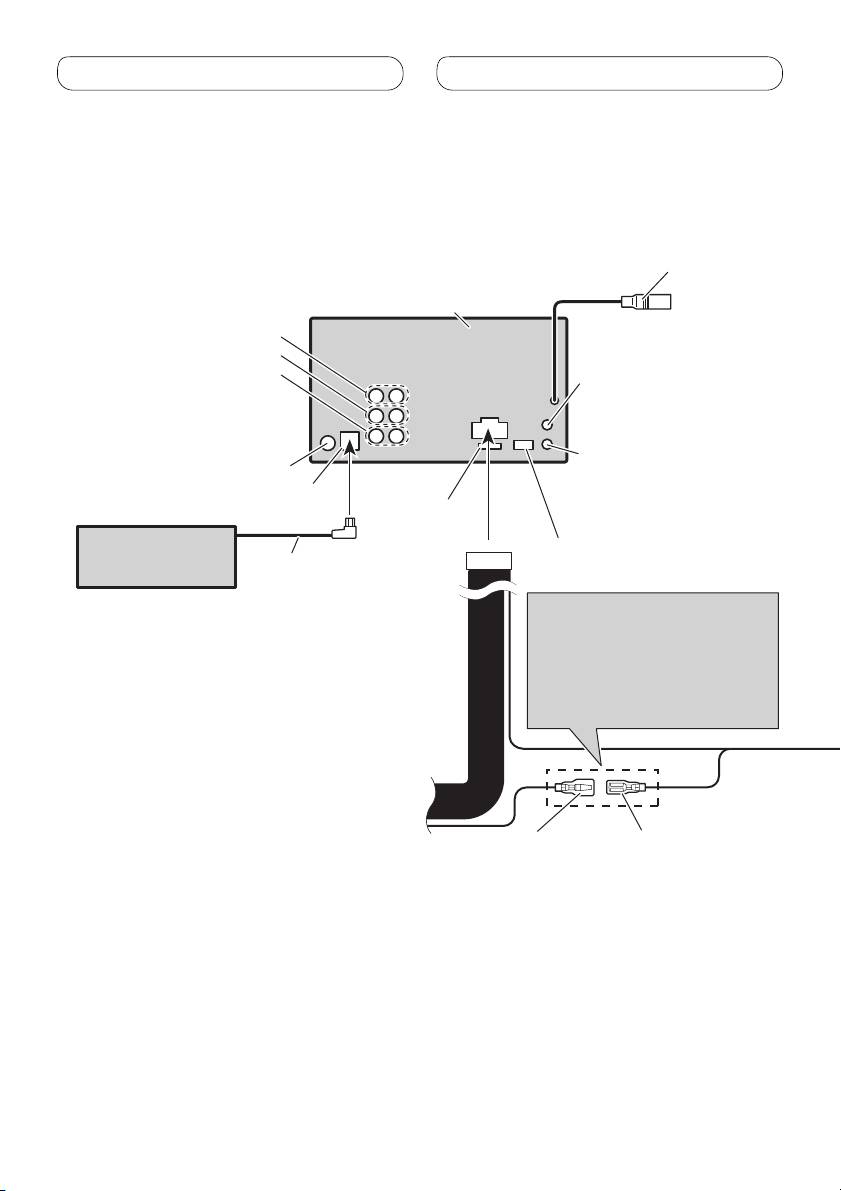
Connecting to separately sold power amp
Microphone input
(Refer to page 4 to 5.)
14 cm
This product
Front output
Rear output
Subwoofer output
AUX jack (3.5 ø)
(Refer to page 4 to 5.)
Wired remote input
Antenna jack
Hard-wired remote control
adaptor can be connected
IP-BUS input (Blue)
Fuse (10 A)
(sold separately).
Multi-CD player
Refer to page 4 to 5.
(sold separately)
IP-BUS cable
The pin position of the ISO
connector will differ depends on
the type of vehicle. Connect 6*
and 7* when Pin 5 is an antenna
control type. In another type of
vehicle, never connect 6* and 7*.
Refer to page 4 to 5.
Blue/white (7*)
Blue/white (6*)
Connect to auto-antenna
relay control terminal
(max. 300 mA 12 V DC).
6
Table of contents
- Contents Connecting the units
- Connecting the units
- Connecting the units
- Connecting the units
- Installation
- Installation
- Installation
- Installation
- Contenido Conexión de las unidades
- Conexión de las unidades
- Conexión de las unidades
- Conexión de las unidades
- Instalación
- Instalación
- Instalación
- Instalación
- Inhalt Anschließen der Geräte
- Anschließen der Geräte
- Anschließen der Geräte
- Anschließen der Geräte
- Einbauverfahren
- Einbauverfahren
- Einbauverfahren
- Einbauverfahren
- Table des matières Connexions des appareils
- Connexions des appareils
- Connexions des appareils
- Connexions des appareils
- Installation
- Installation
- Installation
- Installation
- Indice Collegamento delle unità
- Collegamento delle unità
- Collegamento delle unità
- Collegamento delle unità
- Installazione
- Installazione
- Installazione
- Installazione
- Inhoud Aansluiten van de toestellen
- Aansluiten van de toestellen
- Aansluiten van de toestellen
- Aansluiten van de toestellen
- Installeren
- Installeren
- Installeren
- Installeren
- Содержание Подключение устройств
- Подключение устройств
- Подключение устройств
- Подключение устройств
- Установка
- Установка
- Установка
- Установка


