
Pioneer DEH-X6500DAB: Troubleshooting Error messages
Troubleshooting Error messages: Pioneer DEH-X6500DAB
Table of contents
- About this unit In case of trouble About this manual
- Head unit Display indication Set up menu
- DAB (Digital Audio Broadcasting) Frequently used menu operations
- Tuner
- CD/CD-R/CD-RW and USB storage devices
- iPod
- Audio adjustments
- System menu Selecting the key color
- About MIXTRAX
- System menu
- Connections
- Installation
- Troubleshooting Error messages
- Handling guidelines
- Compressed audio compatibility (disc, USB)
- Copyright and trademark iPod compatibility Russian character chart Sequence of audio files
- Specifications
Appendix
Additional information
Additional information
CD player
USB storage device/iPod
Troubleshooting
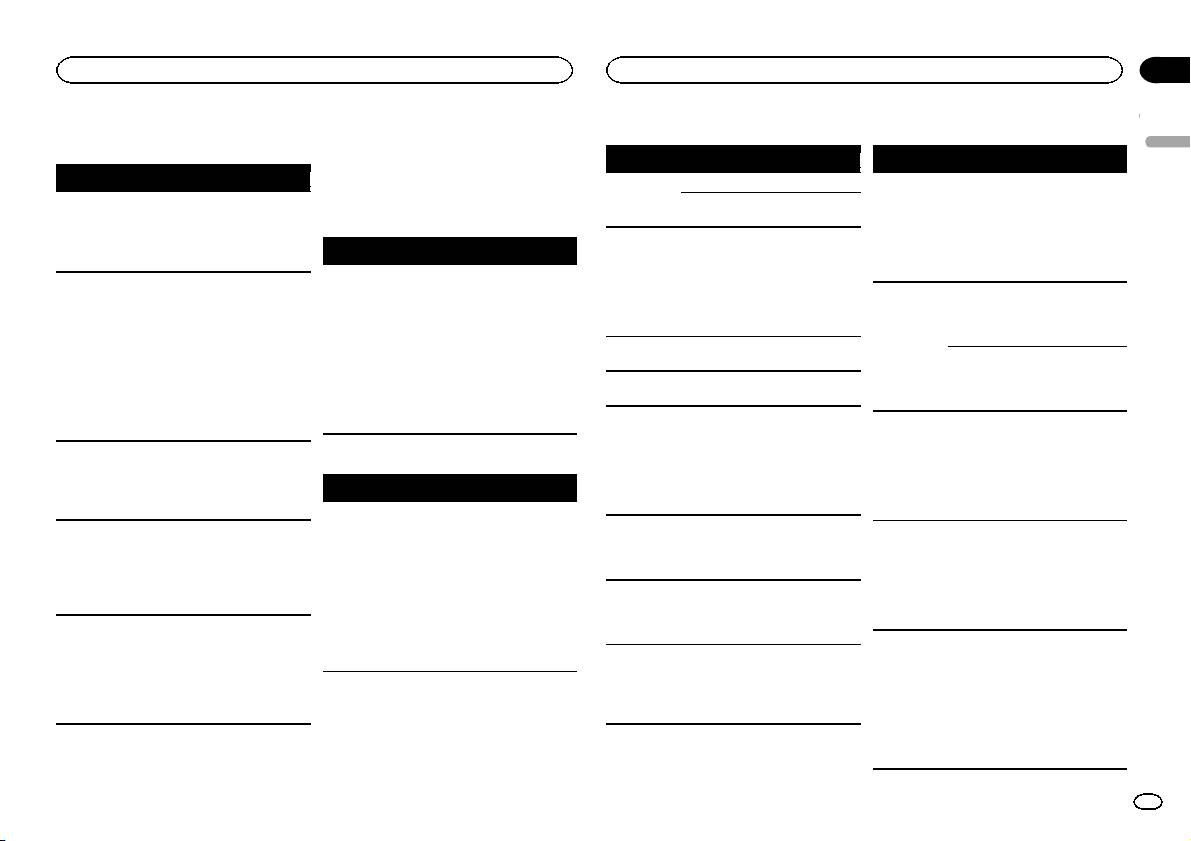
Error messages
English
When you contact your dealer or your nearest
Message Cause Action
Message Cause Action
Symptom Cause Action
Pioneer Service Center, be sure to note the error
ERROR-07,
The disc is dirty. Clean the disc.
FORMAT
Sometimes
Wait until the
message.
11, 12, 17, 30
READ
there is a delay
message disap-
The display
You did not per-
Perform operation
The disc is
Replace the disc.
between the
pears and you
automatically
form any opera-
again.
scratched.
Common
start of playback
hear sound.
returns to the
tion within
ERROR-07,
There is an elec-
Turn the ignition
and when you
ordinary dis-
about 30 sec-
Message Cause Action
10, 11, 12,
trical or me-
switch OFF and
start to hear any
play.
onds.
15, 17, 30,
chanical error.
back ON, or
AMP ERROR Unit fails to op-
Check the speak-
sound.
The repeat
Depending on
Select the repeat
A0
switch to a differ-
erate or speaker
er connection. If
NO AUDIO There are no
Transfer the audio
play range
the repeat play
play range again.
ent source, then
connection is
the message fails
songs.
files to the USB
changes un-
range, the se-
back to the CD
incorrect; pro-
to disappear even
storage device
expectedly.
lected range
player.
tective circuit is
after the engine is
and connect.
may change
activated.
switched off/on,
ERROR-15 The inserted
Replace the disc.
when another
The connected
Follow the USB
contact your deal-
disc is blank.
folder or track is
USB storage de-
storage device in-
er or an author-
ERROR-23 Unsupported
Replace the disc.
being selected
vice has secur-
structions to dis-
ized Pioneer
CD format.
or during fast
ity enabled.
able the security.
Service Station
forwarding/re-
FORMAT
Sometimes
Wait until the
for assistance.
SKIPPED The connected
Play an audio file
versing.
READ
there is a delay
message disap-
USB storage de-
not embedded
between the
pears and you
A subfolder is
Subfolders can-
Select another re-
vice contains
with Windows
start of playback
hear sound.
not played
not be played
peat play range.
DAB tuner
files embedded
Media DRM 9/10.
and when you
back.
when FLD (fold-
with Windows
Message Cause Action
start to hear any
er repeat) is se-
Mediaä DRM 9/
sound.
lected.
ANTENNA
The antenna
Check the anten-
10.
NO AUDIO The inserted
Replace the disc.
NO XXXX ap-
There is no em-
Switch the display
ERROR
connection is
na connection. If
PROTECT All the files in
Transfer audio
pears when a
bedded text in-
or play another
incorrect.
the message fails
disc does not
the USB storage
files not em-
to disappear even
contain any
display is
formation.
track/file.
device are em-
bedded with
changed (NO
after the engine is
playable files.
bedded with
Windows Media
TITLE, for ex-
switched off/on,
SKIPPED The inserted
Replace the disc.
Windows Media
DRM 9/10 to the
ample).
contact your deal-
disc contains
DRM 9/10.
USB storage de-
er or an author-
DRM protected
vice and connect.
The unit is
You are using a
Move electrical
ized Pioneer
files.
malfunction-
device, such as
devices that may
N/A USB The USB device
! Connect a USB
Service Station
ing.
a cellular
be causing the in-
PROTECT All the files on
Replace the disc.
connected to is
Mass Storage
for assistance.
There is inter-
phone, that
terference away
the inserted
not supported
Class compliant
ference.
transmits elec-
from the unit.
disc are em-
by this unit.
device.
tric waves near
bedded with
! Disconnect
the unit.
DRM.
your device and
replace it with a
compatible USB
storage device.
En
15
