
Pioneer XC-HM70-K: Procedure to playback MP3/WMA disc with folder mode on
Procedure to playback MP3/WMA disc with folder mode on: Pioneer XC-HM70-K
Table of contents
- VENTILATION CAUTION IMPORTANT Operating Environment
- Contents Accessories
- Before you start
- Controls and Displays Remote control
- Front Panel Speaker system (X-HM70 only)
- Connecting your equipment Aerial connection
- Speaker connection Using other subwoofer Connecting a TV, etc.
- Connecting to the network through LAN interface AC power connection
- General control To turn the power on Setting the clock Auto power down setup
- Enhancing your system
- Listening to a CD or MP3/ WMA disc
- Advanced CD or MP3/WMA disc playback
- MP3/WMA folder mode (only for MP3/WMA files)
- Procedure to playback MP3/WMA disc with folder mode on
- Listening to the iPod, iPhone or iPad Supported iPod, iPhone and iPad models: Connecting your iPod/iPhone To insert iPad adaptor
- Playing an iPod, iPhone or iPad Basic playback controls
- Listening to USB mass storage device/MP3 player Connecting a USB device Playing a USB device
- Playback with NETWORK feature Listening to Internet radio stations
- Playing back audio files stored on components on the network Playing back your favorite songs
- Network connection requirements
- Glossary
- Listening to the radio Improving FM sound Saving station presets Listening to station presets Naming preset stations Changing the noise cut mode
- Using the Radio Data System (RDS) An introduction to RDS Displaying RDS information Searching for RDS programs
- Timer and sleep operation Sleep operation Setting the wake-up timer Turning the wake-up timer on/off
- Additional Information
- Additional Information
- Additional Information
- Category Extension Stream About playable music file formats Category Extension Stream About status messages Status messages Descriptions
- Specifications About iPod/iPhone/iPad
Listening to a CD or MP3/WMA disc
• Title, Artist and Album name are displayed if they are
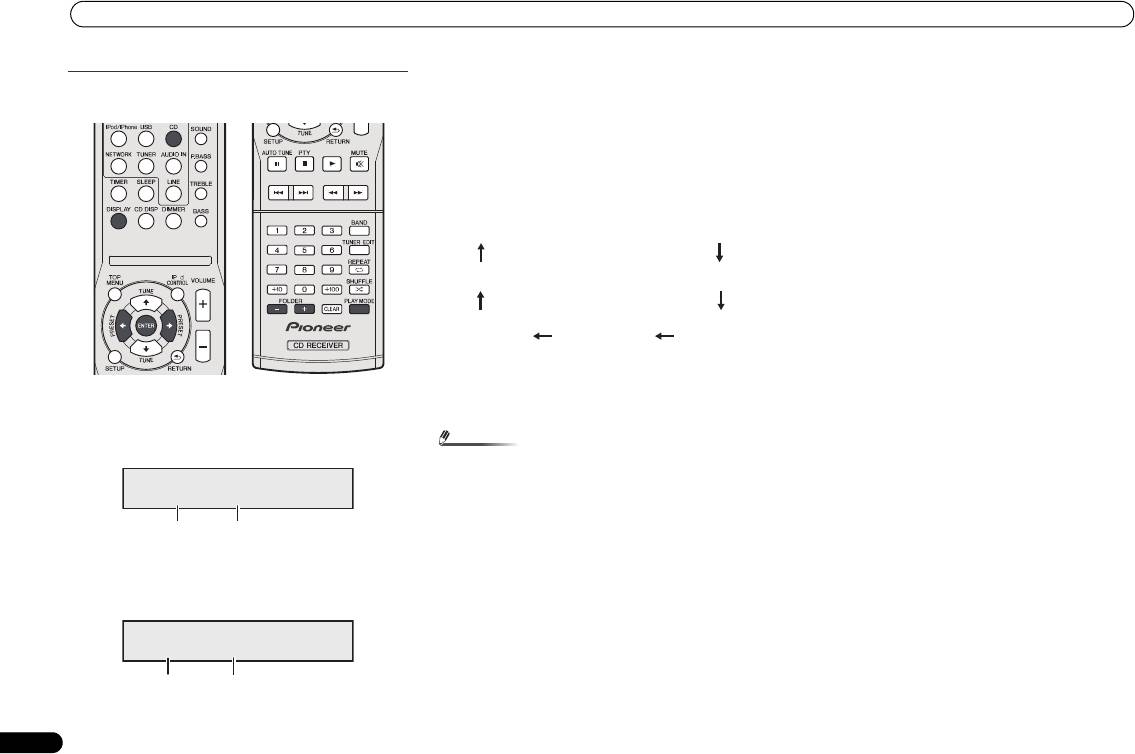
Procedure to playback MP3/WMA disc with folder
recorded on the disc.
mode on
• In case of playback with the folder mode on, press
FOLDER +/-, and the folder can be selected even though
it is in playback/pause mode. It will continue playback/
pause mode in the 1st track of the selected folder.
• Display content can be changed by pressing the DISPLAY
button.
*The song title, artist name, and the album name will only be
displayed during playback.
To play back CD-R/RW.
To cancel the folder playback mode, stop the playback, press
the PLAY MODE button, and select the normal playback
1 Press the CD button, and load an MP3/WMA disc. Press
mode.
the PLAY MODE button to select the folder playback
mode.
Disc info will be displayed.
2 Press FOLDER +/- to select desired playback folder.
(Folder mode on)
Playback will start.
16
En
Note
O
• If “Can’t Play” is displayed, it means “Copyright protected
WMA file” or “Not supported playback file” is selected.
FOLDER
F008 T005
Total folders
Total tracks
FOLDER
F005 T003 00:01
Folder number First track number in the
folder
Total folders and Total tracks (Stopping)
Folder number and Track number (Playing)
Album name display*
File name display
Artist name
Music title
Folder name
display*
display*
display
X-HM70_En.fm 16 ページ 2011年8月2日 火曜日 午後4時46分
