
Pioneer XC-HM70-K: Connecting your equipment Aerial connection
Connecting your equipment Aerial connection: Pioneer XC-HM70-K
Table of contents
- VENTILATION CAUTION IMPORTANT Operating Environment
- Contents Accessories
- Before you start
- Controls and Displays Remote control
- Front Panel Speaker system (X-HM70 only)
- Connecting your equipment Aerial connection
- Speaker connection Using other subwoofer Connecting a TV, etc.
- Connecting to the network through LAN interface AC power connection
- General control To turn the power on Setting the clock Auto power down setup
- Enhancing your system
- Listening to a CD or MP3/ WMA disc
- Advanced CD or MP3/WMA disc playback
- MP3/WMA folder mode (only for MP3/WMA files)
- Procedure to playback MP3/WMA disc with folder mode on
- Listening to the iPod, iPhone or iPad Supported iPod, iPhone and iPad models: Connecting your iPod/iPhone To insert iPad adaptor
- Playing an iPod, iPhone or iPad Basic playback controls
- Listening to USB mass storage device/MP3 player Connecting a USB device Playing a USB device
- Playback with NETWORK feature Listening to Internet radio stations
- Playing back audio files stored on components on the network Playing back your favorite songs
- Network connection requirements
- Glossary
- Listening to the radio Improving FM sound Saving station presets Listening to station presets Naming preset stations Changing the noise cut mode
- Using the Radio Data System (RDS) An introduction to RDS Displaying RDS information Searching for RDS programs
- Timer and sleep operation Sleep operation Setting the wake-up timer Turning the wake-up timer on/off
- Additional Information
- Additional Information
- Additional Information
- Category Extension Stream About playable music file formats Category Extension Stream About status messages Status messages Descriptions
- Specifications About iPod/iPhone/iPad
Connecting your equipment
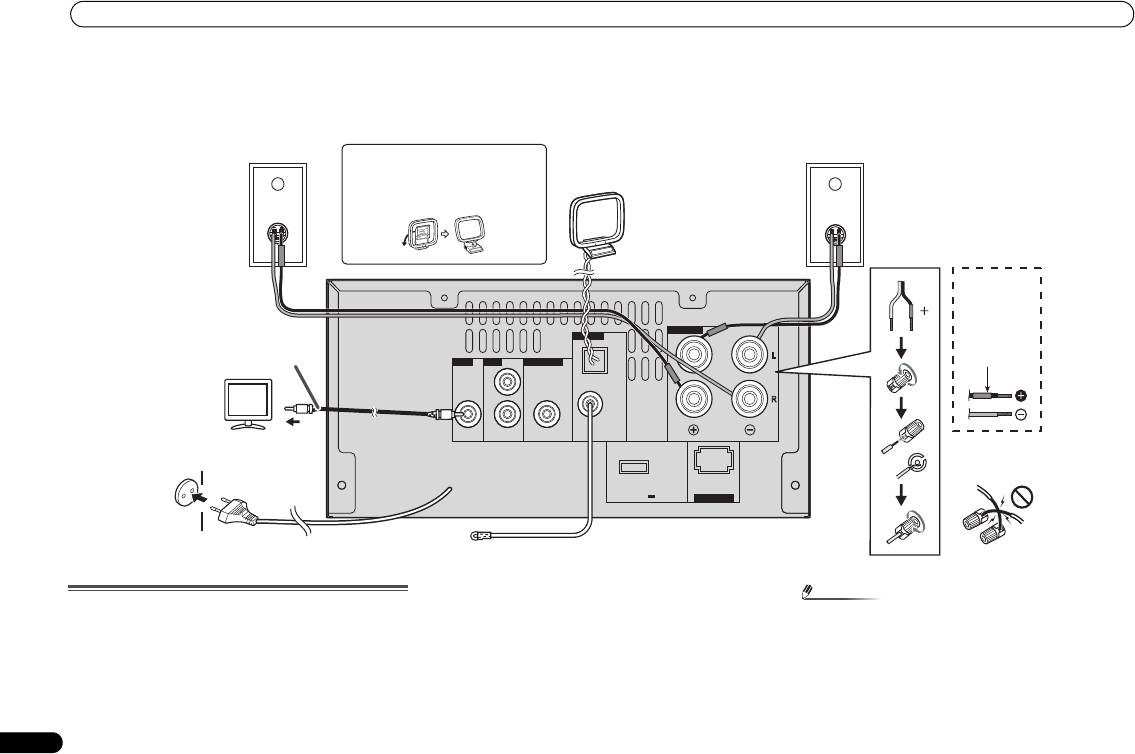
Connecting your equipment
Before making or changing the connections, switch off the power and disconnect the power cord from the AC outlet.
External FM aerial:
Aerial connection
Use an external FM aerial (75 ohms coaxial cable) for better
reception. When an external FM aerial is used, disconnect
Supplied FM aerial:
the supplied FM aerial wire.
Connect the FM aerial wire to the FM 75 ohms socket and
position the FM aerial wire in the direction where the
Supplied AM loop aerial:
strongest signal can be received.
Connect the AM loop aerial to the AM terminal. Position the
AM loop aerial for optimum reception. Place the AM loop
aerial on a shelf, etc., or attach it to a stand.
8
En
Note
• Placing the aerial on the unit or near the AC power lead
may cause noise pickup. Place the aerial away from the
unit for better reception.
SPEAKERS
ANTENNA
AM
VIDEO LINE
SUBWOOFER
LOOP
L
FM
UNBAL
R
75
Ω
OUT
IN
PREOUT
DC OUTPUT
for WIRELESS LAN
(OUTPUT 5 V
0.6 A MAX)
LAN
10/100
(
)
Right
Left
speaker
speaker
Installing the AM loop aerial
AM loop
aerial
< Assembling >
X-HM70
provided
speaker wire
Video cable
Red tube
TV
Wall socket
(AC 220 V to 240 V,
To video input
50 Hz)
socket
Incorrect
FM aerial
X-HM70_En.fm 8 ページ 2011年8月2日 火曜日 午後4時46分
