
Pioneer XC-HM70-K: Listening to the iPod, iPhone or iPad Supported iPod, iPhone and iPad models: Connecting your iPod/iPhone To insert iPad adaptor
Listening to the iPod, iPhone or iPad Supported iPod, iPhone and iPad models: Connecting your iPod/iPhone To insert iPad adaptor: Pioneer XC-HM70-K
Table of contents
- VENTILATION CAUTION IMPORTANT Operating Environment
- Contents Accessories
- Before you start
- Controls and Displays Remote control
- Front Panel Speaker system (X-HM70 only)
- Connecting your equipment Aerial connection
- Speaker connection Using other subwoofer Connecting a TV, etc.
- Connecting to the network through LAN interface AC power connection
- General control To turn the power on Setting the clock Auto power down setup
- Enhancing your system
- Listening to a CD or MP3/ WMA disc
- Advanced CD or MP3/WMA disc playback
- MP3/WMA folder mode (only for MP3/WMA files)
- Procedure to playback MP3/WMA disc with folder mode on
- Listening to the iPod, iPhone or iPad Supported iPod, iPhone and iPad models: Connecting your iPod/iPhone To insert iPad adaptor
- Playing an iPod, iPhone or iPad Basic playback controls
- Listening to USB mass storage device/MP3 player Connecting a USB device Playing a USB device
- Playback with NETWORK feature Listening to Internet radio stations
- Playing back audio files stored on components on the network Playing back your favorite songs
- Network connection requirements
- Glossary
- Listening to the radio Improving FM sound Saving station presets Listening to station presets Naming preset stations Changing the noise cut mode
- Using the Radio Data System (RDS) An introduction to RDS Displaying RDS information Searching for RDS programs
- Timer and sleep operation Sleep operation Setting the wake-up timer Turning the wake-up timer on/off
- Additional Information
- Additional Information
- Additional Information
- Category Extension Stream About playable music file formats Category Extension Stream About status messages Status messages Descriptions
- Specifications About iPod/iPhone/iPad
Listening to the iPod, iPhone or iPad
English Français Español Italiano
Listening to the iPod,
iPhone or iPad
Supported iPod, iPhone and iPad models:
• iPod touch (4
th
/3
rd
/2
nd
/1
st
generation)
• iPod classic
• iPod with video
• iPod nano (6
th
/5
th
/4
th
/3
rd
/2
nd
/1
st
generation)
• iPhone 4/3GS/3G
•iPad
Deutsch
Nederlands
17
En
Important
• Pioneer cannot under any circumstances accept
responsibility for any direct or indirect loss arising from
any inconvenience or loss of recorded material resulting
from the iPod failure.
Note
Connecting your iPod/iPhone
• This system has been developed and tested for the
software version of iPod/iPhone/iPad indicated on the
website of Pioneer (http://pioneer.jp/homeav/support/ios/
eu/).
• Installing software versions other than indicated on the
website of Pioneer to your iPod/iPhone/iPad may result in
incompatibility with this system.
• Once iPod or iPhone is connected to the unit it will begin
charging.
• You can recharge the iPad when the power is on or during
iPod Charge Mode.
• When connecting the iPad, use only an iPad dedicated
cable.
• Connect iPad to the USB terminal.
• iPod and iPhone are licensed for reproduction of non-
copyrighted materials or materials the user is legally
permitted to reproduce.
• Features such as the equalizer cannot be controlled using
this receiver, and we recommend switching the equalizer
off before connecting.
CAUTION
3 Connect your iPod/iPhone.
• If an iPod/iPhone is connected when this unit is in
standby mode, the power will turn on and playback of the
iPod/iPhone will begin.
• When connecting an iPod/iPhone units, always use the
universal dock adapter provided with your iPod/iPhone, or
a commercially adapter designed to support iPod/iPhone.
The iPod/iPhone cannot be connected without a universal
dock adapter; attempting to connect an iPod/iPhone
without a universal dock adapter will cause damage or
malfunction.
• Unplug all accessories from the iPod or iPhone before
inserting it into the dock.
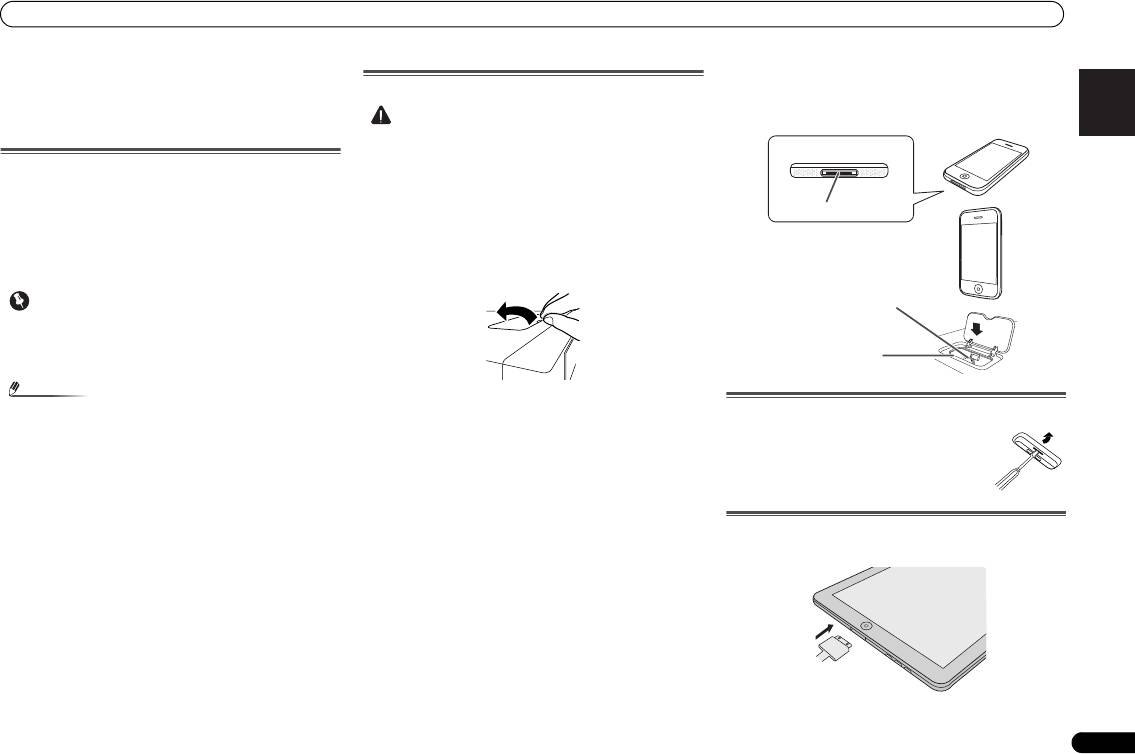
1 Open the dock cover by pulling up.
2 Attach the Universal dock adapter to iPod/iPhone
connector port on this unit.
To remove adaptor for iPod or iPhone
• An iPod/iPhone universal dock adapter is not supplied
with this unit.
When attaching the Universal dock adapter, be sure to orient
the front-back directions of the Universal dock adapter
correctly. To attach, first place the protruding tabs on the
front side of the adapter into the depressions on the iPod/
iPhone connector port and press into position. When
attaching the adapter, be careful not to strike the connectors.
To insert iPad adaptor
1 Insert the iPad connector to the iPad.
iPhone (bottom)
iPhone
Dock connector
iPhone dock
iPhone connector
Insert the tip of a screwdriver ("–" type, small)
into the adaptor hole as shown and lift upward
to remove.
X-HM70_En.fm 17 ページ 2011年8月2日 火曜日 午後4時46分
