
Pioneer X-HM70-S: Before you start
Before you start: Pioneer X-HM70-S
Table of contents
- VENTILATION CAUTION IMPORTANT Operating Environment
- Contents Accessories
- Before you start
- Controls and Displays Remote control
- Test of the remote control Front Panel
- Connecting your equipment Aerial connection
- Speaker connection Using other subwoofer Connecting a TV, etc.
- Connecting to the network through LAN interface AC power connection Connecting to a wireless LAN
- General control
- General control
- Listening to a CD or MP3/ Disc playback WMA disc
- Advanced CD or MP3/WMA disc playback
- MP3/WMA folder mode (only for MP3/WMA files)
- Procedure to playback MP3/WMA disc with folder mode on
- Listening to the iPod, iPhone or iPad Supported iPod, iPhone and iPad models: Connecting your iPod/iPhone To remove adaptor for iPod or iPhone To insert iPad adaptor
- Playing an iPod, iPhone or iPad Basic playback controls
- Listening to USB mass storage device/MP3 player Connecting a USB device Playing a USB device Basic playback controls
- Playback with NETWORK feature Listening to Internet radio stations About list of Internet radio
- Playing back audio files stored on components on the network Network setup menu Playing back your favorite songs
- Network connection requirements About network playback
- Glossary
- Listening to the radio Improving FM sound Saving station presets Listening to station presets Naming preset stations Changing the noise cut mode
- Using the Radio Data System (RDS) An introduction to RDS Displaying RDS information Searching for RDS programs
- Timer and sleep operation Sleep operation Setting the wake-up timer
- Additional Information
- Additional Information
- Additional Information
- Additional Information About playable music file formats Category Extension Stream About status messages Status messages Descriptions
- Additional Information
Before you start
English Français Español Italiano
Before you start
General
• Use the unit on a firm, level surface free from vibration.
• Place the speakers at least 30 cm away from any CRT TV
to avoid colour variations across the TV screen. If the
variations persist, move the speakers further away from
the TV. LCD TV is not prone to such variation.
• Keep the unit away from direct sunlight, strong magnetic
fields, excessive dust, humidity and electronic/electrical
equipment (home computers, facsimiles, etc.) which
generate electrical noise.
• Do not place anything on top of the unit.
• Do not expose the unit to moisture, to temperatures
Deutsch
higher than 60°C (140°F) or to extremely low
temperatures.
• If your system does not work properly, disconnect the AC
power lead from the wall socket. Plug the AC power lead
back in, and then turn on your system.
• In case of an electrical storm, unplug the unit for safety.
• Hold the AC power plug by the head when removing it
from the wall socket, as pulling the lead can damage
internal wires.
Nederlands
• The AC power plug is used as a disconnect device and
shall always remain readily operable.
• Do not remove the outer cover, as this may result in
electric shock. Refer internal service to your local
PIONEER service facility.
• The ventilation should not be impeded by covering the
ventilation openings with items, such as newspapers,
tablecloths, curtains, etc.
• No naked flame sources, such as lighted candles, should
be placed on the apparatus.
• Attention should be drawn to the environmental aspects
of battery disposal.
• The apparatus is designed for use in moderate climates.
5
En
CAUTION
• The voltage used must be the same as that specified on
this unit. Using this product with a higher voltage other
than that which is specified is dangerous and may result
in a fire or other type of accident causing damage.
PIONEER will not be held responsible for any damage
resulting from use of this unit with a voltage other than
that which is specified.
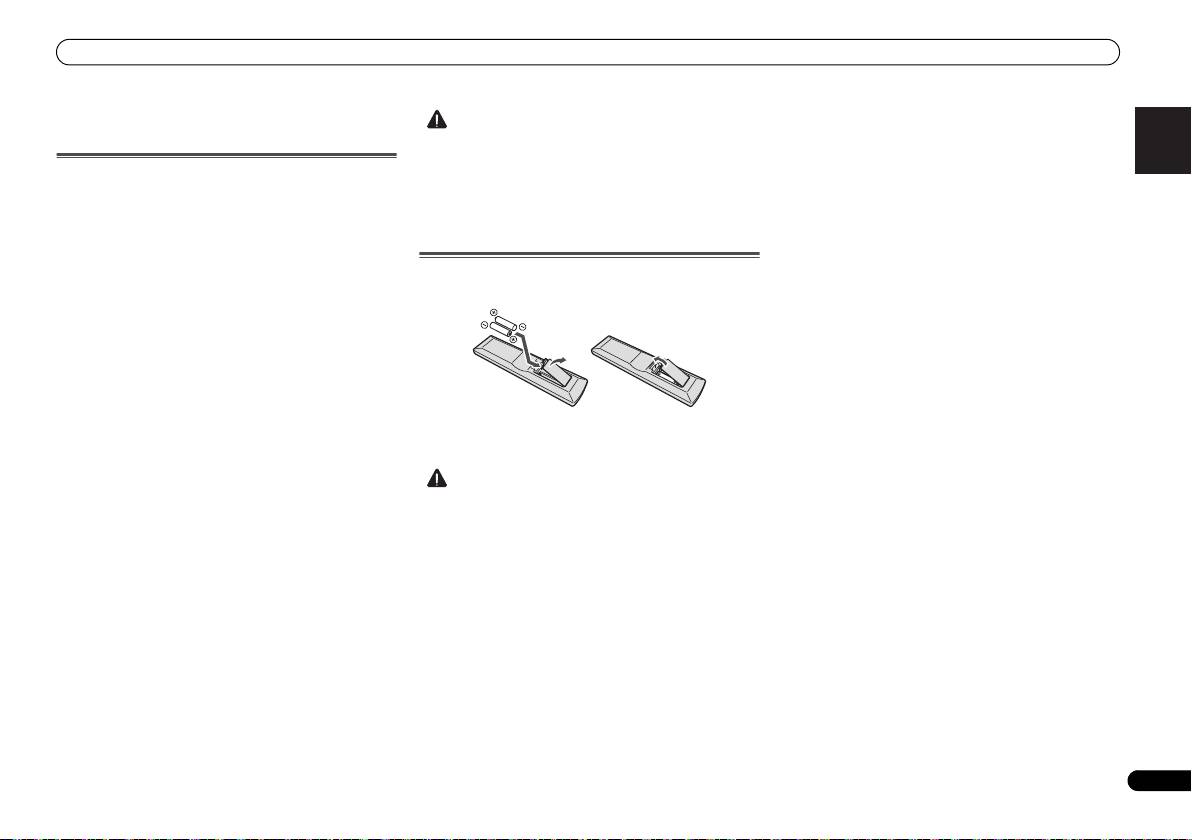
Loading the batteries
The batteries included with the unit are to check initial
operations; they may not last over a long period. We
recommend using alkaline batteries that have a longer life.
CAUTION
X-HM70_En.fm 5 ページ 2011年8月2日 火曜日 午後4時46分
• Incorrect use of batteries may result in such hazards as
leakage and bursting. Observe the following precautions:
-
Never use new and old batteries together.
-
Insert the plus and minus sides of the batteries properly
according to the marks in the battery case.
-
Batteries with the same shape may have different
voltages. Do not use different batteries together.
-
When disposing of used batteries, please comply with
governmental regulations or environmental public
instruction’s rules that apply in your country or area.
• Do not use or store batteries in direct sunlight or other
excessively hot place, such as inside a car or near a
heater. This can cause batteries to leak, overheat, explode
or catch fire. It can also reduce the life or performance of
batteries.
