
Pioneer X-HM10-S: Using the Radio Data System (RDS)
Using the Radio Data System (RDS): Pioneer X-HM10-S
Table of contents
- Operating Environment VENTILATION CAUTION
- ENGLISH Introduction Accessories CONTENTS
- Precautions n General n Volume control Controls and indicators n Front panel
- n Speaker system n Remote control n Display
- System connections n Aerial connection n Speaker connection n Connecting iPod or iPhone to TV
- n AC power connection n Connecting a TV, etc. n Battery installation n Test of the remote control
- General control Setting the clock (Remote control only)
- Setting the clock (Remote control only) (continued) Listening to the iPod, iPhone or iPad
- Listening to the iPod, iPhone or iPad (X-HM20 only) (continued)
- Listening to the iPod, iPhone or iPad (X-HM20 only) (continued)
- Listening to a CD or MP3/WMA disc
- Advanced CD or MP3/WMA disc playback
- Advanced CD or MP3/WMA disc MP3/WMA folder mode (only for MP3/ playback (continued) WMA files)
- MP3/WMA folder mode (only for MP3/ Listening to USB mass storage WMA files) (continued) device/MP3 player
- Listening to USB mass storage device/MP3 player (continued) Advanced USB playback
- Listening to the radio
- Using the Radio Data System (RDS)
- Using the Radio Data System (RDS) (continued)
- Using the Radio Data System (RDS) Timer and sleep operation (Remote (continued) control only)
- Timer and sleep operation (Remote control only) (continued)
- Timer and sleep operation (Remote Headphones control only) (continued)
- Troubleshooting chart
- Troubleshooting chart (Continued)
- Specifications
- Notice
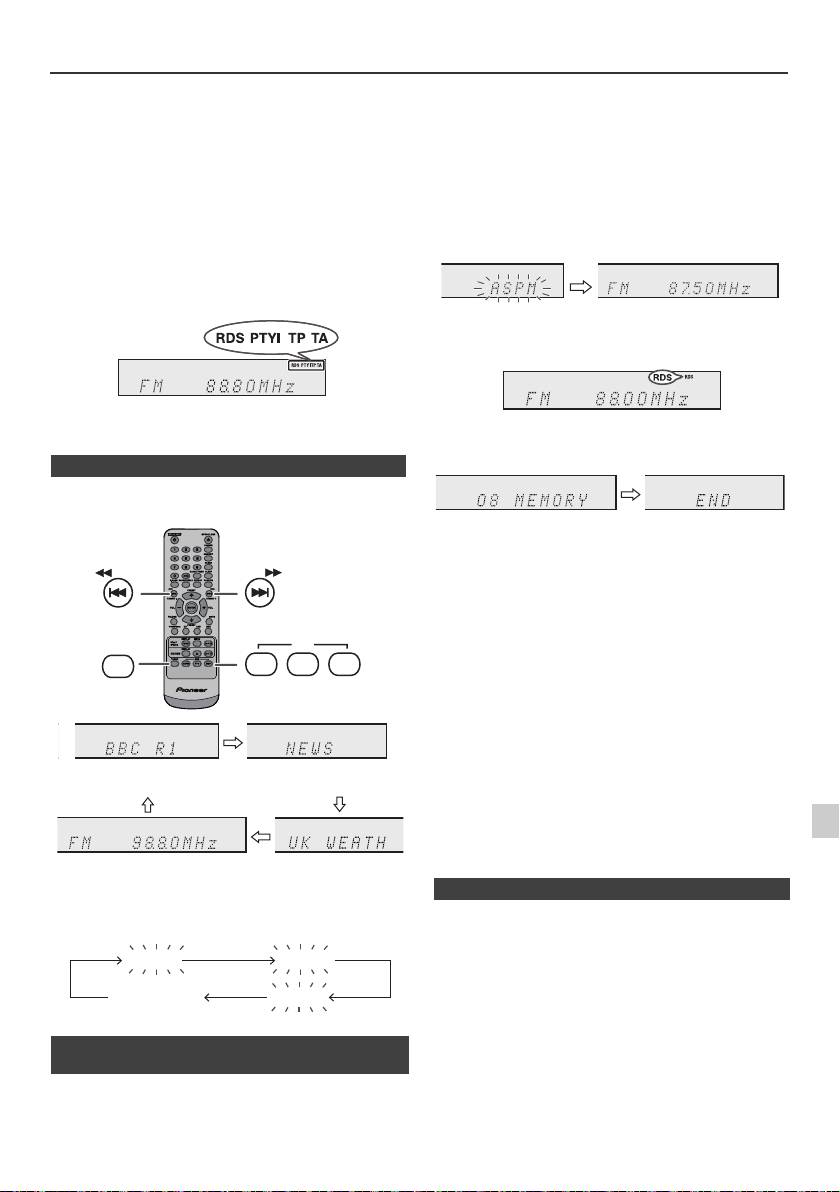
Using the Radio Data System (RDS)
RDS is a broadcasting service which a growing
If you have already stored some stations in memory, the
number of FM stations provide. These FM stations
number of new stations you can store will be less.
send additional signals along with their regular
programme signals. They send their station names,
and information about the type of programme such as
sport, music, etc.
When tuned to an RDS station, “RDS” and the station
name will be displayed.
“TP” (Traffic Programme) will appear on the display when
the received broadcast carries traffic information, and “TA”
(Traffic Announcement) will appear whilst a traffic
information is on air.
“PTYI” (Dynamic PTY Indicator) will appear whilst the
Dynamic PTY station is received.
You can control the RDS by using the buttons on the
remote control only.
n Information provided by RDS
Each time the RDS DISPLAY button is pressed, the
display will switch as follows:
To stop the ASPM operation before it is complete:
Press the RDS ASPM button whilst it is scanning for
stations.
The stations which are already stored in memory will be
kept there.
Notes:
l If the same station is broadcasting on different
frequencies, the strongest frequency will be stored in
memory.
l Any station which has the same frequency as the one
stored in memory will not be stored.
l If 40 stations have already been stored in memory, the
scan will be aborted. If you want to redo the ASPM
operation, erase the preset memory.
l If no station have been stored in memory, “END” will
appear for about 4 seconds.
l If the RDS signals are very weak, station names may
not be stored in memory.
l The same station name can be stored in different
1
channels.
l In a certain area or during certain time periods, the
station names may temporarily be different.
2
When tuning in to a station other than an RDS station or
to an RDS station which sends weak signal, the display
3
If any of the following events occur, it does not mean
will change in the following order:
that the unit is faulty:
4
l “PS”, “No PS” and a station name appear alternately,
and the unit does not operate properly.
l If a particular station is not broadcasting properly or a
5
station is conducting tests, the RDS reception function
may not work properly.
6
l When you receive an RDS station whose signal is too
weak, information like the station name may not be
n Using the Auto Station Programme
displayed.
7
Memory (ASPM)
l “No PS”, “No PTY” or “No RT” will flash for about 5
seconds, and then the frequency will be displayed.
Whilst in the ASPM operation mode, the tuner will
8
automatically search for new RDS stations. Up to 40
stations can be stored.
9
En-19
11/5/25 X-HM10_20_En.fm
TUNING −
TUNING +
RDS
TUNER
ASPM PTY DISP
Station name (PS) Programme type (PTY)
Frequency Radio text (RT)
No PS No PTY
FM 98.80 MHz
No RT
1 Press the TUNER button on the remote control or
INPUT button repeatedly on the main unit to select
TUNER function.
2 Press and hold down the RDS ASPM button on the
remote control.
1 After “ASPM” has flashed for about 4 seconds,
scanning will start (87.50 - 108.00 MHz).
2 When an RDS station is found, “RDS” will appear
for a short time and the station will be stored in
memory.
3 After scanning, the number of stations stored in
memory will be displayed for 4 seconds, and then
“END” will appear for 4 seconds.
n Notes for RDS operation
