
Pioneer X-HM10-S: Troubleshooting chart (Continued)
Troubleshooting chart (Continued): Pioneer X-HM10-S
Table of contents
- Operating Environment VENTILATION CAUTION
- ENGLISH Introduction Accessories CONTENTS
- Precautions n General n Volume control Controls and indicators n Front panel
- n Speaker system n Remote control n Display
- System connections n Aerial connection n Speaker connection n Connecting iPod or iPhone to TV
- n AC power connection n Connecting a TV, etc. n Battery installation n Test of the remote control
- General control Setting the clock (Remote control only)
- Setting the clock (Remote control only) (continued) Listening to the iPod, iPhone or iPad
- Listening to the iPod, iPhone or iPad (X-HM20 only) (continued)
- Listening to the iPod, iPhone or iPad (X-HM20 only) (continued)
- Listening to a CD or MP3/WMA disc
- Advanced CD or MP3/WMA disc playback
- Advanced CD or MP3/WMA disc MP3/WMA folder mode (only for MP3/ playback (continued) WMA files)
- MP3/WMA folder mode (only for MP3/ Listening to USB mass storage WMA files) (continued) device/MP3 player
- Listening to USB mass storage device/MP3 player (continued) Advanced USB playback
- Listening to the radio
- Using the Radio Data System (RDS)
- Using the Radio Data System (RDS) (continued)
- Using the Radio Data System (RDS) Timer and sleep operation (Remote (continued) control only)
- Timer and sleep operation (Remote control only) (continued)
- Timer and sleep operation (Remote Headphones control only) (continued)
- Troubleshooting chart
- Troubleshooting chart (Continued)
- Specifications
- Notice
Troubleshooting chart (Continued)
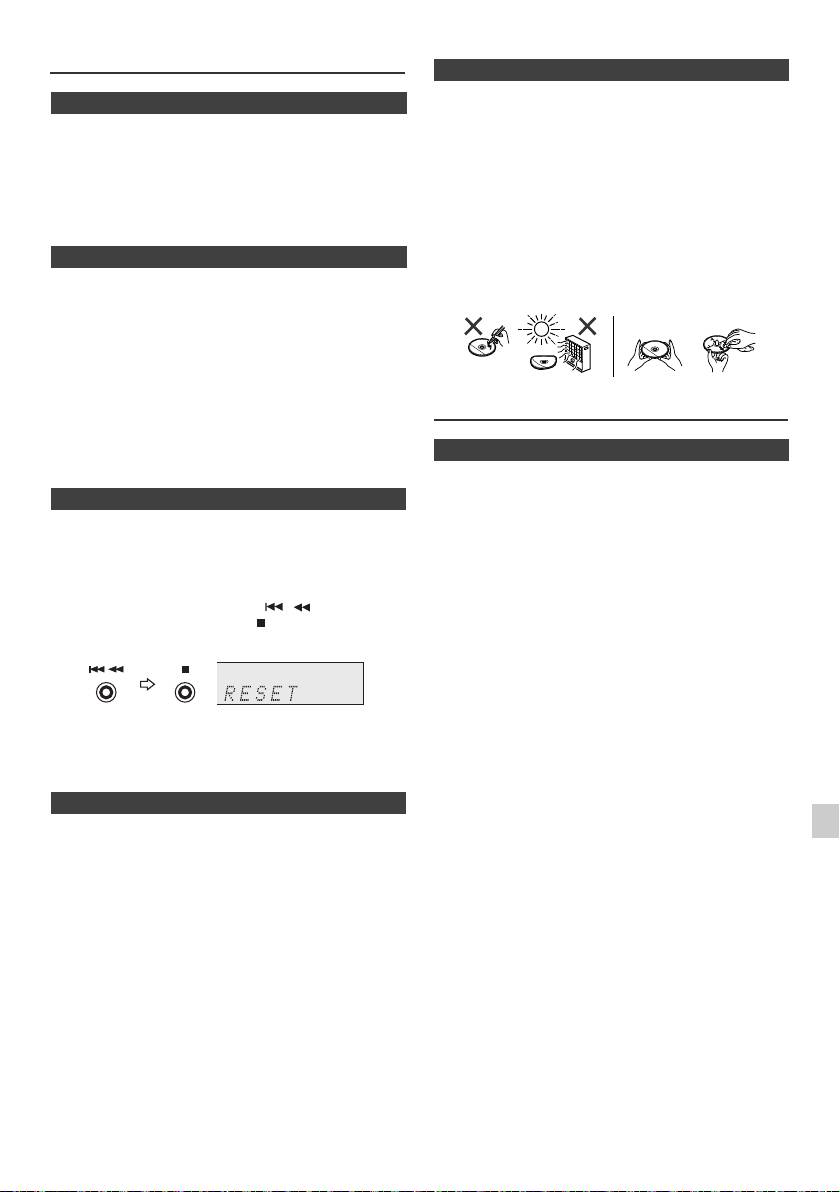
n Care of compact discs
Compact discs are fairly resistant to damage, however
n Condensation
mistracking can occur due to an accumulation of dirt on
Sudden temperature changes, storage or operation in an
the disc surface. Follow the guidelines below for maximum
extremely humid environment may cause condensation
enjoyment from your CD collection and player.
inside the cabinet (CD pickup, etc.) or on the transmitter
l Do not write on either side of the disc, particularly the
on the remote control. Condensation can cause the unit to
non-label side from which signals are read. Do not
malfunction. If this happens, leave the power on with no
mark this surface.
disc in the unit until normal playback is possible (about 1
l Keep your discs away from direct sunlight, heat, and
hour). Wipe off any condensation on the transmitter with a
excessive moisture.
soft cloth before operating the unit.
l Always hold the CDs by the edges. Fingerprints, dirt, or
water on the CDs can cause noise or mistracking. If a
n If problem occurs
CD is dirty or does not play properly, clean it with a soft,
dry cloth, wiping straight out from the centre, along the
When this product is subjected to strong external
radius.
interference (mechanical shock, excessive static
electricity, abnormal supply voltage due to lightning, etc.)
or if it is operated incorrectly, it may malfunction.
If such a problem occurs, do the following:
1 Set the unit to the stand-by mode and turn the power on
again.
2
If the unit is not restored in the previous operation, unplug
Maintenance
and plug in the unit again, and then turn the power on.
Note:
If neither operation above restores the unit, clear all the
n Cleaning the cabinet
memory by resetting it.
Periodically wipe the cabinet with a soft cloth and a diluted
soap solution, then with a dry cloth.
n Factory reset, clearing all memory
Caution:
1
Press the STANDBY/ON button to turn the power on.
l Do not use chemicals for cleaning (petrol, paint thinner,
etc.). It may damage the cabinet.
2 Press the LINE button button on the remote control or
l Do not apply oil to the inside of the unit. It may cause
INPUT button repeatedly on the main unit to select
malfunctions.
LINE IN function.
3 In LINE IN function, press the button on the
main unit press and hold the button until "RESET"
appears.
Caution:
This operation will erase all data stored in memory
including clock, timer settings, tuner preset, and CD
programme.
n Before transporting the unit
Remove the iPod, USB memory device and disc from the
1
unit. Then, set the unit to the power stand-by mode.
Carrying the unit with iPod or USB memory device left
2
docked or discs left inside might damage the unit.
3
4
5
6
7
8
9
En-25
11/5/25 X-HM10_20_En.fm
NO YES
Correct
