
Pioneer X-HM10-S: General control Setting the clock (Remote control only)
General control Setting the clock (Remote control only): Pioneer X-HM10-S
Table of contents
- Operating Environment VENTILATION CAUTION
- ENGLISH Introduction Accessories CONTENTS
- Precautions n General n Volume control Controls and indicators n Front panel
- n Speaker system n Remote control n Display
- System connections n Aerial connection n Speaker connection n Connecting iPod or iPhone to TV
- n AC power connection n Connecting a TV, etc. n Battery installation n Test of the remote control
- General control Setting the clock (Remote control only)
- Setting the clock (Remote control only) (continued) Listening to the iPod, iPhone or iPad
- Listening to the iPod, iPhone or iPad (X-HM20 only) (continued)
- Listening to the iPod, iPhone or iPad (X-HM20 only) (continued)
- Listening to a CD or MP3/WMA disc
- Advanced CD or MP3/WMA disc playback
- Advanced CD or MP3/WMA disc MP3/WMA folder mode (only for MP3/ playback (continued) WMA files)
- MP3/WMA folder mode (only for MP3/ Listening to USB mass storage WMA files) (continued) device/MP3 player
- Listening to USB mass storage device/MP3 player (continued) Advanced USB playback
- Listening to the radio
- Using the Radio Data System (RDS)
- Using the Radio Data System (RDS) (continued)
- Using the Radio Data System (RDS) Timer and sleep operation (Remote (continued) control only)
- Timer and sleep operation (Remote control only) (continued)
- Timer and sleep operation (Remote Headphones control only) (continued)
- Troubleshooting chart
- Troubleshooting chart (Continued)
- Specifications
- Notice
General control
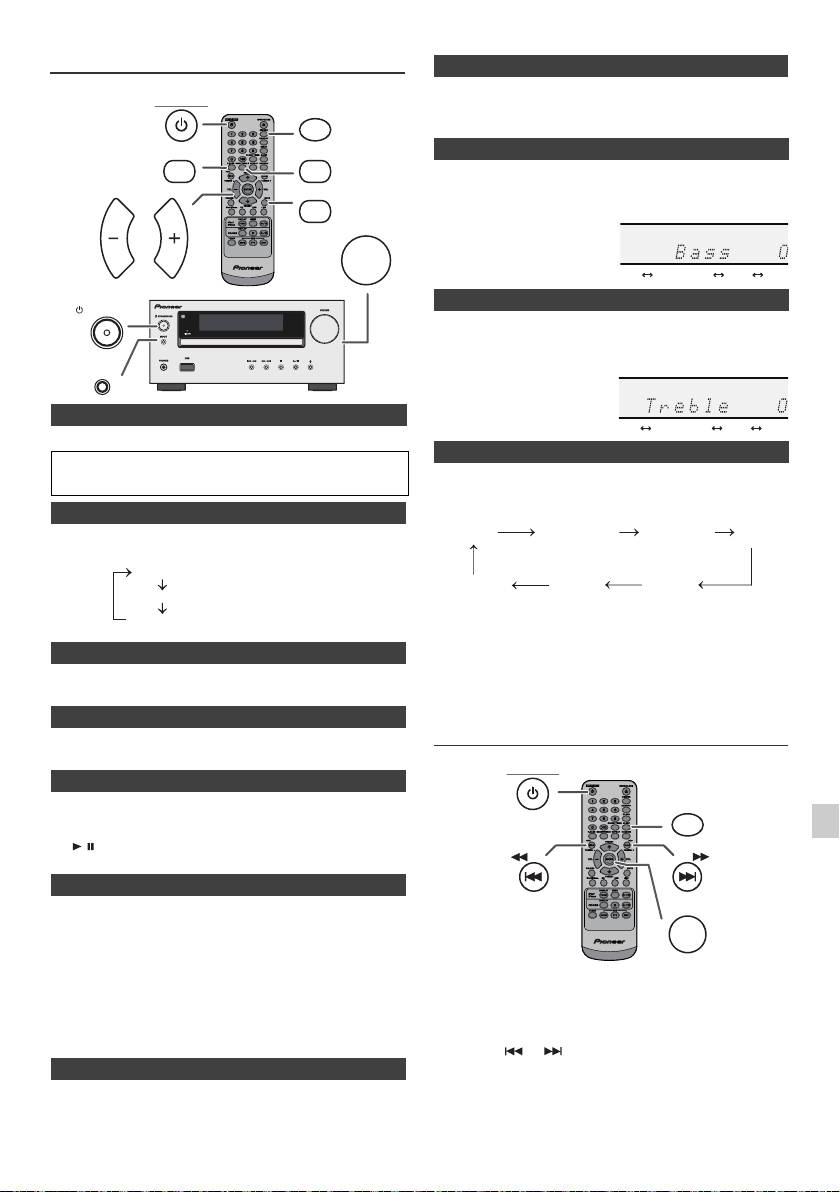
When the power is first turned on, the unit will enter the P.bass mode
STANDBY/ON
which emphasises the bass frequencies. To cancel the P.bass mode,
DIMMER
press the P.BASS button on the remote control.
P.BASS
BASS/TREBLE
1
Press the BASS/TREBLE button to select “Bass”.
2
Within 5 seconds, press the VOL (+ or –) button to adjust the
MUTE
bass.
VOLUME
VOL VOL
STANDBY/ON
1
Press the BASS/TREBLE button to select “Treble”.
2
Within 5 seconds, press the VOL (+ or –) button to adjust the
treble.
INPUT
n To turn the power on
Press the STANDBY/ON button to turn the power on.
After use:
When the INPUT button on main unit is pressed, the
Press the STANDBY/ON button to enter the power stand-by mode.
current function will change to different mode. Press the
INPUT button repeatedly to select desired function.
n Display brightness control
To dim the display brightness, press the DIMMER button on the
remote control.
Dimmer 1
Dimmer 2
Dimmer Off
Note:
The backup function will protect the memorised function
n Volume auto set-in
mode for a few hours should there be a power failure or the
If you turn off and on the main unit with the volume set to 17 or higher,
AC power lead becomes disconnected.
the volume starts at 16.
Setting the clock (Remote control
n Volume control
only)
Turn the volume knob towards VOLUME (on main unit) or press VOL
+/– (on remote control) to increase or decrease the volume.
n Auto power on function
When you press any of the following buttons, the unit turns on.
l
iPod / iPhone, CD, USB, LINE, TUNER on the remote control:
1
Selected function is activated.
l
/ button on the main unit: The unit turns on and playback of
the last function will start (CD, TUNER, USB, iPod, LINE IN)
2
n Auto power off function
3
The main unit will enter the stand-by mode (when iPod/iPhone is not
docked) after 15 minutes of inactivity during:
iPod/iPhone: No connection.
4
CD / USB: In the stop mode.
LINE IN:No detection of input signal or very low sound au-
In this example, the clock is set for the 24-hour (00:00) display.
dibility.
5
Note:
X-HM20 only: However, if iPod/iPhone is docked, the unit will begin
6
charging.
“Charge Mode” will be displayed during standby mode.
7
n Muting
The volume is muted temporarily when pressing the MUTE button on
8
the remote control. Press again to restore the volume.
9
En-9
11/5/25 X-HM10_20_En.fm
(Display is dim).
(Display gets dimmer).
(Display is bright).
n P.Bass control
n Bass control
n Treble control
n Function
1
Press the STANDBY/ON button to turn the power on.
2
Press the CLOCK/TIMER button.
3
Within 10 seconds, press the ENTER button. To adjust the day,
press the or button and then press the ENTER button.
........
-5 -4 +4 +5
........
-5 -4 +4 +5
CD AM
FM STEREO
FM MONO
Line In
iPod
USB
(X-HM20 only)
STANDBY/ON
CLOCK/TIMER
TUNING −
TUNING +
ENTER
