
Pioneer VSX-520-K: Chapter 9: Other connections Wireless music play Remote control operation
Chapter 9: Other connections Wireless music play Remote control operation: Pioneer VSX-520-K
Table of contents
- IMPORTANT IMPORTANT: THE MOULDED PLUG
- Information for users on collection and disposal of old equipment and used batteries Operating Environment
- Contents
- 08 Making recordings
- Flow of settings on the receiver
- Chapter 1: Before you start Checking what’s in the box Installing the receiver Loading the batteries
- Ventilation
- Chapter 2: Controls and displays Front panel
- Operating range of remote control
- Display
- Controls and displays02
- Remote control
- Controls and displays02
- Controls and displays 02
- Chapter 3: Connecting your equipment Placing the speakers
- Hints on the speaker placement
- Connecting the speakers
- Making cable connections
- HDMI cables About HDMI Analog audio cables
- Digital audio cables About video outputs connection Video cables
- Connecting a TV and playback components Connecting using HDMI Connecting your component with no HDMI terminal
- Connecting a satellite receiver Connecting an HDD/DVD or other digital set-top box recorder, VCR and other video sources
- Using the component video jacks Connecting other audio components
- Connecting antennas
- Plugging in the receiver
- Chapter 4: Basic Setup Automatically setting up for surround sound (MCACC)
- Basic Setup04
- Chapter 5: Listening to your system Basic playback
- Auto playback Listening in surround sound
- Using the Advanced surround effects
- Using Front Stage Surround Advance Listening in stereo
- Using Stream Direct Better sound using Phase Control Using the Sound Retriever
- Using surround back channel processing Listening with Acoustic Calibration EQ
- Setting the Audio options Setting the Up Mix function
- Setting What it does Option(s)
- Setting What it does Option(s)
- Choosing the input signal Using the headphone
- Chapter 6: The System Setup menu Using the System Setup menu Manual speaker setup
- Speaker setting
- Crossover network Channel level Speaker distance
- The Input Assign menu The Pre Out Setting
- Chapter Using the tuner Listening to the radio Saving station presets
- Listening to station presets Naming preset stations
- An introduction to RDS Searching for RDS programs
- Displaying RDS information
- Chapter 8: Making recordings Making an audio or a video recording
- Chapter 9: Other connections Wireless music play Remote control operation
- Connecting Optional Bluetooth ADAPTER
- Listening to Music Contents of Bluetooth wireless technology device with Your System
- Chapter 10: Additional information Troubleshooting Problem Remedy
- Problem Remedy
- Problem Remedy
- HDMI Symptom Remedy
- Important information regarding the HDMI connection Resetting the main unit
- Specifications Cleaning the unit
Other connections09
Chapter 9:
Other connections
CAUTION
• Before making or changing the connections,
switch off the power. Plugging in
components should be the last connection
you make with your system.
• Do not allow any contact between speaker
wires from different terminals.
Bluetooth
® ADAPTER for
Wireless Enjoyment of Music
Important
• Do not move the receiver with the
Bluetooth ADAPTER connected. Doing so
could cause damage or faulty contact.
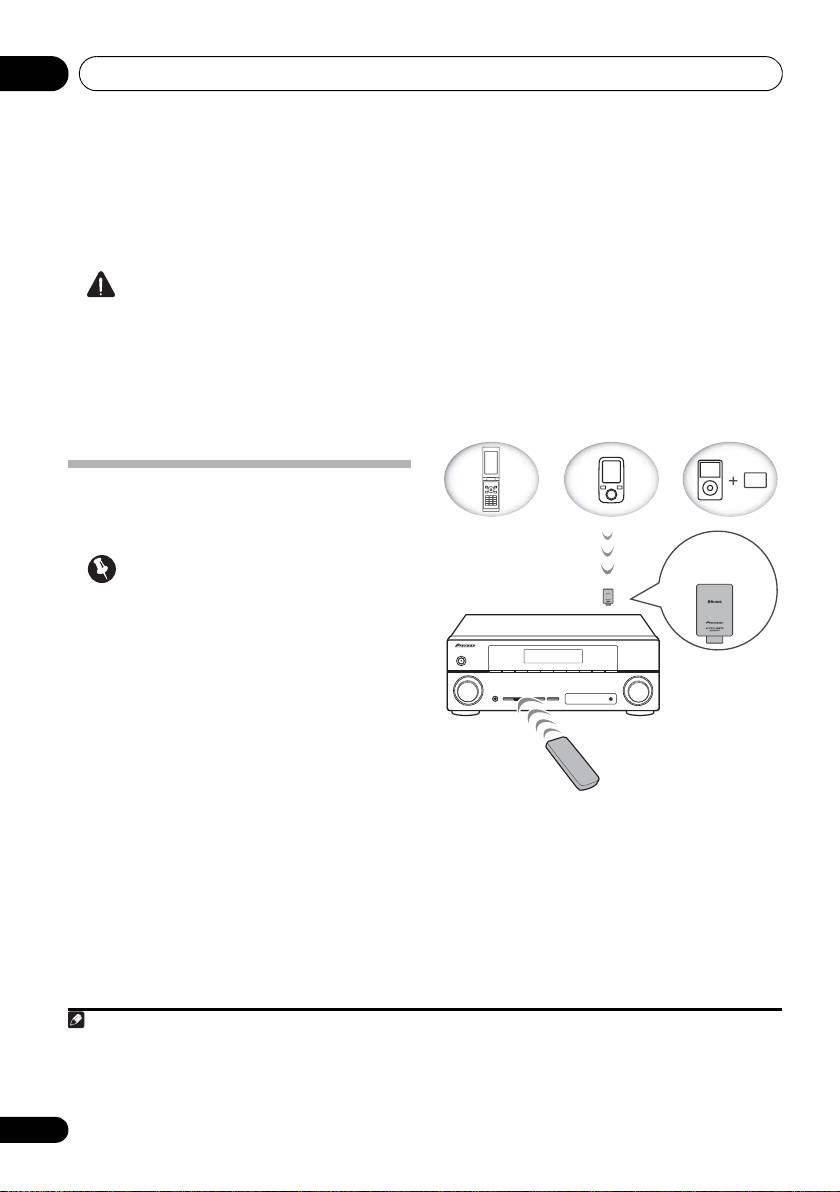
Wireless music play
When the Bluetooth ADAPTER (Pioneer Model
No. AS-BT100) is connected to this unit, a
product equipped with Bluetooth wireless
technology (portable cell phone, digital music
player, etc.) can be used to listen to music
1
wirelessly.
Also, by using a commercially
Remote control operation
available transmitter supporting Bluetooth
wireless technology, you can listen to music on
The remote control supplied with this unit
a device not equipped with Bluetooth wireless
allows you to play and stop media, and perform
2
technology. The AS-BT100 model supports
other operations.
SCMS-T contents protection, so music can
also be enjoyed on devices equipped with
SCMS-T type Bluetooth wireless technology.
48
En
Note
1 • It must be necessary that the Bluetooth wireless technology enabled device supports A2DP profiles.
• Pioneer does not guarantee proper connection and operation of this unit with all Bluetooth wireless technology enabled
devices.
2 • It must be necessary that the Bluetooth wireless technology enabled device supports AVRCP profiles.
• Remote control operations cannot be guaranteed for all Bluetooth wireless technology enabled devices.
Device not
equipped with
Bluetooth wireless
technology:
Digital music
Bluetooth
Bluetooth wireless
player
wireless
technology
+
technology
enabled device:
Bluetooth audio
enabled device:
Digital music
transmitter
cell phone
player
(sold commercially)
®
Music data
Bluetooth
ADAPTER
This receiver
Remote control
operation
VSX-520_SYXCN_En.book 48 ページ 2010年4月12日 月曜日 午後7時13分
