
Pioneer VSX-520-K: Chapter 1: Before you start Checking what’s in the box Installing the receiver Loading the batteries
Chapter 1: Before you start Checking what’s in the box Installing the receiver Loading the batteries: Pioneer VSX-520-K
Table of contents
- IMPORTANT IMPORTANT: THE MOULDED PLUG
- Information for users on collection and disposal of old equipment and used batteries Operating Environment
- Contents
- 08 Making recordings
- Flow of settings on the receiver
- Chapter 1: Before you start Checking what’s in the box Installing the receiver Loading the batteries
- Ventilation
- Chapter 2: Controls and displays Front panel
- Operating range of remote control
- Display
- Controls and displays02
- Remote control
- Controls and displays02
- Controls and displays 02
- Chapter 3: Connecting your equipment Placing the speakers
- Hints on the speaker placement
- Connecting the speakers
- Making cable connections
- HDMI cables About HDMI Analog audio cables
- Digital audio cables About video outputs connection Video cables
- Connecting a TV and playback components Connecting using HDMI Connecting your component with no HDMI terminal
- Connecting a satellite receiver Connecting an HDD/DVD or other digital set-top box recorder, VCR and other video sources
- Using the component video jacks Connecting other audio components
- Connecting antennas
- Plugging in the receiver
- Chapter 4: Basic Setup Automatically setting up for surround sound (MCACC)
- Basic Setup04
- Chapter 5: Listening to your system Basic playback
- Auto playback Listening in surround sound
- Using the Advanced surround effects
- Using Front Stage Surround Advance Listening in stereo
- Using Stream Direct Better sound using Phase Control Using the Sound Retriever
- Using surround back channel processing Listening with Acoustic Calibration EQ
- Setting the Audio options Setting the Up Mix function
- Setting What it does Option(s)
- Setting What it does Option(s)
- Choosing the input signal Using the headphone
- Chapter 6: The System Setup menu Using the System Setup menu Manual speaker setup
- Speaker setting
- Crossover network Channel level Speaker distance
- The Input Assign menu The Pre Out Setting
- Chapter Using the tuner Listening to the radio Saving station presets
- Listening to station presets Naming preset stations
- An introduction to RDS Searching for RDS programs
- Displaying RDS information
- Chapter 8: Making recordings Making an audio or a video recording
- Chapter 9: Other connections Wireless music play Remote control operation
- Connecting Optional Bluetooth ADAPTER
- Listening to Music Contents of Bluetooth wireless technology device with Your System
- Chapter 10: Additional information Troubleshooting Problem Remedy
- Problem Remedy
- Problem Remedy
- HDMI Symptom Remedy
- Important information regarding the HDMI connection Resetting the main unit
- Specifications Cleaning the unit
Before you start 01
7
En
English
Français
Español
VSX-520_SYXCN_En.book 7 ページ 2010年4月12日 月曜日 午後7時13分
Chapter 1:
Before you start
• Batteries with the same shape may have
different voltages. Do not use different
Checking what’s in the box
batteries together.
Please check that you’ve received the following
• When disposing of used batteries, please
supplied accessories:
comply with governmental regulations or
• Setup microphone
environmental public instruction’s rules
• Remote control
that apply in your country or area.
• AAA size IEC R03 dry cell batteries (to
• Do not use or store batteries in direct
confirm system operation) x2
sunlight or other excessively hot place,
• AM loop antenna
such as inside a car or near a heater. This
can cause batteries to leak, overheat,
•FM wire antenna
explode or catch fire. It can also reduce the
•Power cord
life or performance of batteries.
• Warranty card
• These operating instructions
Installing the receiver
• When installing this unit, make sure to put
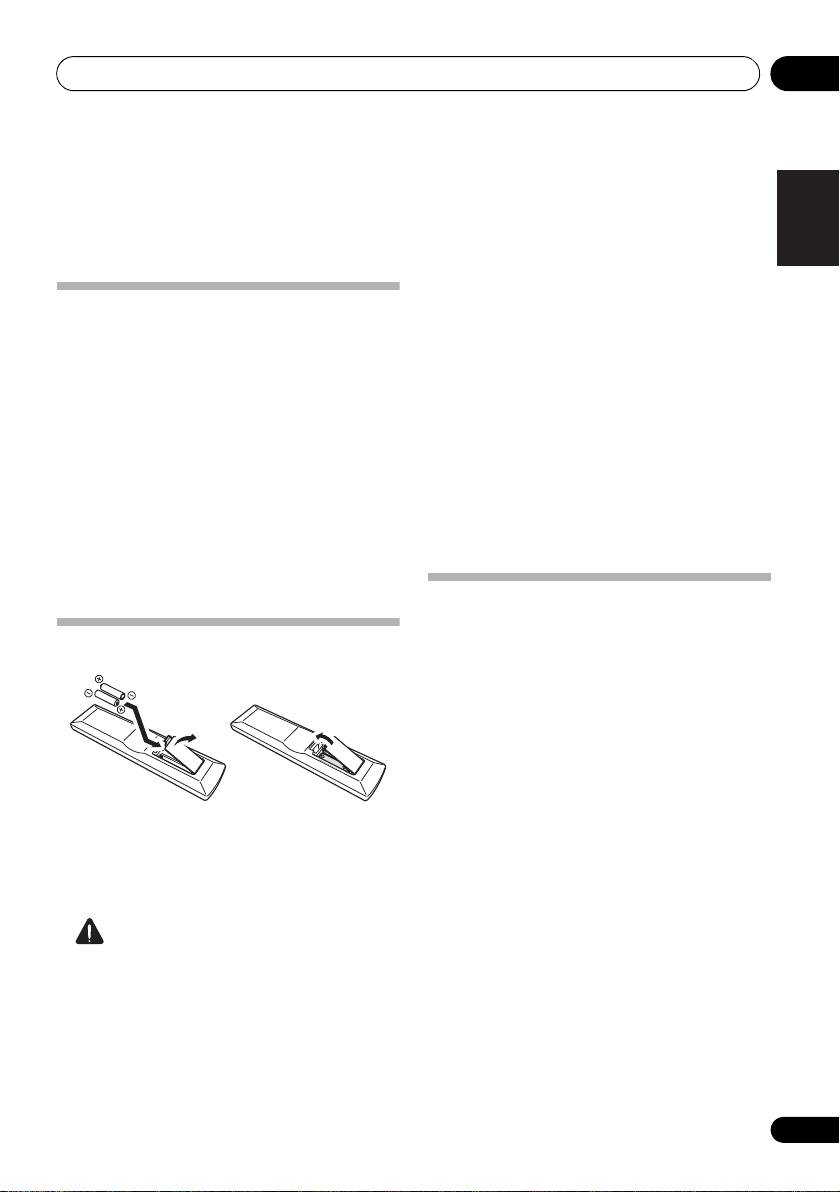
Loading the batteries
it on a level and stable surface.
Don’t install it on the following places:
– on a color TV (the screen may distort)
– near a cassette deck (or close to a device that
gives off a magnetic field). This may interfere
with the sound.
– in direct sunlight
– in damp or wet areas
– in extremely hot or cold areas
The batteries included with the unit are to
– in places where there is vibration or other
check initial operations; they may not last over
movement
a long period. We recommend using alkaline
– in places that are very dusty
batteries that have a longer life.
– in places that have hot fumes or oils (such as
a kitchen)
CAUTION
Incorrect use of batteries may result in such
hazards as leakage and bursting. Observe the
following precautions:
• Never use new and old batteries together.
• Insert the plus and minus sides of the
batteries properly according to the marks
in the battery case.
