
Pioneer S-LX70W: CONNECTIONS LINE LEVEL CONNECTION OPERATION
CONNECTIONS LINE LEVEL CONNECTION OPERATION: Pioneer S-LX70W
Table of contents
- IMPORTANT
- Operating Environment POWER-CORD CAUTION
- CONTENTS FEATURES IN COMBINATION WITH SPEAKERS ACCESSORY ITEMS
- INSTALLATION Speaker Installation Installation Precautions
- PANEL FACILITIES FRONT PANEL REAR PANEL
- CONNECTIONS LINE LEVEL CONNECTION OPERATION
- TROUBLESHOOTING SYMPTOM CAUSE REMEDY SPECIFICATIONS
01_S_LX70W_En.book 7 ページ 2008年7月18日 金曜日 午後5時4分
8 Auto Standby switch (AUTO STANDBY)
10 Line Level Input terminal (LINE LEVEL INPUT)
English Français Deutsch
Switches the Auto Standby feature on/off.
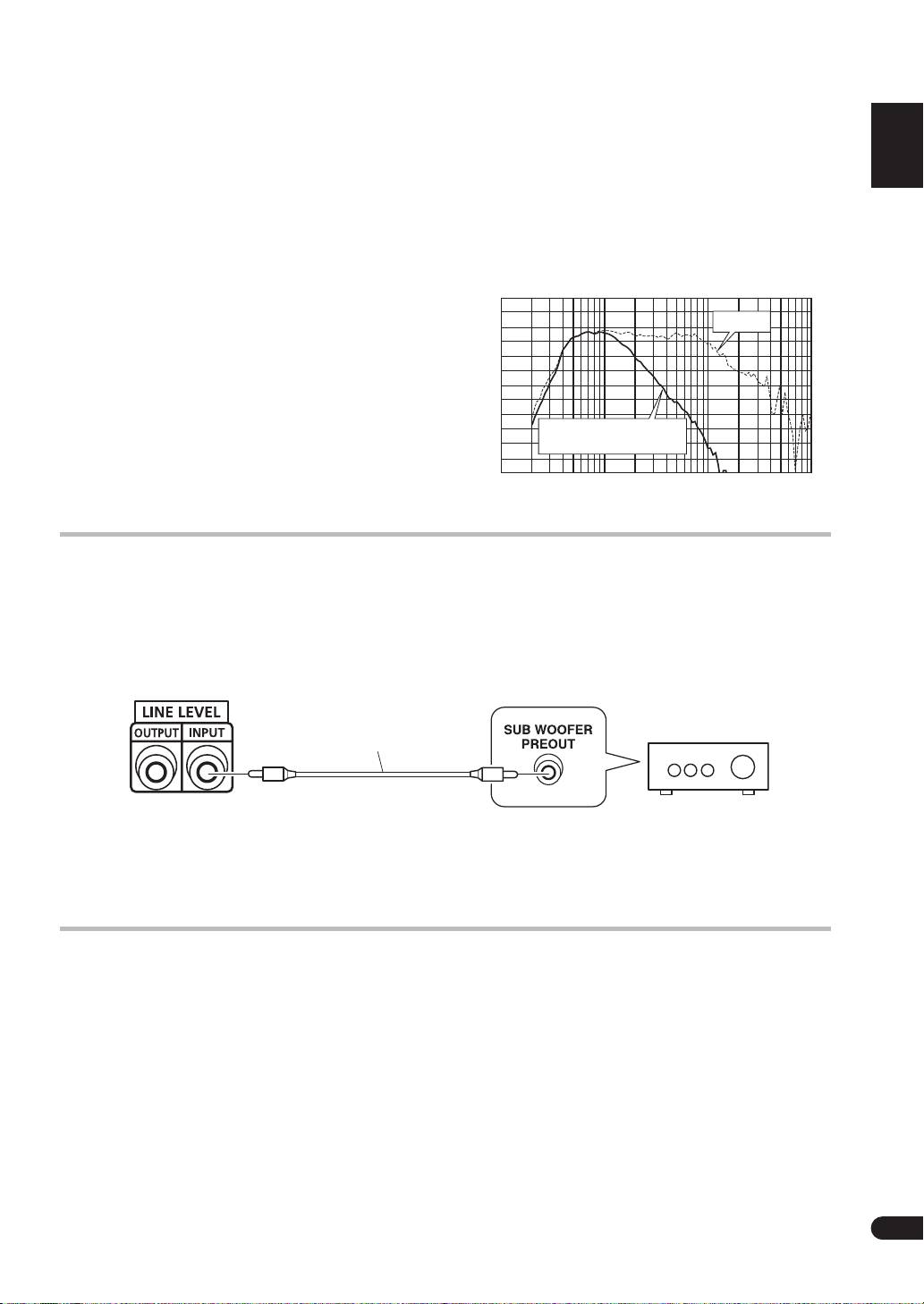
Connect to the SUBWOOFER PREOUT terminal of an
When switched
ON
(the default setting is
OFF
), the
amplifier or receiver, with the specially provided RCA
Auto Standby feature becomes active. In this mode, if
plug cord.
there is no input signal for 12 minutes the system
automatically switches to standby. The power is
11 AC INLET
automatically switched on again if an input signal is
• Connect the power cord to the powered subwoofer
detected.
unit’s AC INLET.
NOTE:
• Connect the power cord to a AC socket.
• There may be cases where a connected component
S-LX70W/S-81W-MK
Music mode Frequency response
outputs noise or some other non-audio signal which
100
causes this system to automatically power on when in
Auto Standby mode. If this happens, switch off the
Bypass
90
Auto Standby mode and switch the system on/off
manually.
80
70
9 Line Level Output terminal (LINE LEVEL OUTPUT)
Used for connecting other equipment through the
60
Italiano Español
amplifier. The signal output from this jack is not
Non-bypass
50
(Crossover 200 Hz)
affected in any way by the settings of the various
Sound pressure level (dB)
controls on the unit.
40
10
100
1000
10000
Frequency (Hz)
Nederlands
CONNECTIONS
Before making or changing any connections, switch off the power and disconnect both this unit and the
amplifier/receiver from the AC outlet.
LINE LEVEL CONNECTION
S-LX70W/S-81W-MK
(Rear Panel)
Supplied RCA plug cord
This connection is for an amplifier or receiver equipped
NOTE:
with a
SUBWOOFER PREOUT
terminal. Connect to the
• When connected to the
PREOUT
terminal for
LINE LEVEL INPUT
terminal on this unit, using the
surround center channel on the amplifier or receiver,
specially provided RCA plug cord.
the bass is heard only on the center channel, so it will
be insufficient.
OPERATION
For details regarding operating part functions, refer to
2. Operate the amplifier or receiver and adjust the
page 6.
volume of the other speakers.
1. Turn the POWER switch (2) ON.
3. Adjust the volume of the bass with the VOLUME
• If the unit’s power cord is connected to a switched AC
knob (3).
outlet on the amplifier or receiver and the switch is left
• When necessary, operate the
CROSSOVER
knob (
4
)
ON, the unit can be turned ON/OFF together with the
and
PHASE
switch (
7
), and then adjust with the
amplifier or receiver.
VOLUME
knob (
3
). Set the
BASS MODE
switch (
6
) to
• If the unit cannot be connected to the amplifier or
either
MUSIC
or
CINEMA
.
receiver, turn the power to the amplifier or receiver ON
4. Turn the POWER switch (2) OFF.
before turning the power to the unit ON. When turning
• The power indicator disappears.
the power OFF, turn the power to the unit OFF before
turning the power to the amplifier or receiver OFF.
7
En
