
Pioneer CP-LX70: 4 Preparing to attach the speaker. 6 Secure the speaker. 5 Connect the speaker cable to the speaker.
4 Preparing to attach the speaker. 6 Secure the speaker. 5 Connect the speaker cable to the speaker.: Pioneer CP-LX70
Table of contents
- Confirm your Accessories
- Assembling the speaker stands Installing the speaker stands
- 2 Securing the pillar onto the stand base. 3 Adjust the length of the speaker cable.
- 4 Preparing to attach the speaker. 6 Secure the speaker. 5 Connect the speaker cable to the speaker.
- Connect the speaker cable to the amplifier Placement Changing the Speaker Height
- Specifications
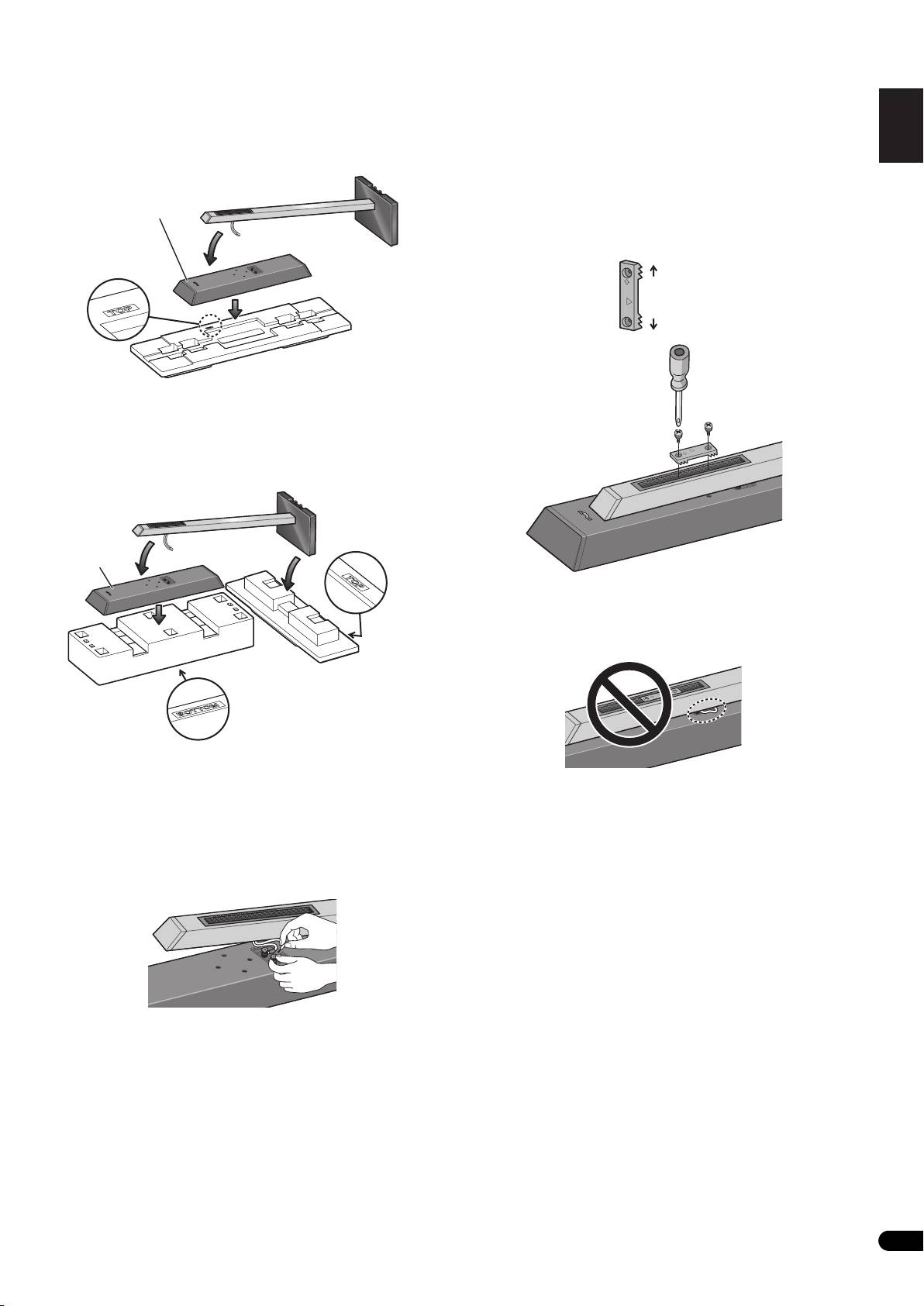
4 Preparing to attach the speaker.
6 Secure the speaker.
English Français Deutsch
CP-LX70: Temporarily place the speaker stand upright, and detach
Once the speaker is placed in the installation position, pull the
the bottom cushion material, leaving only the top cushion on the
slack of the speaker cord and store in the bottom side of the stand
floor. Place the speaker on the top cushion and place the speaker
base as shown in step 3.
stand on top of the speaker.
Next, place the speaker security plate on the pillar, and secure to
the speaker using the supplied screws (large).
• The speaker security plates are designed with a directional
Speaker
orientation in which they are to be installed. Attach them so
that the side printed with “TOP” is oriented toward the top of the
speaker and pillar.
Italiano Español Português Dansk Norsk SuomiSvenska
Cushioning
material (Top)
CP-LX70TS: Temporarily stand the speaker stand upright, then turn
the bottom cushion material over and place the speaker on it. As
shown in the illustration, turn the top cushion material sideways
Nederlands
and orient it sideways to the stand, then rest the speaker stand
assembled in step 2 on it.
Speaker
Caution
Confirm that the speaker cable does not become pinched between
(Rear side)
the pillar and the speaker.
Cushioning
material (Top)
Cushioning
material (Bottom)
(Rear side)
5 Connect the speaker cable to the speaker.
Pull the speaker cable through the front side of the pillar (the
bottom side during assembly) and connect to the terminals located
on the backside of the speaker.
• Connect the speaker cable with the marking to the (+) terminal,
and the cable without the marking to the (–) terminal.
• If connecting the cords proves to be difficult, slightly move the
position of the pillar and speaker.
5
En
TOP
TOP
Top
Bottom
OP
T
TOP
TOP
01_CP-LX70_EU.book 5 ページ 2007年9月5日 水曜日 午前10時51分
TOP
