
Pioneer CP-LX70: 2 Securing the pillar onto the stand base. 3 Adjust the length of the speaker cable.
2 Securing the pillar onto the stand base. 3 Adjust the length of the speaker cable.: Pioneer CP-LX70
Table of contents
- Confirm your Accessories
- Assembling the speaker stands Installing the speaker stands
- 2 Securing the pillar onto the stand base. 3 Adjust the length of the speaker cable.
- 4 Preparing to attach the speaker. 6 Secure the speaker. 5 Connect the speaker cable to the speaker.
- Connect the speaker cable to the amplifier Placement Changing the Speaker Height
- Specifications
01_CP-LX70_EU.book 4 ページ 2007年9月5日 水曜日 午前10時51分
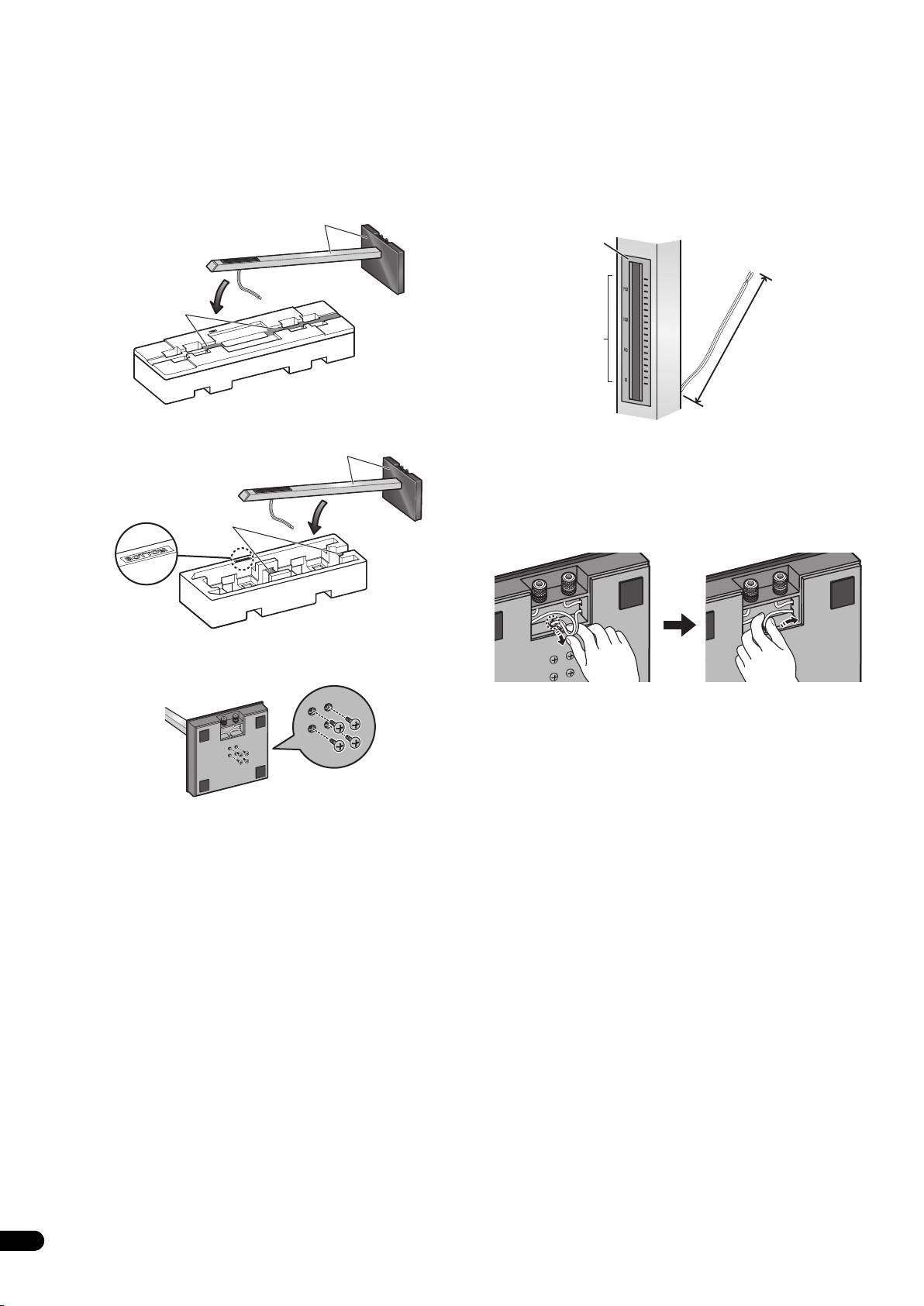
2 Securing the pillar onto the stand base.
3 Adjust the length of the speaker cable.
While the pillar is fitted into the stand base, slowly place the stand
Adjust the length of the speaker cable to suit the height at which
onto the groove of the cushioning material (places indicated in the
the speaker is going to be installed. Viewing the height scale on the
accompanying illustration) so that the rear side of the stand faces
backside of the pillar, adjust the length of the exposed speaker
upwards (securely hold both the pillar and the stand base when
cable using the following numbers as reference:
doing this).
Scale: 0 Approx. 11 cm (4.3 in.)
• Pillar and base for CP-LX70
Scale: 100 Approx. 15 cm (5.9 in.)
Hold both pillar and stand base
Scale: 170 Approx. 22 cm (8.7 in.)
Backside
of pillar
Rest pillar here
Height scale
Exposed speaker
cable length
• Pillar and base for CP-LX70TS
• To shorten the speaker cable, adjust the length by pulling the
Hold both pillar and stand base
additional cable in the pillar from the hole in the bottom of the
stand base, and then push that extra cable into the hole where
the right or left cable passes, as shown in the illustration. If all
of the extra cable cannot be pressed into the hole, store the
Rest pillar here
remainder of the cable in the open space on the bottom of the
stand base.
Cushioning
material (Bottom)
From the bottom side of the stand base, secure the pillar to the
stand base by screwing in 4 supplied screws (small).
(When making the cord shorter)
Screws (small)
4
En
