
Pioneer XC-HM70-S: VENTILATION CAUTION IMPORTANT Operating Environment
VENTILATION CAUTION IMPORTANT Operating Environment: Pioneer XC-HM70-S
Table of contents
- VENTILATION CAUTION IMPORTANT Operating Environment
- Condensation
- Contents Accessories
- Before you start General Loading the batteries
- Controls and Displays Remote control
- Front Panel
- Connecting your equipment Aerial connection
- Speaker connection Using other subwoofer Connecting a TV, etc.
- Connecting to the network through LAN interface AC power connection
- General control To turn the power on Setting the clock Auto power down setup
- Enhancing your system
- Listening to a CD or MP3/ Disc playback WMA disc Various disc functions
- Advanced CD or MP3/WMA disc playback Programmed play (CD)
- Programmed play (MP3/WMA) MP3/WMA folder mode (only for MP3/WMA files)
- Procedure to playback MP3/WMA disc with folder mode on
- Listening to the iPod, iPhone or iPad Supported iPod, iPhone and iPad models: Connecting your iPod/iPhone To remove adaptor for iPod or iPhone To insert iPad adaptor
- Playing an iPod, iPhone or iPad Basic playback controls
- Listening to USB mass storage device/MP3 player Connecting a USB device Playing a USB device
- Playback with NETWORK feature Listening to Internet radio stations
- Playing back audio files stored on components on the network Network setup menu Playing back your favorite songs
- Network connection requirements About network playback
- Glossary
- Listening to the radio Improving FM sound Saving station presets Listening to station presets Naming preset stations Changing the noise cut mode
- Using the Radio Data System (RDS) An introduction to RDS Displaying RDS information Searching for RDS programs
- Timer and sleep operation Sleep operation Setting the wake-up timer Turning the wake-up timer on/off
- Additional Information
- Additional Information
- Additional Information
- About playable music file formats Category Extension Stream About status messages Status messages Descriptions
- Specifications About iPod/iPhone/iPad Disclaimer for Third Party Content
2
En
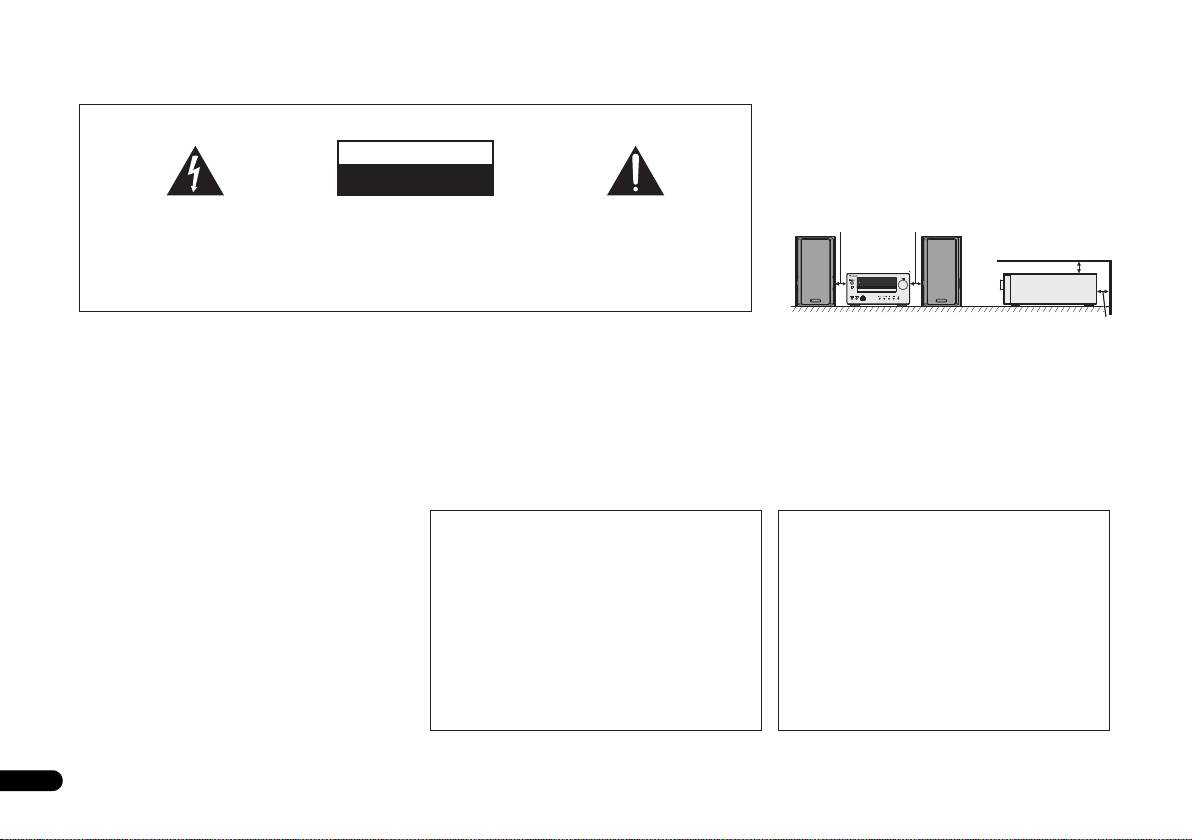
VENTILATION CAUTION
IMPORTANT
When installing this unit, make sure to leave space
around the unit for ventilation to improve heat radiation
CAUTION
(at least 10 cm at top, 10 cm at rear, and 10 cm at each
RISK OF ELECTRIC SHOCK
side).
DO NOT OPEN
The lightning flash with arrowhead symbol,
CAUTION:
The exclamation point within an equilateral
within an equilateral triangle, is intended to
TO PREVENT THE RISK OF ELECTRIC
triangle is intended to alert the user to the
10 cm 10 cm
alert the user to the presence of uninsulated
SHOCK, DO NOT REMOVE COVER (OR
presence of important operating and
“dangerous voltage” within the product’s
BACK). NO USER-SERVICEABLE PARTS
maintenance (servicing) instructions in the
10 cm
enclosure that may be of sufficient
INSIDE. REFER SERVICING TO QUALIFIED
literature accompanying the appliance.
magnitude to constitute a risk of electric
SERVICE PERSONNEL.
TIMER
shock to persons.
D3-4-2-1-1_A1_En
10 cm
WARNING
Operating Environment
WARNING
This equipment is not waterproof. To prevent a fire or
Operating environment temperature and humidity:
Slots and openings in the cabinet are provided for
shock hazard, do not place any container filled with liquid
+5 °C to +35 °C (+41 °F to +95 °F); less than 85 %RH
ventilation to ensure reliable operation of the product,
near this equipment (such as a vase or flower pot) or
(cooling vents not blocked)
and to protect it from overheating. To prevent fire
expose it to dripping, splashing, rain or moisture.
Do not install this unit in a poorly ventilated area, or in
hazard, the openings should never be blocked or
D3-4-2-1-3_A1_En
locations exposed to high humidity or direct sunlight (or
covered with items (such as newspapers, table-cloths,
strong artificial light)
curtains) or by operating the equipment on thick carpet
D3-4-2-1-7c*_A1_En
or a bed.
D3-4-2-1-7b*_A1_En
WARNING
Before plugging in for the first time, read the following
If the AC plug of this unit does not match the AC
CAUTION
section carefully.
outlet you want to use, the plug must be removed
The STANDBY/ON switch on this unit will not
The voltage of the available power supply differs
and appropriate one fitted. Replacement and
completely shut off all power from the AC outlet.
according to country or region. Be sure that the
mounting of an AC plug on the power supply cord of
Since the power cord serves as the main disconnect
power supply voltage of the area where this unit
this unit should be performed only by qualified
device for the unit, you will need to unplug it from the
will be used meets the required voltage (e.g., 230 V
service personnel. If connected to an AC outlet, the
AC outlet to shut down all power. Therefore, make
or 120 V) written on the rear panel.
D3-4-2-1-4*_A1_En
cut-off plug can cause severe electrical shock. Make
sure the unit has been installed so that the power
sure it is properly disposed of after removal.
cord can be easily unplugged from the AC outlet in
The equipment should be disconnected by removing
case of an accident. To avoid fire hazard, the power
the mains plug from the wall socket when left unused
cord should also be unplugged from the AC outlet
WARNING
for a long period of time (for example, when on
when left unused for a long period of time (for
To prevent a fire hazard, do not place any naked flame
vacation).
example, when on vacation).
sources (such as a lighted candle) on the equipment.
D3-4-2-2-1a_A1_En
D3-4-2-2-2a*_A1_En
D3-4-2-1-7a_A1_En
X-HM70_En_Anki.fm 2 ページ 2011年8月1日 月曜日 午後9時40分
